Hello everyone,
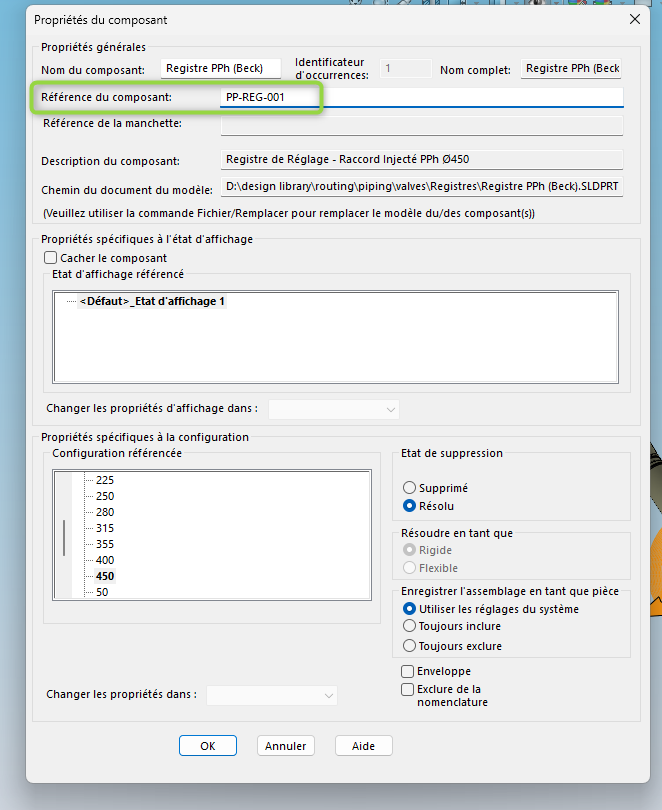
I want to retrieve the component reference to use it as a custom property during an IFC export. Is this possible?
Thank you.
Hello everyone,
I want to retrieve the component reference to use it as a custom property during an IFC export. Is this possible?
Thank you.
Hello sdevauchelle,
Here's what I just found on the web about it=>https://help.solidworks.com/2025/French/SolidWorks/sldworks/c_IFC_Files.htm
and that too =>https://www.s3dengineering.net/blog/guide-complet-pour-importer-et-exporter-des-fichiers-ifc-dans-solidworks/
Good luck.
@+.
AR.
Hello;
By Macro:
Via Nomenclature:
https://my.solidworks.com/reader/onlinehelp/2021%252Fenglish%252Fsolidworks%252Fsldworks%252Fc_component_references.htm/component-references
It is therefore reasonable to think that the property is: " Component Reference " or " ComponentReference "
(To test, this is not a property or information that we use in our BE=> No virtual components in our company...)
But technically I find it strange to use " Component References " on components with a " Part Family":
between " Designation ", the " Configuration Name" and " Description " isn't that already enough naming possibilities? (Risk of confusion?)
Thank you for your answers.
I will specify what I am trying to do.
I work on networks with the routing module, and I have to export them to IFC to transmit them to the BIM manager.
Here's how I do it:
1 - Saving my assembly in IFC, with export and mapping of custom properties.
2 - I open my IFC under SIMPLEBIM, in order to georeference it.
3 - under SIMPLEBIM, you are able to manually fill in new properties, or even automate this task.
The problem is that Solidworks is not able to generate different Global IDs (or GUIDs) for each element of the assembly.
We had found a solution by combining the " container name " and "name" (basically, the name of the parent assembly and that of the part) in order to create a new reference differentiating all the components and usable in BIM. But this solution is not viable because, during a new IFC export (new index), Solidworks will randomly assign the suffix differentiating the identical parts (for example two identical taps). It is therefore impossible to create a robust export.
That's why I'm looking to create a new property that can be exported to IFC, filled in once and for all at the assembly level. The " component reference" box seemed ideal to me because I could manually fill in the PID TAG of each piping element.
Unfortunately, I can't find a way to export it to an IFC.
It is possible to easily retrieve it in BOM on a drawing, which is interesting for other uses, but not for an export to BIM...
In this case, the macro with an automated concatenation seems to me the most relevant solution...
Pay attention to the " Level " of the name of the assembly to be retrieved (Head Assembly or Sub-Assembly?)
So now, I'm dumped...
I ran the macro (by displaying the execution window), but I really don't see what it's for...
Which macro are you talking about?
If it is the "codestack.net " one , it must be modified:
" This Macro has an option to process only virtual components by setting the VIRTUAL_ONLY option to True."
to process all the components you have to toggle the VIRTUAL_ONLY* option to False
You have to change the macro:
Currently it does the opposite of what you want to achieve:
=> It is used to copy the name of the component into the component reference.
I proposed it for example since it uses the "
ComponentReference" is therefore a " native " property in Solidworks that must be usable in your property list (I haven't found its exact title yet).
The macro below will probably be a little more telling:
No, I'm talking about the one in your previous message:
This macro "Traverse Assembly at Component and Feature Levels Using Recursion Example (VBA)"
Is just an illustration of what is possible if you want to recover
the Name of a subassembly rather than the Name of the head assembly.
=> Relation to the requested concatenation (It all depends on your definition
I can concatenate different properties in SIMPLEBIM, but I have to find a property that is different for two identical elements even if they are in the same assembly.
There is the name, but Solidworks randomly generates the suffix, so it's not stable.
" container name " is the name of the parent assembly in the IFC.
That's why I thought it was ideal to try to retrieve " component reference", which I can name whatever I want...
There would be " occurrence identifier" as well, but I can't change it (it's grayed out)
This parameter is not modifiable, it depends, as its name suggests, on the number of occurrences of the part deposited in the assembly (deleted or not).
Hello @sdevauchelle
I'm exactly in the same situation as you and unfortunately I came to exactly the same conclusion, except that for me the goal was to produce a naviswoks model.
So if you ever find a solution to export this " component ref" property, I'm all for it.
Good luck.
I got to the point of trying to create a macro that creates configurations for parts that have the " component reference" populated. In order to, from this new config, create a personal property " Tag PID " using $PRP:" SW-Configuration Name ".
The idea is to run this macro just before recording in IFC, and not to save the assembly and its subassemblies.
Here's where I am: the macro does create the (derived) configurations, and integrates the value of the " component reference" well into the custom properties.
On the other hand, when I open the . IFC, for two identical parts (identical or not macro pre-macro configurations), the " Tag PID " properties are the same.
Here's the current macro:
Dim swApp As SldWorks.SldWorks
Dim swModel As SldWorks.ModelDoc2
Dim swAssy As SldWorks.AssemblyDoc
Dim swComp As SldWorks.Component2
Dim swPart As SldWorks.ModelDoc2
Dim swConfig As SldWorks.Configuration
Dim swCustPropMgr As SldWorks.CustomPropertyManager
Dim vComponents As Variant
Dim i As Long
Dim compRef As String
Dim parentConfig As String

Sub main()
    Set swApp = Application.SldWorks
    Set swModel = swApp.ActiveDoc

    If swModel Is Nothing Then Exit Sub
    Set swAssy = swModel
    vComponents = swAssy.GetComponents(False)

    If Not IsEmpty(vComponents) Then
        For i = 0 To UBound(vComponents)
            Set swComp = vComponents(i)

            If swComp.GetSuppression = swComponentFullyResolved Then
                compRef = swComp.ComponentReference

                If compRef <> "" Then
                    Set swPart = swComp.GetModelDoc2

                    If Not swPart Is Nothing Then
                        parentConfig = swComp.ReferencedConfiguration

                        ' 1. Créer la config au nom du TAG (ex: "V-102")
                        ' On utilise le TAG pur comme nom de config
                        Set swConfig = swPart.ConfigurationManager.AddConfiguration(compRef, "", "", 256, parentConfig, "")

                        ' 2. Basculer l'instance sur cette config
                        swComp.ReferencedConfiguration = compRef

                        ' 3. Écrire dans l'onglet "PERSONNALISER" (Global) du document pièce
                        ' On pointe vers le nom de la config active
                        Set swCustPropMgr = swPart.Extension.CustomPropertyManager("")

                        ' La valeur "$PRP..." force SW à lire le nom de la config en cours
                        swCustPropMgr.Add3 "Tag PID", swCustomInfoText, "$PRP:""SW-Configuration Name""", 1
                    End If
                End If
            End If
        Next i
    End If

    swModel.ForceRebuild3 True
    MsgBox "Propriété globale 'Tag PID' liée au nom de configuration." & vbCrLf & _
           "Prêt pour l'export IFC."
End Sub
Hello;
Since the 2025 version of Solidworks it seems to be possible to modify the *.xml file to map the properties to be exported:

For the macro, why not settle for a counter instead of (or in addition to) PID Tags?
In general, the variable ‹ i › with i=i+1 (to avoid the Zero) does the job well...
Yes, I'm already using it to sort properties in a given Pset.
I didn't enter the meter?
I suggested that you add a counter on:
swCustPropMgr.Add3 "Tag PID", swCustomInfoText, "$PRP:""SW-Configuration Name""", 1
of the type:
swCustPropMgr.Add3 "Tag PID" , swCustomInfoText, "$PRP:""SW-Configuration Name""" & "_" i+1, 1
In order to " Force " the differentiation of your new " Tag PID " property by adding this counter at the end of the string:
thus " Tag PID " would become:
The Name of the configuration_1
The Name of the configuration_2
…
The Name of the configuration_11
(depending on the number of configurations), it's an additional security, optional, to avoid duplicates...
I had thought of a more radical solution which was to make the component to be tagged independent by creating a folder with all the elements specific to the case at hand.
This file would only include the instrumental and the taps if I'm mistaken.
I tried, but it refuses the addition of & " _ " i+1