Hello
With the macro used you need to modify the export options of the dxf/dwg formats in the solidworks options:

Kind regards
Hello
With the macro used you need to modify the export options of the dxf/dwg formats in the solidworks options:
Kind regards
Hello
The result is the same, I still have 4 files at the lie of 2
Unlike PDFs
Hello
For my part, I am set to "Export all sheets in a file" and I have no problem.
Only if the setting is "Export all sheets in separate files" the export generates 4 files.
What I have also noticed is that you have to force the change of settings twice for it to be taken into account correctly (probably SW2020 bug).
SW had not taken into account the "Export all sheets to a file" setting
I do have 2 files with the right syntax but it's the same sheet in the 2, the one that is "active" on the screen.
Looking at the macro, there are several times "swExpPdfData" and "SldWorks.ExportPdfData"
and a line outFile = outFile & IIf(INCLUDE_DRAWING_NAME, drawName & "_", "") & sheetName & ".dxf" or it's ".pdf" in the PDF macro that works
Is it the ..... ExpPdfData that should be replaced by the equivalent for DXFs?
Oops, I'm looking in more detail, I didn't open the files.
Re
Normally the code below meets the need
Option Explicit
Dim swApp       As SldWorks.SldWorks
Dim swModel     As SldWorks.ModelDoc2
Dim swDraw      As SldWorks.DrawingDoc
Dim sPathname   As String
Dim vSheetName  As Variant
Dim nErrors     As Long
Dim nWarnings   As Long
Dim i           As Long
Dim bRet        As Boolean
Dim lParam      As Long

Sub main()
    Set swApp = Application.SldWorks
    Set swModel = swApp.ActiveDoc
    Set swDraw = swModel

    lParam = swApp.GetUserPreferenceIntegerValue(swDxfMultiSheetOption)

    'Changement paramétrage export dxf si différent de feuille active
    If lParam <> 0 Then
        bRet = swApp.SetUserPreferenceIntegerValue(swUserPreferenceIntegerValue_e.swDxfMultiSheetOption, swDxfMultisheet_e.swDxfActiveSheetOnly)
    End If

    sPathname = swModel.GetPathName
    sPathname = Left(sPathname, Len(sPathname) - 7)
    vSheetName = swDraw.GetSheetNames
    For i = 0 To UBound(vSheetName)
        bRet = swDraw.ActivateSheet(vSheetName(i))
        bRet = swModel.SaveAs4(sPathname & "_" & vSheetName(i) & ".dxf", swSaveAsCurrentVersion, swSaveAsOptions_Silent, nErrors, nWarnings)
    Next i
    ' Retour à la Feuille 1
    bRet = swDraw.ActivateSheet(vSheetName(0))
    ' Remise en place du paramétrage initial
    bRet = swApp.SetUserPreferenceIntegerValue(swUserPreferenceIntegerValue_e.swDxfMultiSheetOption, lParam)
End Sub
Thank you
It works perfectly ;-)
Hello
Sorry to dust off the subject, but I tried this macro on SW2025 and it doesn't work.
This is exactly what I am looking to do as well, I do drawing of parts with multiple welded bodies.
Thank you very much
Manu
Hello @Emmanuel_SERVEL and welcome.
To be able to help you, we would need more information:
You say that the macro does not work under Sw2025, what and the error message?
Is your version of Solidworks a Local or 3Dexperience version?
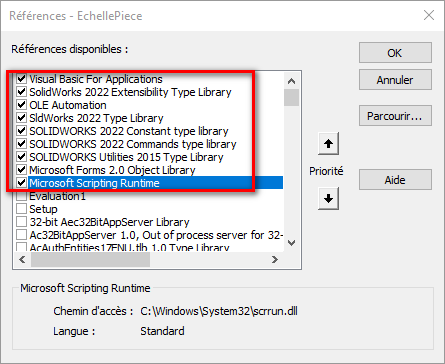
Have you thought about loading Solidworks References into your VBA editor?
Note:
The " SaveAs4 " function is considered deprecated in the Solidworks API Help.
strangely it is replaced by " SaveAs3 "
and their statements are slightly different:
value = instance. SaveAs4(Name, Version, Options, Errors, Warnings)
and
value = instance. SaveAs3(Name, Version, Options, ExportData, AdvancedSaveAsOptions, Errors, Warnings)
That said, an " obsolete " function is not necessarily unusable...
But here we are attacking a subject that depends on your level in VBA programming.
In your case I'm thinking more of the VBA References to add...
Kind regards.
Hello
Thank you for your feedback, when I went to check the references, the SW boxes were already all checked. I just added Microsoft Scripting Runtime, ran the macro again to try and it seems to work perfectly. I don't know if that was the problem, but in any case I'm satisfied.
Thank you very much
Manu
Hello
It's not strangely replaced by SaveAs3, it's just not on the same methods, SaveAs4 is part of the ModelDoc2 and SaveAs3 methods of ModelDocExtension.
In response @Emmanuel_SERVEL , the Microsoft Scripting Runtime reference is normally not needed for the snippet of code I gave. The bug could come from the Left function which sometimes is not recognized, you have to use VBA as a replacement. Left.
Thank you @Cyril_f ... Enrichment of my personal culture: 
(and there's not even sarcasm)
ModelDoc2 :
Represents the main document in SolidWorks (part, assembly, or drawing)
ModelDocExtension :
Is an extension of ModelDoc2, accessed through the property .Extension of a ModelDoc2* object.
Was created to add additional methods and properties when ModelDoc2 reached its capacity limit in terms of the number of methods.
Provides access to advanced or less common features, such as: custom property management, mass property calculations, bill of materials (BOM) table management, conversion operations, advanced record management (e.g., SaveAs2)
So: ModelDocExtension :p advanced or specialized operations that are not available directly in ModelDoc2, accessible through the property .Extension of a ModelDoc2 object
In summary, ModelDocExtension complements ModelDoc2 and provides access to additional functionality needed for macros or advanced automations in SolidWorks
.
Hello, it's me again regarding this subject.
Starting from the initial MACRO and looking for other macros on the forum, I had modified it to integrate the index and the date at the end of each DXF file generated.
Attached is the file of my macro:
EXPORT_DXF_IND-DATE.swp (49.5 KB)
I have two concerns:
The file works, the expected result is good but on the other hand the production time is extremely long. Not knowing anything about VBA, I clearly took pieces of macro here and there to achieve my ends, I don't know where it can come from. I have plan files with sometimes more than 100 sheets, the macro must take 20min to generate all the sheets in DXF.
And the other point is that I'd like to add the page number to the beginning of each filename, but I'm not sure which variable I should call.
Thank you for your feedback
Regards
Manu
Hello;
It would have been better to open a new discussion rather than relaunch an old one that was already " Resolved "...
Is it possible for you to edit your code directly here (without forgetting the </> tags)...
I'm never very keen on downloading a macro directly... and in view of what is described for its design ... I'm even less inclined to download 
Hello,
Thank you for the feedback, sorry I'm not a forum consumer, I don't know the rules to follow.
Below is my macro:
Option Explicit
Dim swApp       As SldWorks.SldWorks
Dim swModel     As SldWorks.ModelDoc2
Dim swDraw      As SldWorks.DrawingDoc
Dim swCustProp  As CustomPropertyManager
Dim valOut1     As String
Dim resolvedValOut1 As String
Dim sPathname   As String
Dim vSheetName  As Variant
Dim nErrors     As Long
Dim nWarnings   As Long
Dim i           As Long
Dim bRet        As Boolean
Dim lParam      As Long

Sub main()
    Set swApp = Application.SldWorks
    Set swModel = swApp.ActiveDoc
    Set swDraw = swModel

    lParam = swApp.GetUserPreferenceIntegerValue(swDxfMultiSheetOption)

    'Changement paramétrage export dxf si différent de feuille active
    If lParam <> 0 Then
        bRet = swApp.SetUserPreferenceIntegerValue(swUserPreferenceIntegerValue_e.swDxfMultiSheetOption, swDxfMultisheet_e.swDxfActiveSheetOnly)
    End If

    ' On récupère la date du jour et on la met dans un format pouvant se mettre dans le nom d'un fichier
    Dim dateNow As String
    dateNow = Replace(Date, "/", ".")

    ' On récupère les valeurs qui nous intéresse dans les propriétés personnalisées du plan
    Set swCustProp = swModel.Extension.CustomPropertyManager("")
    swCustProp.Get2 "Révision", valOut1, resolvedValOut1

    sPathname = Replace(swModel.GetPathName, ".SLDDRW", "")
    vSheetName = swDraw.GetSheetNames
    For i = 0 To UBound(vSheetName)
        bRet = swDraw.ActivateSheet(vSheetName(i))
        bRet = swModel.SaveAs4(sPathname & " - " & resolvedValOut1 & " - " & dateNow & "_" & vSheetName(i) & ".dxf", swSaveAsCurrentVersion, swSaveAsOptions_Silent, nErrors, nWarnings)
    Next i

    ' Retour à la Feuille 1
    bRet = swDraw.ActivateSheet(vSheetName(0))

    ' Remise en place du paramétrage initial
    bRet = swApp.SetUserPreferenceIntegerValue(swUserPreferenceIntegerValue_e.swDxfMultiSheetOption, lParam)
End Sub
In any case, I thank you all very much. 
Manu
Hello;
Overall I don't see too many inconsistencies in the code, to see what more professionals than me say about it .
I would have just used a variable for the " Revision " property
Style:
Dim MyRevision as string
then
MyRevision = swCustProp.Get2 "Révision", valOut1, resolvedValOut1
And to add the page number, why not use (i+1)?
This will give:
bRet = swModel.SaveAs4(sPathname & " - " & MyRevision & " - " & dateNow & "_" & vSheetName(i) & i+1 & ".dxf", swSaveAsCurrentVersion, swSaveAsOptions_Silent, nErrors, nWarnings)
Also, I'm not a big fan of using " ." dots in the file name,
So (but it's optional): dateNow = Replace(Date, " / ", " _ ")
And finally, I'll add a check to check that MyRevision isn't " Empty ":
If MyRevision ="" then
 msgbox ("La propriété Révision n’existe pas.")
exit sub
end if
To save a little time, it is possible to disable Solidworks graphical updates during processing:
swModel.FeatureManager.EnableFeatureTree = False 'Désactivation de la mise à  jour treeManager
modView.EnableGraphicsUpdate = False 'Désactivation de la mise à  jour graphique
EnableFeatureTreeWindow = False 'Désactivation de la mise à  jour de la fenetre
But they will have to be reactivated at the end of the treatment:
swModel.FeatureManager.EnableFeatureTree = True 'Activation de la mise à  jour treeManager
modView.EnableGraphicsUpdate = True 'Activation de la mise à  jour graphique
EnableFeatureTreeWindow = True 'Activation de la mise à  jour de la fenetre
Hello,
It all depends on the " heaviness " of each leaf.
It's possible that SW lags at this level (I have a bit the same behavior on some macros that only do a simple PDF export)
At the same time more than 100 sheets, not at all surprised that it lags!
And this reinforces my way of doing things:
1 piece = one file = 1 plan then assembly (except for multi-body tubular welded construction)
OK thank you for your feedback.
I'm trying to modify this and I'm trying my next generation of DXF.
For your information, I am in welded construction for furniture modeling, so depending on the furniture there can be many parts to plan. And I am asked to purify as much of the leaves as possible, so a lot of leaves for one and the same piece.
In any case, I thank you all very much for the time you have given to answer me.