Hello,
When updating my post from SolidWorks 2022 to 2025, I found that on the 3D files that had undergone the conversion, the available properties tabs were not the same as on a part created with SW2025 directly.
Any idea why?
Thank you.
Hello,
When updating my post from SolidWorks 2022 to 2025, I found that on the 3D files that had undergone the conversion, the available properties tabs were not the same as on a part created with SW2025 directly.
Any idea why?
Thank you.
Hello,
I admit to having a little trouble knowing what to talk to you about... Is it possible to have a screenshot please?
As much for me the screenshots got lost.


So the answer is simple:
Since I don't remember which version, the architecture of custom properties has evolved.
You can update your old files to this new architecture by right-clicking on the file name in the feature manager authoring tree and selecting " Update Custom Properties".
This was already present in the 2022 version. Your document templates must have been recovered from a previous version.
The same goes for thread representations, which are highly recommended to be updated!
Thank you for your answer.
And for the representation of threads is it the same approach?
Hello;
For the representation of threads, it is indeed the same approach:
Right-click on the file name in the feature manager authoring tree and select "Upgrade Thread Representation Features".
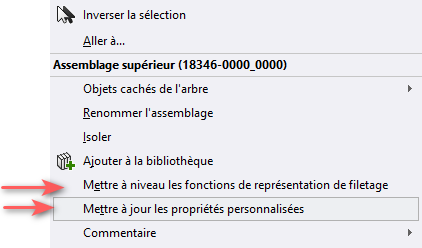
Screenshot of the 2022 version
Everything is perfect, thank you.
Do you know if there are any other important points or subtleties to consider when upgrading SolidWorks?
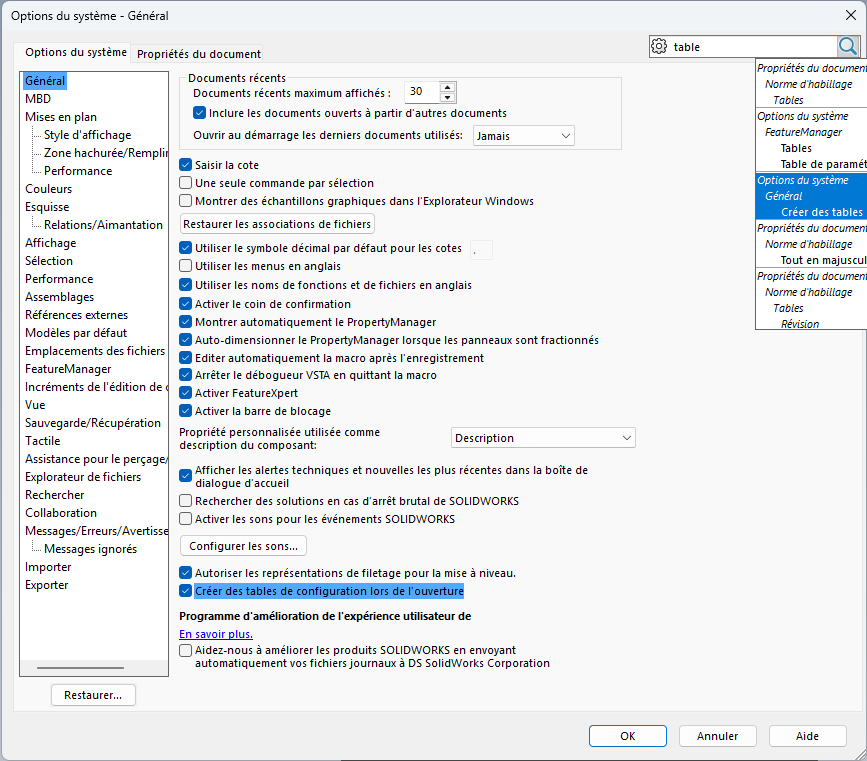
In particular, I have noticed on my models that a configuration table is now automatically created when adding new configurations. On the other hand, when the files come from an earlier version, it sometimes happens that a display problem occurs: the configuration table does not appear in its dedicated folder.
After opening the editing table and then closing it, everything seems to be back to normal.
Have you ever encountered this behavior or identified other points of vigilance related to migrating to a new version?
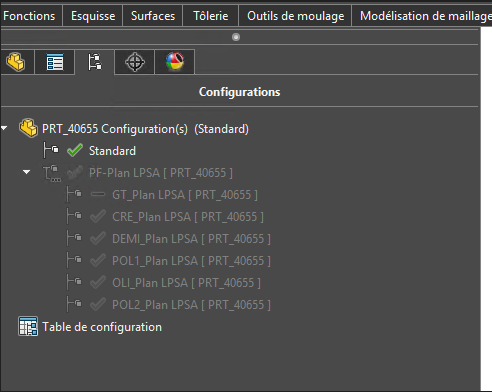
You need to think about redoing all of your document templates:
And to review all the Preferences (Solidworks Option) (*.sldreg). I strongly advise you not to keep your 2022 options for a version jump to 2025.
If you do not want a configuration table to be created automatically, simply uncheck this option:
Thank you for your answers, it's great.
Beautiful day.