Nous utilisons actuellement la version SolidWorks 2025 Professionnel SP5 et nous tentons d’activer Costing. J’ai bien positionné le bouton dans l’interface, mais un simple clic ne déclenche aucune action (le menu ne s’ouvre pas et rien ne se passe).
Auriez-vous une idée de la procédure à suivre ou d’un paramètre spécifique à vérifier pour activer ce module ?
J’ai eu ce type de problème avec Costing (sous Solidworks Premium 2022).
Une réparation de l’installation Solidworks à solutionné ce petit désagrément.
Bon à l’époque j’étais sous indows10 et cela ne m’étonnerai qu’à moitié qu’il faille déverrouiller un fichier ou deux pendant l’installation…
Pas le problème de mon côté, est-ce que vous pointez bien dans les dossiers de Costing au niveau des emplacements de fichier?
Après sinon oui problème d’installation.
C’est en faite le patron de la boite qui m’a demandé de trouver le module (Actuellement en stage) , et quand j’ai tester impossible de la lancer, ils ont la version professionnel.
J’ai contrôlé cette partie avant le poste, je n’ai trouver aucun dossier costing sur leur PC. Même l’éditeur qui devrai exister je l’ai pas trouver
Merci pour vos réponses, je leur ai transmit les infos, comme ce n’est pas moi qui m’occupe de leur systeme informatique je vais patienter et venir faire le retour ensuite
Leur informatitiens a reinstaller le solidworks sur les 2 postes, sur le 1er poste le module costing fonction, mais sur le 2ieme sa ne fonctionne toujours pas.
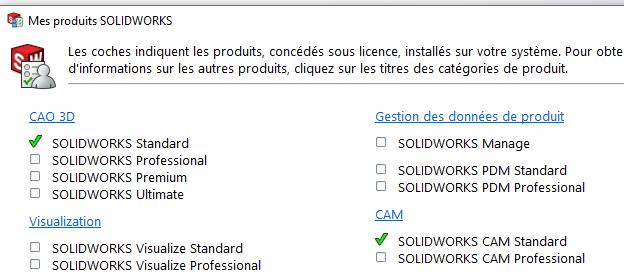
Mais il semble y avoir quelque chose que je ne comprends pas
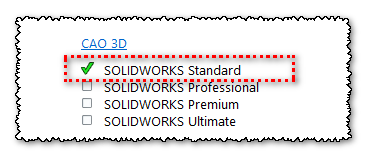
en dessous de solidworks c’est noté
et dans mes produits en allant en haut sur solidworks j’ai sa:
J’aimerai bien mettre 2 meilleurs réponse car vous m’avez donné les 2 les information, a part qu’il ont reinstaller solidworks car il avait effectivement oublié de cocher la case pour le module costing


 car vous m’avez donné les 2 les information, a part qu’il ont reinstaller solidworks car il avait effectivement oublié de cocher la case pour le module costing