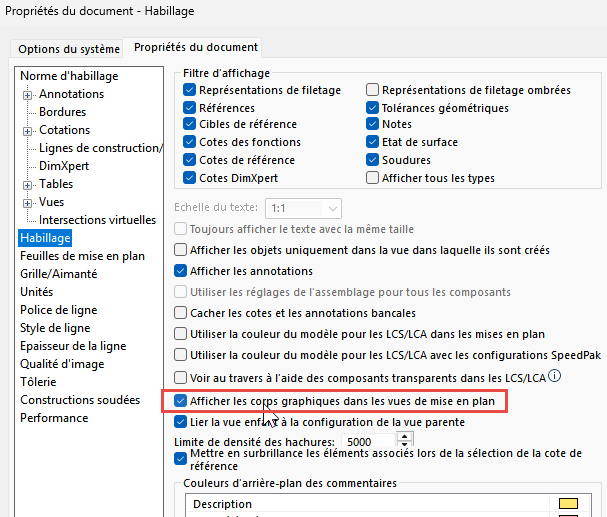
I was sent a file from a scan. This file is an .stl or .obj depending on the zone. I can't open it in volume when importing because it's too heavy, and opening it in surface is enough for me. I've recreated a few surfaces, and I'm trying to make sure that there is no interference with my design. The problem comes when I move on to the drawing of my assemblies, the graphic body is not displayed even though it allows to give all the context. Do you have a solution to display it?
Which version of Solidworks? Are your " graphic bodies" that don't appear in the Solidworks format in the end? (sldasm / sldprt) or have they remained as 3D-connect complements, or worse with the notion of " envelope "?
Note: never hesitate to add screenshots to contextualize your problems... (but I understand that this option is not yet active during the first messages).
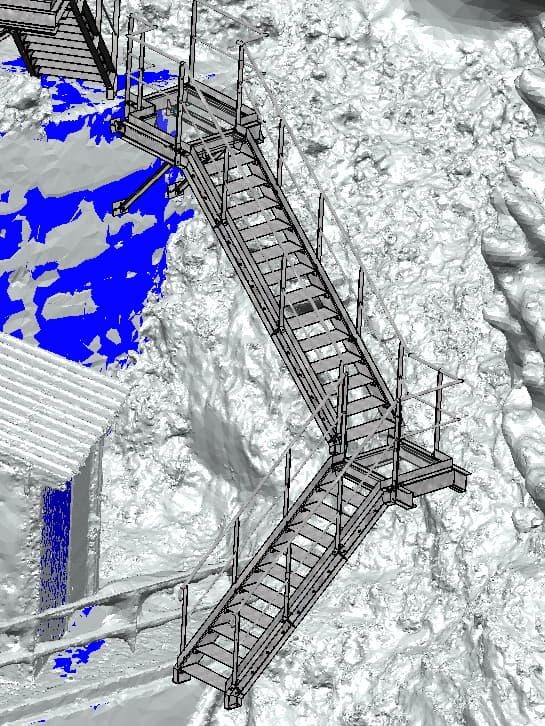
Thank you for your message. My body graphics are saved in SLDPRT format. I'm on SW2026 SP0 (I had the same problem with SW 2024). I'm attaching a screenshot of my assembly (I can't put everything for privacy). In blue, these are the surfaces that I recreated. I can't do it everywhere, especially on the natural terrain, but I can at least see the interference and position my pieces. On the other hand, as soon as I move on to the drawing, the graphic body disappears and only the surfaces I have recreated remain. This makes it impossible for my client to see the implantation or the interference.
Wow! I didn't expect this , but it's interesting and pretty enough. I think the problem is more a hardware memory (RAM) limit, in this case Solidworks makes its own trade-offs... what does it look like by saving your assembly or drawing in Edrawing format (for example). Is the field still invisible?
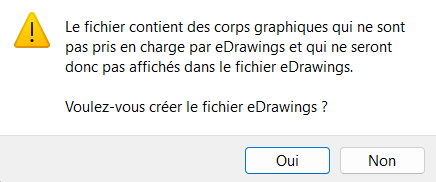
Here are the error messages for e-drawings. I also tried to upload to the 3D experience drive to share with my customers but nothing is displayed either.
It's not a memory problem because the assembly opens in less than 30 seconds while it's 20 times the size of what I showed you. I work locally on this subject.
When you import your scan, is it fixed originally? If this is the case, everything you reproduce in this environment is also fixed at the origin (Body in blue on your screen print). So your stairs or railings are in the right position in my opinion. If you want to be sure of your implantation, refer to the origin scan, you will be sure to be implanted according to a common reference. Another question: when you import your scan is it not possible to convert it to another format?
I fix the origin of the scan at the origin of the assembly, so no particular worries about it, especially since I then export the ASM file so that a surveyor can check the layout on site. My only concern is to make the graphics appear during the drawings to show the client the final rendering... I manage to import the scan in surface, but it becomes very heavy and in addition it only creates one surface and I can't use it to position my stairs or platforms. In surface, I can make my scan appear on the plan but it makes the work very complex because it is slow. Maybe by creating a config with the surface scan removed to work and activated just during drawings?
Hello; I'll come back to the 30 seconds of openings, it seems extremely fast to me even for local processing, wouldn't you be in " Light " (or worse " Skinning ") opening mode by chance? I wonder if this will not have an influence on whether or not to see the surfaces in the MEPs...?
 , but it's interesting and pretty enough.