Hello,
When I put an appearance on my part when creating it, (example: screw holes of one color, pin hole of another...) and well when these parts are inserted into an assembly all it disappears. Do you know how to keep the original appearance in the assembly?
Thank you
Fred
Hello,
Is it possible to have an example file please?
Hello,
Do you have multiple display states?
Hello,
From memory, you have to right-click on your part → component property and choose your display state
Hello Fréderic_ALLEAUME,
There's also the display in the assembly...
@+.
AR.
Hello;
To see if appearances are not " forced into assembly ":
Right-click on the Head Assembly / Appearances / Remove All Appearances.
=> Warning: click on " REMOVE " appearances, if the option appears, and above all not on " Delete " appearances.
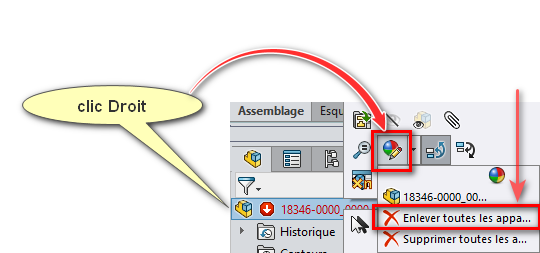
Operation to be repeated on the sub-assemblies if option possible...
nb: If you click on " Delete " instead of " Remove ", a rewind (CTRL+Z) is possible immediately after the operation...
Or rather " U " for cancellation, dear colleague
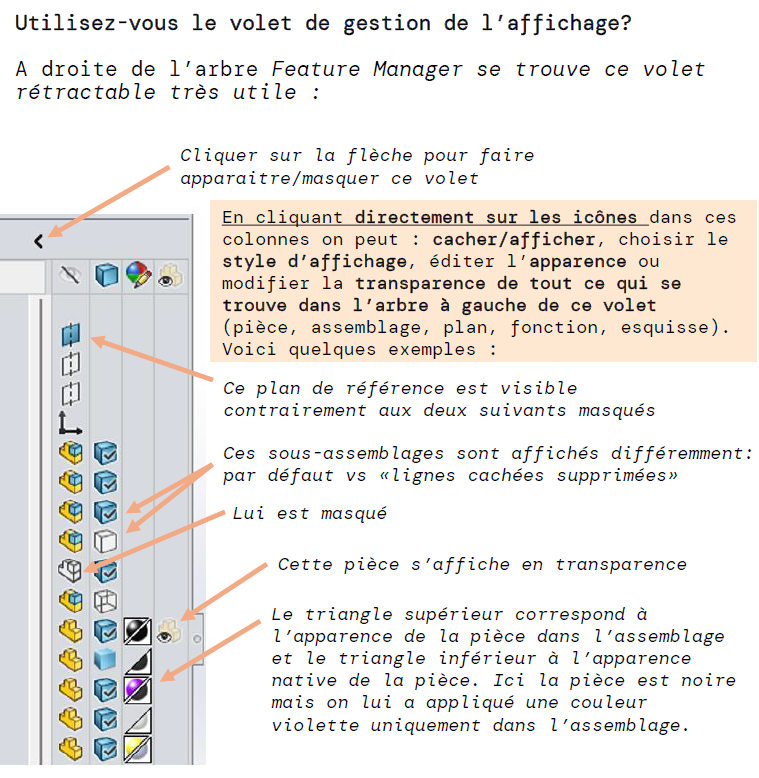
In addition, for information 
5 Likes