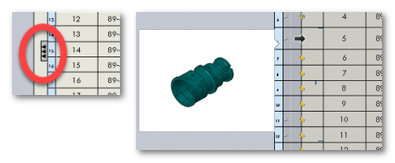
In a parts only nomenclature I would like to see that the assembly and not the parts that compose it. I know to go to the component properties and check the boxes in the ' save assembly as a part ' box. Except that I have to forget to do something, because it doesn't work
I know that this subject has already been dealt with, but I can't find the message anymore If someone can put the link in addition to the answer, thank you in advance
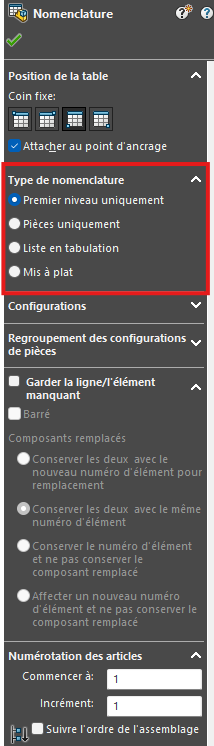
I may be saying something stupid because I don't know exactly why you have to use the " Part only " type of BOM, but I'll let you know how to do it for BOMs:
I always use the " First level only ", this allows me as its name suggests to ALWAYS display the first level, never the parts that make up the assembly, and then sort out what I want to keep or not.
If I have an assembly that I want to break down (show only the parts that are in it), it happens in 3D (even if you can also do it directly on the bill of materials itself, but I usually do as many things as possible in 3D so that my drawings and bills of materials are almost finished from the start):
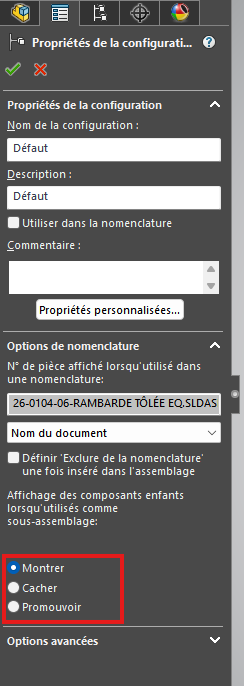
In the configuration(s) of your assembly, you can right-click > property of the configuration.
You can therefore have access to the display of your component in the BOM. In the case of a standard nomenclature " First level only " (in layman's terms):
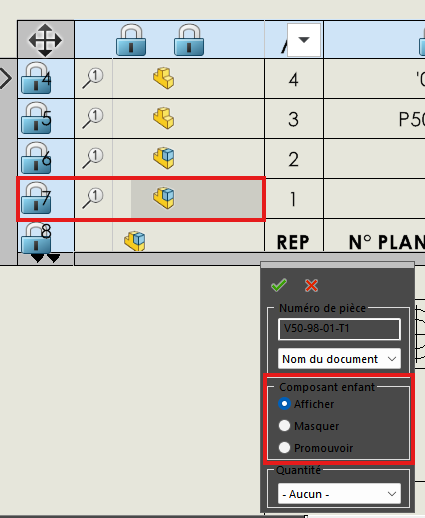
Show = Show top-level component only
Hide = Do not show the component in the BOM or the parts that make it up
Promote = Show only the components of the assembly without showing the first level.
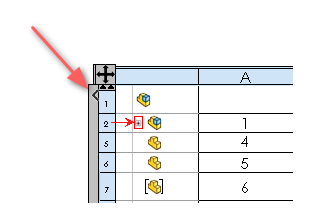
You can also access this feature directly on the BOM, by expanding the left side of the BOM, right-clicking on your component's row icon> " Component Options..." »
I hope that all this can help you, it is another methodology that allows you to achieve your result.
Hello RodyVH Thank you for your feedback, but it doesn't correspond to my needs.
The fact that I have a parts bill of materials only allows me to have the list to fill in our ERP and to indicate the elements to order. We order pre-assembled parts sets. For purchases, it is an order line (a part number). except in 3D it's an assembly of parts. I would like to see that the number of this assembly. (seen in the message that I can't find anymore )
Yes; Solidworks 2020 allows this (This option dates from 2014...):
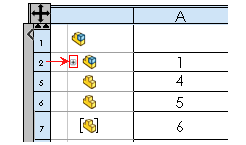
Note, to access the possibility of grouping subassemblies, click on the Nomenclature, then on the small arrow pointing to the right on the left edge of the table.
 )
)