Hello dear colleagues,
I have a toolbar (which SW calls control manager ??? and which moved due to a mistake on my part.
See the images
But I can't put it back where it was before

The bar is on the side

It's very stupid I know 
Thank you
Hello dear colleagues,
I have a toolbar (which SW calls control manager ??? and which moved due to a mistake on my part.
See the images
But I can't put it back where it was before
The bar is on the side
It's very stupid I know
Thank you
Hello,
You click on it and hold the click to drag it in and out of the side.
Then you click on it again and you drag it to the top of the window, normally when the cursor arrives in the middle of the top, the hook appears.
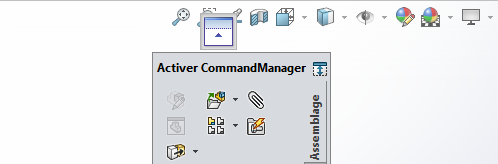
And presto, it's done...
Otherwise even more stupid, you turn your head 90° to the left, to make it look like it's in the high position!
Otherwise if you have a stiff neck, you may prefer the solution of @eriaud, I wouldn't take it badly! 
A small subtlety all the same!
You have to think about right click => customize and uncheck " Lock CommandManager and toolbars " in order to be able to integrate it on your sup banner
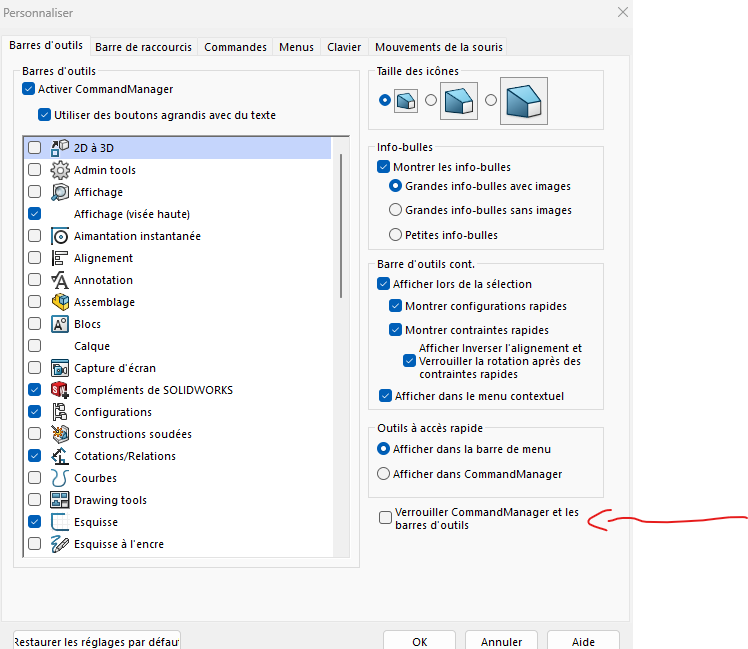
There's also the option to turn the screen to relieve the neck!

Hi coin37coin,
Thanks for the information, I just checked it. Indeed it's very annoying this movement of bars ...
Thanks again, @+.
AR.
@coin37coin thank you for the additional info.
everything went back to normal and I took care to lock it once everything was in place
Thank you @a_eriaud it's the hook point that I was missing because it only appears in certain positions.
Thank you all for your subtle advice on neck position!
It's a way of telling myself that I'm worth it.
So there! You're nice, much more so.