Hello,
SW2024SP5 / Layout
In my MEPs, I always insert a 3D view with a display style " Edges in shaded image mode"
When I save the MEP as a PDF, the display style changes by itself to " Shaded Image." When displayed on my PC and also on the PDF file. Which is very ch... 
A small detail: this problem only exists in assembly MEPs and  is not systematic.
Does anyone have any idea how to fix this anomaly?
Thank you
Hello;
Some basic questions:
_ Are these PDF recordings (export) or prints on a PDF printer?
_ Are these PDF outputs made before or after saving the slddrw layout?
_ Can you take a screenshot of the PDF export configuration?
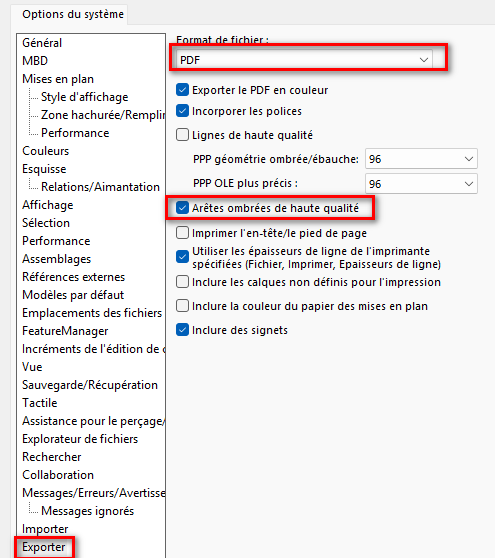
2 Likes
So no, it's not exporting but " saving it as ," but your answer helped me solve my problem.
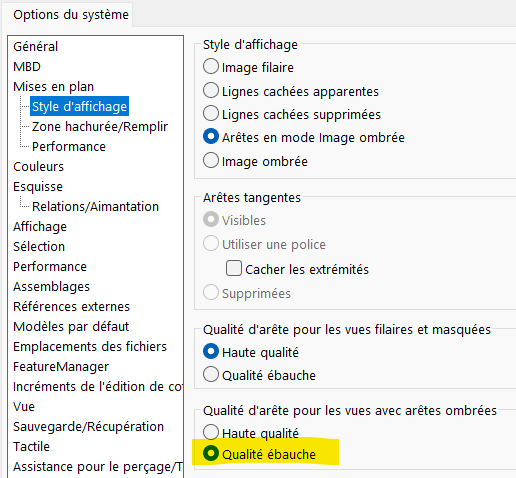
In the system/MEP/display style/ options, check " Draft quality" for shaded image edges.
However, in the PDF export options, I have Shaded Edges high quality unchecked.
See image below.
3 Likes