Configure a text sketch by room family

Hello

I'm starting to discover the configuration by part family and I was wondering if it was possible to change its text (done with the Text sketch tool) in the part family table .

Example: 

I have a piece that says "HT / 1000". I then create a configuration because you need a second part that is slightly different in terms of dimensions and especially with the text "HT / 500" in exactly the same place as "HT / 1000". Is it possible to change it via the room family table?

While waiting for an interesting answer,

Hello

Upgrade to see if it's a little bit like that? If that's it, I'll explain to you how we do it. Part made under 2016


tu_o_-_3_avec_degaufrage_et_configuration_.sldprt
4 Likes

Yes, that's it. So how come?

Hello

You need to link your text to the "configuration name" property

After that, for the position, it depends on your sketch.


edits: larger image link;


text_pilote_par_config.jpg
2 Likes

Dsl for delay; here's how to do it in the ZIP file with the part


configurer_une_esquisse_texte_par_famille_de_pieces.zip
2 Likes

Thank you for your help and answers!

It's true that it's easier with the configuration name binding, I proceed differently because my marking is not always identical to the name of my configuration.

3 Likes

Hello, I am interested in this subject, however the download link and the explanations are no longer accessible.

Hello;

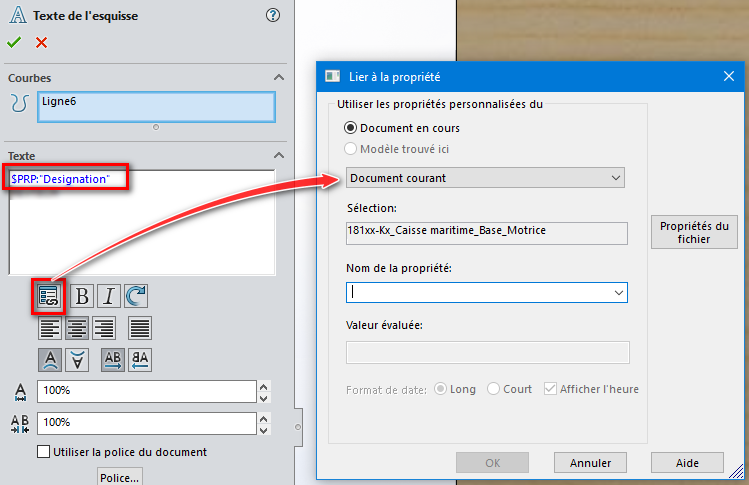
To bind the Text (sketch) to a property:
image
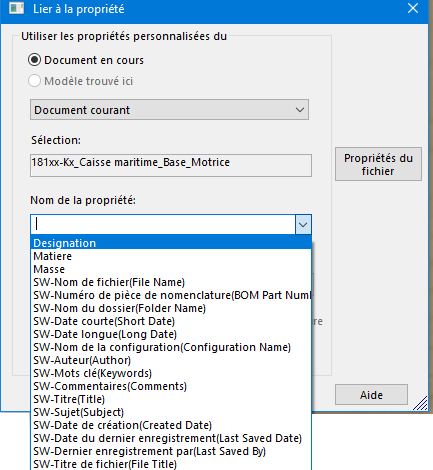
Use the " link to property " function, then choose
In the drop-down list the desired property:
image

2 Likes

Is the record broken?
image

1 Like

:laughing::laughing: 8 years is probably not the record, but we are getting closer, however, if we count the double question, should we combine the two temporalities plus a penalty for digging up due to discussion???

https://forum.mycad.visiativ.com/t/configurer-une-esquisse-texte-par-famille-de-pieces/102115/8
https://forum.mycad.visiativ.com/t/parametrage-du-texte-de-cotation-via-la-famille-de-piece/114122