Cześć
Mam błąd i chciałbym wiedzieć, do czego on odpowiada
Sldavealldlgu:0000A6BF
Czy ktoś może mi coś powiedzieć?
Z góry dziękuję
Cześć
Mam błąd i chciałbym wiedzieć, do czego on odpowiada
Sldavealldlgu:0000A6BF
Czy ktoś może mi coś powiedzieć?
Z góry dziękuję
W jakim kontekście pojawia się ten komunikat o błędzie?
Cześć;
Pod warunkiem, że będzie więcej kontekstu:
Wyobrażam sobie, że masz na myśli: sldsavealldlgu.dll. (a nie sldavealldlgu.dll)
Wygląda na to, że to błąd związany z DLL (błędnie zarejestrowany lub uszkodzony).
regsvr32 w wierszu poleceń.Albo przeprowadzić " naprawę " dotkniętego oprogramowania.
Cześć @Maclane
Niestety, nic nie mogę zrobić, pracuję w firmie, gdzie zarządzanie komputerami, zwłaszcza CAD, nie istnieje. i nie mam dostępu do mojego komputera
Ale dziękuję za odpowiedź
PC w sieci chronionej przed światem zewnętrznym, ale nie przed samym sobą  .
.
Mam tyle błędów, awarii, spowolnień, że pracuję w tej firmie, że musiałem przejrzeć wszystko, co było możliwe, żeby mieć problem z tym oprogramowaniem.
Mam dość tych problemów i zarządzania IT
A co z wsparciem VISIATIV?
Gram na komputerach z ograniczonym dostępem.
Mamy standaryzowane postacie, które wydają różne krzyki, w zależności od dnia i nastroju.
Niepokojące
Cześć
Dziś popełniłem nowy błąd
Czy mógłbyś zapytać o typ błędu sldworks:ffff000000000
Dziękuję
Czy kwestionowałeś wsparcie VISIATIV?
Nie wiem, czym jest ograniczony komputer 
Cześć,
Zgłaszane błędy to błędy potencjalnie uszkodzonych DLL.
Pozostaje tylko uruchomić program programowy w trybie awaryjnym, żeby sprawdzić, czy działa poprawnie, inaczej odinstalowanie/ponowna instalacja nie zaszkodzi, moim zdaniem.
@Le_Bidule
Komputery ograniczone to komputery odłączone od Internetu i intranetu.
Te sieci umożliwiają pracę nad wrażliwymi projektami oraz ochronę przed wirusami lub szpiegostwem, a także ochronę patentów.
Mamy mieć stabilne komputery, mówię rozsądne. Bo przez ostatnie dwa lata widziałem, jak wiele beugów pojawia się w miarę rozwoju projektu.
Wiem, że pojawiają się aktualizacje, ale teraz osiągnąłem poziom niestabilności, który jest zdumiewający. Rano wszystko działa w południe, wszystko na targach, ten sam model, ten sam plan
Zaczynam poważnie analizować błędy i kody, ale nie mogę się zalogować ani udostępnić modeli, nad którymi pracuję. Po prostu podaj kody błędów.
Ale na przykład: mam niezwykły komunikat o błędzie, w którym SW prosi mnie o wybranie kodu błędu .
W ciągu dwóch lat podsumowałem 20 lat beug 
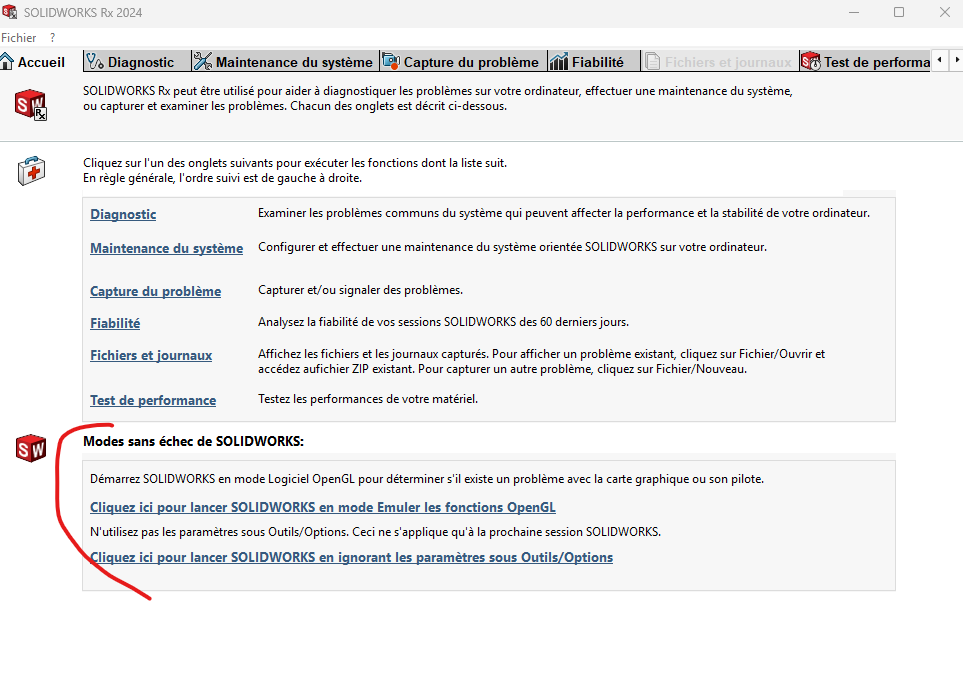
Jak uruchomić oprogramowanie w trybie awaryjnym.
Problemy wynikają też z modelowania, z ograniczonej pojemności postaci (co w naszych czasach było szalone).
Zmieniłem komputer, ponownie zainstalowałem oprogramowanie, teraz widzę tylko jedno: warstwy podłożne, które same w sobie mogą rozwiązać połowę błędów i błędów.
Ale zamierzam oglądać uruchamianie w trybie awaryjnym, chcę poznać procedurę.
W przypadku Solidworks Rx. To trochę mylące, bo obsługuje tylko fakt uruchamiania bez personalizacji narzędzia lub emulacji funkcji OpenGL, by sprawdzić, czy nie ma problemu ze sterownikiem
Nie myliłem się. W domu przeszliśmy do 64GB RAM i dość wysokich taktowania, bo przy nakładkach bezpieczeństwa wszystko stawało się coraz bardziej skomplikowane. Następnie zmieniliśmy zakres procesorów (z architektury Xeon na I7).
Warstwa podwarstwa jest dość gruba, zanim zacznę pisać SW, mam już 3 strony menedżera zadań, a oprogramowanie, którego nie używam, jest uruchamiane, krótko mówiąc
Problem z procesorem leży głównie po stronie MEP-ów, rozumiem, że działa z sercem (mit czy prawda?).
Dobry silnik graficzny (może mit), to stary blunderbuss, ale nic o nim nie wiem.
Obecnie nasze konfiguracje
13. generacja intel(R) Core ™ I9 - 13950HX
Serce 24
32 procesory logiczne
32 GB RAM (w dwóch gniazdach) SODIMM 4000 MHz
Karta graficzna
NVIDIA RTX3500 Laptop generacji Ada, GPU12GB grafika 128MB
Windows 64
Konfiguracja nie wydaje się eksplodować mimo braku pamięci RAM, a karty graficznej nie wiem.
Czy jest kompatybilny z SW? Nie wiem.
Karta graficzna powinna być kompatybilna dopiero od 2026 roku (to nie znaczy, że nie będzie działać, ale w starszej wersji nic nie gwarantuje).
Certyfikacja sprzętu | SOLIDWORKS
W przeciwnym razie na pamięci 2022 musisz wyłączyć opcję poprawy wydajności graficznej
W przeciwnym razie na pamięci 2022 musisz wyłączyć opcję poprawy wydajności graficznej
Czy to ironiczne?
Przetestuję to
Podsumowując, karta graficzna jest zbyt młoda na wersję oprogramowania
Dziękuję
Tak, trochę za świeżo jak na 2022 rok, ale to wciąż loteria, może się udać. Po prostu SW nie testuje i certyfikuje starszych wersji.
I nie, to nie jest ironia, funkcje geniuszy SW nie zawsze są dostosowane i robią bałagan w działaniu SW, zamiast je ulepszać (ta opcja jest idealnym przykładem w wersjach niższych niż 2023, z tego co pamiętam).