Hello,
I just replicated this door handle.
I need to " easily " reproduce the lid that will clip into the 5 notches located on the curved surface.
How do I do this easily and quickly starting from the curved cutout I made, please?
Is the easiest way to make a geodesic surface offset of 0.1mm for example and copy the sketch into a new room?
Poignee_Porte_Marco.SLDPRT (718.6 KB)
Lid.SLDPRT (100.9 KB)
Couverture.STEP (81.7 KB)
Hello;
Which version of Solidworks is used?
Please add a screenshot and/or a STEP or Parasolid equivalent for those who cannot open the attached file.
Parasolid is not allowed so I add the WWTP.
At the time for me for the Solidworks version, it's the 2025.
Poignee_Porte_Marco.STEP (1.2 MB)
Do you have a supplier reference?
It wouldn't surprise me if you can find the full 3D in a Find-il or tracepart download hub...
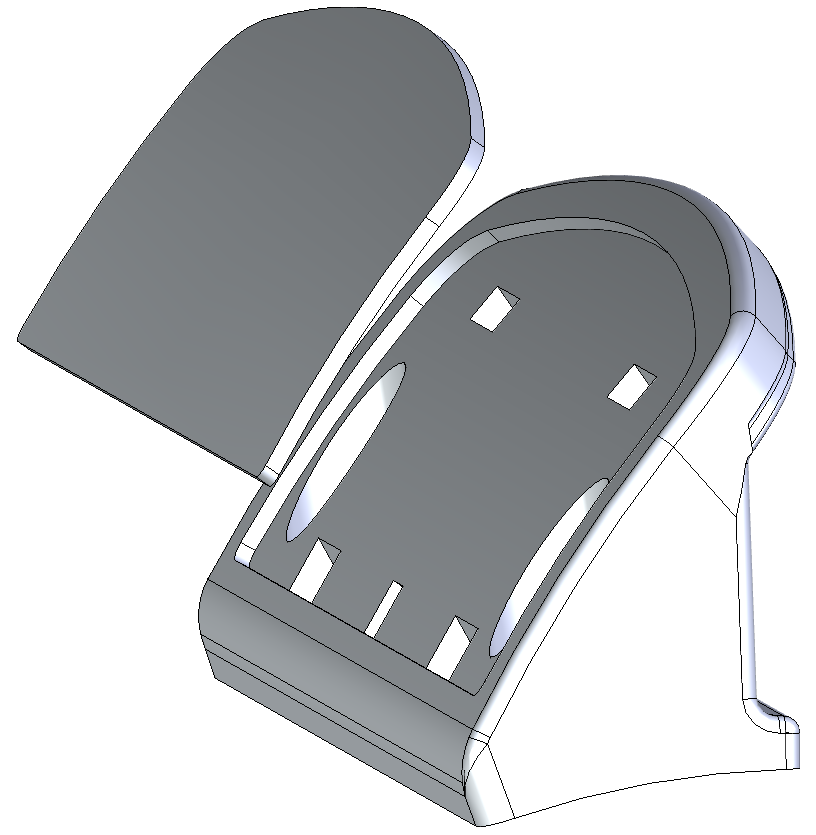
Otherwise, I'll work on the curved cut (Lid) in the assembly + 0.1mm reduced projection of the sketch of the 5 notches (One notch = one sketch to control the extrusion direction) and then a Draft function...
And I'll add a small notch or a removal of material on one edge so that I can remove it with a small screwdriver...
1 Like
No, I'm sorry, I don't have any supplier reference anymore... I tried to search with the information I was given but without success and it's already been a while ...
I didn't use the draft. I copied and pasted the 3D sketch into a new part but by extruding it created a non-modifiable angle on the thickness of the part (see 3D file). When I try to change the angle of the plane to 45° for example, it changes the angle on the other side like with a mirror...
I'm going to try like you did there.
Can I create a part from assembly? and then modify it? And if I modify the handle, the lid follows, right?