Hello, I have a problem with the display in DraftSight. Lines that have been deleted a long time ago are displayed, radii disappear, etc. I have already reinstalled new drivers, graphics card and program.
I urgently need ADVICE.
Thank you
A screenshot to better understand?
Graphics card configuration...
I'm just reinstalling again. then I'll send a screenshot
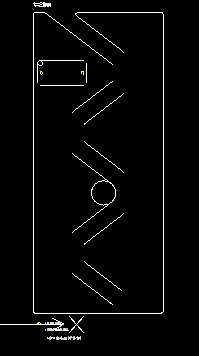
this is an example - the circle does not exist, and the lines should be connected with radii. this is an existing file and when opening and zooming everything is suddenly incorrect
Hello;
@Scofield give some good advice here:
https://forum.mycad.visiativ.com/t/draft-sight-fehler-bei-der-darstellung/112668
This looks very much like a graphics card problem (it's not always a question of installing the latest Driver...), as @sbadenis asked, tell us your current configuration instead:
PC Type / Configuration / OS...
Your graphics card + current driver
Draftsight's version of the Draftsight...
(Note: Reinstalling software very rarely solves a problem of this type... prefer " Repair ", it's faster and less violent.)
2 Likes
Hello
Is it the same behavior if you save the file in dxf?
1 Like
hello, DXF unfortunately does not solve my problem either... I tried it
We have the same problem recently on 3 workstations without having done a software or graphics card update...
Can be related to a windows update?
Hello @Maria_Holzer and @geoffrey1,
If the behavior is at the level of ZOOM / DEZOOM I recommend that you access the Nvidia panel (right click on the desktop), manage the 3D settings, add the Draftsight software in the programs processed by the graphics card, and disable threaded optimization.
Kind regards
1 Like
In the meantime, I have found a solution that works on all 3 workstations:
On the command bar, type: _OPENGLPROFILE
This opens a window in which, by selecting " open gl compatible " rather than " opengl core ", it solved our problem.
1 Like
Hello
The problem is that a priori it disables the consideration of the graphics card, therefore drop in performance on complex levels.
If there is no Nvidia graphics card in the PC then you can use this command which will force the use of the processor rather than an Intel chip for example, otherwise it is better to use the deactivation of threaded optimization.
Kind regards
1 Like
Thanks for this info, I can try to go back to see the difference and if it works.
When you change the mode, is the open GL only for the software concerned or is it for the whole machine?
This is only for the Draftsight.
1 Like