Hello,
I'm looking for how to keep the "detail" display in the PDM explorer, because I have to change it every time.
Thank you in advance for your answers.
CDT
Fred
Hello,
As with any Windows folder, once put in detail view on the root of the vault click on the 3 small dots then Options.
Then in the folder option window, go to the View tab and click on apply to folders (this will apply to all the folders in the vault).
2 Likes
Hello,
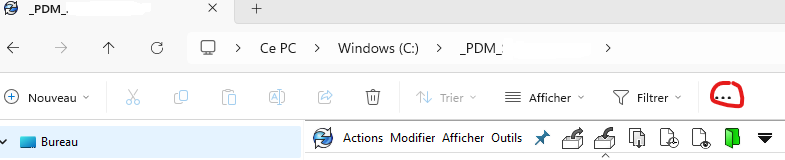
Windows 11
I'm in windows 10!
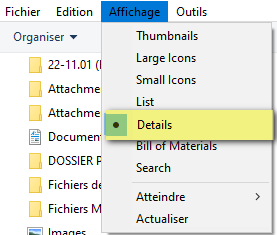
On Windows 10 memory, it's in view then folder options
On Win10:
Display and Details to be precise:
On the other hand at home (SW and EPDM 2020) the display does not reset: it remains in the last config used.
There may be a windows setting that forces your display to explore without details (on restart for example).
Note: PDM supports specific column views for search cards, quick searches, " file lists" (not understanding what that meant). It could explain differences in visualization depending on what you do.
1 Like
Hello,
First of all, thank you all for your answers.
I have finally solved the problem:
Once the display has been chosen

Go to options.

View and Apply to Folders
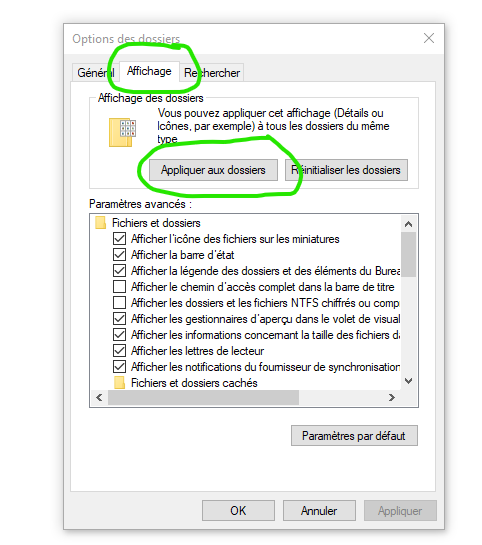
And now my display type is preserved.
Fred