Hi all
Is there a config or macro way to do face exports (Export to dxf/dwg) for laser cutting or other in dwg as a first choice (and not dxf by default).
Without myCad tools
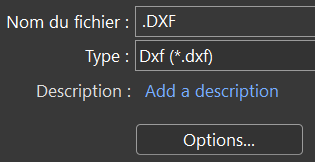
SW2023SP5 but this function has not changed since Thales 
Hi all
Is there a config or macro way to do face exports (Export to dxf/dwg) for laser cutting or other in dwg as a first choice (and not dxf by default).
Without myCad tools
SW2023SP5 but this function has not changed since Thales
Hello;
This is surely because the *. DWG and a proprietary format (autodesk) and that the *. DXF and a so-called " universal " format...
The most practical is to use a macro... Like what:
Also to see (I just realized that I didn't install it on my computer) if " Solidworks Task scheduler " doesn't allow you to choose one of the two formats as a priority...
Hello
My need is not necessarily for bent sheet metal.
This can be thin or very thick sheet metal or a material other than sheet metal.
But your explanation of the proprietary format of the dwg must be the reason
Otherwise, I have the myCADtools. If you do not use automation, it is for several reasons, including, for example, some holes cannot be made with a laser (Ø=<ep), but also the naming of the files containing the material/thickness/quantity.