Bonjour,
Nous travaillons sur de gros assemblages (Environ 700 à 900 pièce).
Lorsqu’une seule pièce est extraite, cela interdit l’extraction de toutes les mises en plan, même celles non concernées par la pièce déjà extraite.
Existe-t-il une solution pour forcer l’extraction ?
Vous remerciant par avance de vos retours,
Sébastien
Bonjour et bienvenue;
Merci de préciser les versions des logiciel utilisés:
Solidworks (Version ? + type local ? ou online ?)
et
PDM
Bonjour Maclane,
Effectivement j’ai oublié l’essentiel.
SW 2023 SP2.1 en local
SW PDM 31.2 (B1) en local
Autre info : Je ne suis pas adm du PDM.
Merci !
Bonjour,
Il va falloir aller voir l’admin EPDM car soit c’est un souci de droits utilisateur, soit c’est un souci de workflow.
Un truc classique c’est de vouloir faire l’extraction via l’explorateur Windows alors que le fichier est ouvert via l’assemblage dans Solidworks.
Même si c’est pénible, ce blocage là est normal (comme le fichier est ouvert par solidworks il est bloqué pour changer son état via l’explorateur de fichier). La solution : faire l’extraction via Solidworks (ou fermer l’assemblage dans Solidworks et faire l’extraction via l’explorateur).
Nb : comme SW n’est pas le champion de la libération des fichiers/mémoire vive, faire l’extraction via SW est souvent le plus rapide (tu n’es pas à l’abri d’avoir encore un fichier de bloqué par SW alors qu’à priori il ne devrait plus l’être).
Bon, moi je n’ai pas PDM… mais d’après l’aide:
Donc @froussel a raison, il faut se rapprocher le l’Administrateur de PDM.
Nota: il est indiqué que le PDM est en « local », il est curieux que l’utilisateur ne soit pas l’administrateur dans ce cas non ?
Bonjour Froussel,
J’effectue l’extraction sous SW après l’ouverture du fichier lorsque SW me le propose.
Le comportement du PDM est normal puisque je souhaite mettre à jour un plan pointant sur un fichier d’assemblage dont un élément est extrait (et donc potentiellement en cours de modification). Mon plan est donc en théorie impacté. Sauf que mon plan est partiel sur l’ensemble et que je n’utilise pas le composant extrait (Je le sais et SW ne peux pas le savoir). Je souhaitais savoir si il y avait un moyen de forcer l’interdiction de SW PDM dans ce cas précis.
« En local » = « on premise » sur le serveur de l’entreprise par opposition à « cloud » sur le serveur Dassault sys.
Je ne suis pas adm.
Mais mon adm aussi ne connais pas de solution.
NB: Merci pour le lien de la doc, mais je l’avais déjà parcourue avant de m’adresser au forum 
Cela ressemble donc lié a des droits de changements de version → c’est l’admin PDM qui peut changer les réglages.
Sinon tu archives ta pièce le temps de faire la maj de ta MEP d’ensemble non ?
Juste un petit truc à l’époque (2017  ) la gestion de l’extraction et de l’archivage
En passant par SW ou PDM, il fallait recharger la pièce il me semble ??
Selon la procédure:
- j’extrait la pièce ou l’assemblage je l’ouvre. Et quand SW pose un problème je recharge
- J’ouvre ma pièce sur SW, j’extrait ma pièce via SW et je charge la pièce en décochant lecture seul
Quand il 'y avait un souci, toujours bien demander la dernière version sur PDM, pour être sur que l’on est bien à jour en termes de cache et autre.
Voir ci-dessous la manip, mais vous la connaissiez surement
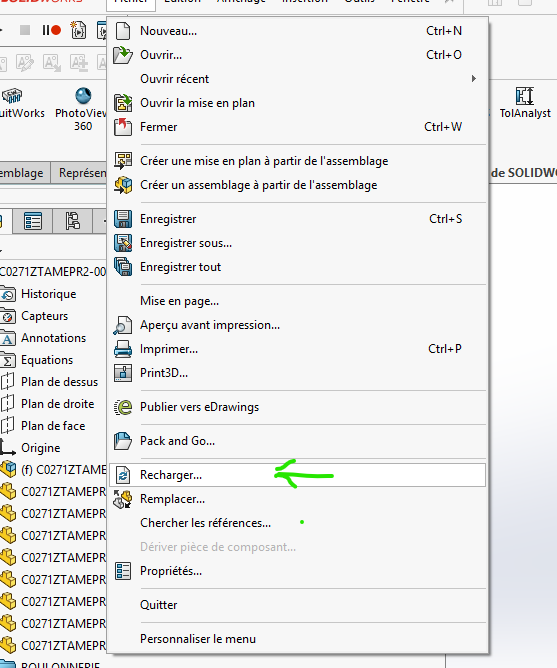
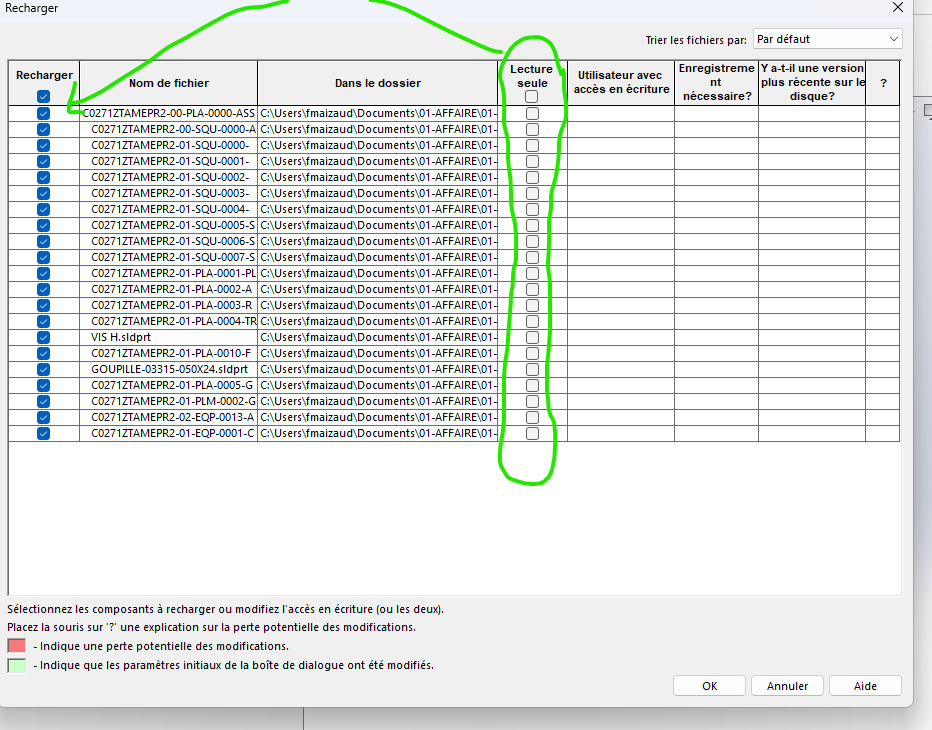
Bonjour Froussel,
Merci de remuer tes méininges pour ma problématique 
[quote=« froussel, post:8, topic:114465 »]
Cela ressemble donc lié a des droits de changements de version
[/quote] Le fichier extrait par mon collègue est bien en SW2023.
Pour info, je travaille sur un plan de sous ensemble. Je ne peux pas l’archiver, puisque je n’ai pas pu l’extraire !
Bonjour Fred78,
Pour info, je suis un vieux briscard de Catia (26 ans d’expérience!) mais je viens de glisser vers SW depuis 6 mois. Je n’ai donc que très peu de bagages sous SW.
J’ai regardé la fonction recharger. Effectivement, je la trouve disponible sur le fichier de la pièce extraites par mon collègue, mais je n’ai pas la main pour décocher lecture seule.
CAPTURE D’ECRAN A L’EXTRACTION DU PLAN
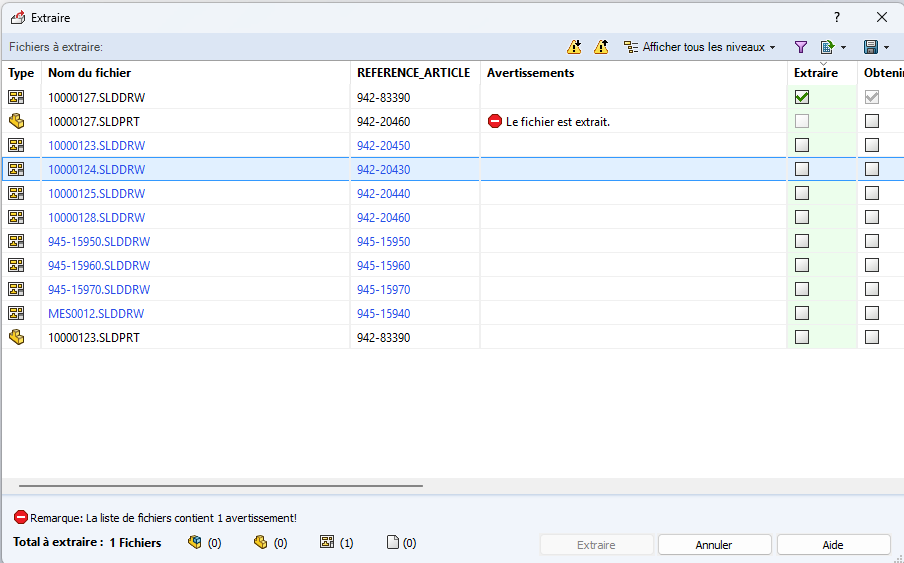
CAPTURE D’ECRAN RECHARGER FICHIER
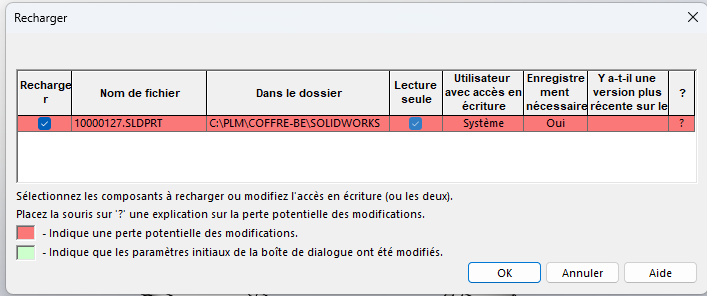
Pas de pot passer de CATIA à SW 
Ne pas hésiter à recharger, la solution n’est peut-être pas là. Cela ressemble à des droits comme expliquer précédemment, si vous avez tout essayé.
Dernière solution si cette pièce n’a pas besoin d’un historique, la renommer après avoir surprimé la pièce originale. Vous reprenez la main et l’archivé en la maintenant extraite.
A l’ouverture d’un assemblage ou une mise en plan, un message vous dira qu’elle porte le bon nom mais ce n’est la pièce d’origine. Comme c’est une copie exacte il n’y aura pas de problème.
Autre question :
C’est pièce a t-elle été directement dans un assemblage ?
Essayé d’ouvrir l’assemblage qui contient cette pièce extrait et ou archivé après ouverture. Et fermer l’assemblage. Essayer à nouveau d’extraire la pièce et de l’ouvrir dans SW
Le fichier 10000127 est déjà extrait (logiquement par quelqu’un d’autre). Donc cela parait logique que tu ne puisses pas l’extraire une deuxième fois.
Nb : Cela doit pouvoir arriver quelques fois qu’un fichier soit extrait sur ton poste mais que tu ne puisses pas bosser dessus. Souvent des soucis de Lecture/Ecriture Windows si EPDM ou l’explorateur a planté au moment de l’extraction (PDM le considère extrait mais en pratique il est en lecture seule sur le poste).
Dans ce cas essayer de changer le lecture seule à la mano via le clic droit sur le fichier.
Mais normalement l’utilisateur propriétaire ou l’administrateur doit pourvoir annuler l’extraction ?
Sauf problème (du genre de celui que j’ai décrit au dessus), normalement oui : l’utilisateur qui a extrait doit pouvoir soit archiver soit annuler l’extraction (à moins qu’ils aient rajouté des nuances de droits depuis EPDM 2020 : c’est pas totalement impossible même si cela ne semble pas nécessaire).
Bonjour,
Non, rien n’a été ajouté sur les droits depuis des années.
Pour moi, vu qu’il n’y a aucun avertissement remonté sur le fichier SLDDRW (fichier que tente d’extraire @Sébastien_QUÉREL), je ne vois qu’un problème de droits (entre autre le fait de ne pas afficher comme avertissement le fait de ne pas avoir les droits d’extraire).
Je pencherai pour un fichier SLDDRW qui n’est pas dans le même état de workflow que le fichier SLDPRT ce qui pourrait expliquer le fait que l’action d’extraction soit impossible.
J’ai testé sur 2025 le fait que le fichier SLPDRT soit extrait ne bloque en rien l’extraction du plan sur un autre poste.
Edit: et je n’ai pas souvenir de ce genre de bug sur des versions antérieures (2020/2021/2022/2023/2024)
1 « J'aime »
Bonjour @Cyril_f
Dans PDM les droits sont inscrit au dossier pas au fichier ? Quoique possible surement ?
Normalement si la pièce ou l’assemblage est attaché au plan celui-suis le worksflow
A mon époque je ne sais pas si c’est le cas la 3D ne suivait pas le Workflow, elle était juste bloqué temporairement lors de la validation du plan. Et libéré soit par le dessinateur ou le CP lors d’une nouvelle révision. La 3D n’était pas indicée dans le workflow
En sommes nous sûr ?
Je regarderai du cotés des messages ignoré dans Solidworks on ne sait jamais:
https://www.javelin-tech.com/blog/fr/2026/04/how-to-restore-solidworks-dismissed-messages/
ps: Sur le site de Javelin je suis tombé sur cet article aussi:
Cela est une explication possible…
" l’Explorateur de fichiers de Windows 11 ne met pas à jour correctement le chemin d’accès au dossier dans le coffre-fort de fichiers SOLIDWORKS PDM"
https://www.javelin-tech.com/blog/fr/2024/07/troubleshooting-solidworks-pdm-windows-11-file-explorer-not-updating-correct-folder-path-in-solidworks-pdm-file-vault/
Droits des dossiers + droit de workflow indépendamment du type d’extension.
Après reste les avertissements qui sont paramétrable par groupe ou utilisateur