Hello in this code I want to make a save as in order to choose the location where to save the file. I tried several methods (Saveas Save as3 runcommand...) in vain. Several methods work in debug mode but not so macro run from SW.
Option Explicit

Dim swApp As SldWorks.SldWorks
Dim swModel As ModelDoc2
Dim swExt As ModelDocExtension
Dim bRet As Boolean

Sub addSameLink()

    Set swApp = Application.SldWorks
    Set swModel = swApp.ActiveDoc

    ' === Vérifie document ===
    If swModel Is Nothing Then
        MsgBox "Aucun document actif", vbExclamation
        Exit Sub
    End If

    Set swExt = swModel.Extension

    ' === Chemin fichier ===
    Dim swPath As String
    swPath = swModel.GetPathName

    ' === Enregistrer si nécessaire ===

If swPath = "" Then
    MsgBox "Fenêtre enregister sous à ouvrir ici pour chemin fichier  (fichier sldprt et déjà nommé)"
    swApp.RunCommand 620, ""

    swPath = swModel.GetPathName

    If swPath = "" Then
        MsgBox "Enregistrement annulé.", vbExclamation
        Exit Sub
    End If

End If


    ' === Chemin PDF attendu ===
    Dim pdfPath As String
    pdfPath = Left(swPath, InStrRev(swPath, ".") - 1) & ".pdf"

    Debug.Print "PDF attendu : " & pdfPath

    ' === Si PDF absent => sélection utilisateur ===
    If Dir(pdfPath) = "" Then

        Dim xlApp As Object
        Dim fd As Object
        Dim selectedFile As String

        ' ? Lancement Excel (solution fiable)
        Set xlApp = CreateObject("Excel.Application")
        Set fd = xlApp.FileDialog(3) ' FilePicker

        With fd
            .Title = "Sélectionner la fiche technique du MR (Fichier Pdf qui sera renommé et déplacé automatiquement)"
            .Filters.Clear
            .Filters.Add "Fichiers PDF", "*.pdf"
            .AllowMultiSelect = False

            ' Option : ouverture dans le bon dossier
            .InitialFileName = Left(swPath, InStrRev(swPath, "\"))

            If .Show <> -1 Then
                MsgBox "Aucun fichier sélectionné.", vbExclamation
                xlApp.Quit
                Set xlApp = Nothing
                Exit Sub
            End If

            selectedFile = .SelectedItems(1)
        End With

        ' Fermeture Excel
        xlApp.Quit
        Set xlApp = Nothing

        ' === Vérifications ===
        If LCase(Right(selectedFile, 4)) <> ".pdf" Then
            MsgBox "Le fichier sélectionné n'est pas un PDF.", vbCritical
            Exit Sub
        End If

        ' === Copie + renommage ===
        Dim fso As Object
        Set fso = CreateObject("Scripting.FileSystemObject")

        On Error Resume Next
        fso.MoveFile selectedFile, pdfPath

        If Err.Number <> 0 Then
            MsgBox "Erreur lors de la copie du PDF.", vbCritical
            Exit Sub
        End If

        On Error GoTo 0

    End If

    ' === Ajout Design Binder ===
    Dim bRes As Boolean
    bRes = swExt.InsertAttachment(pdfPath, True)

    If bRes Then

        Dim swCustProp As CustomPropertyManager
        Set swCustProp = swExt.CustomPropertyManager("")

        bRet = swCustProp.Add3("Material", _
                              swCustomInfoType_e.swCustomInfoText, _
                              "Pdf", _
                              swCustomPropertyAddOption_e.swCustomPropertyDeleteAndAdd)
                              MsgBox "Fiche technique motoréducteur(pdf) ajouté au classeur de conception."
    Else
        MsgBox "Echec de l'insertion du PDF", vbExclamation
    End If

End Sub
For my part, after various crashes of SW2025 with the functions I was using to display a Windows Explorer window, I switched to calling the Excel function. My code snippet:
Public Function GetFolder(Title As String)
Dim folder As FileDialog
Dim selected_folder As String
Set folder = Excel.Application.FileDialog(msoFileDialogFolderPicker)
With folder
    .AllowMultiSelect = False
    .ButtonName = "Ok"
    .Filters.Clear
    .InitialFileName = sInitialFolder 'Nom du dossier ouvert à l'affichage de la fenêtre
    .Title = Title
    If .Show <> -1 Then GoTo NextCode
    selected_folder = .SelectedItems(1)
End With
NextCode:
Debug.Print selected_folder
GetFolder = selected_folder
Set folder = Nothing
End Function
For your information, I also invite you to anticipate Microsoft's abandonment of objects related to Microsoft Scripting Runtime (FSO) and to replace it with pure VB code.
Hello, I'm not an expert in macro but I managed to cobble together something that works for me.
Dim swApp As Object
Sub main()

    Dim swApp As SldWorks.SldWorks
    Dim swFile As ModelDoc2
    Dim swCustomPropMgr As CustomPropertyManager
    Dim docBE As Object
    Dim chemin As String
    Dim chemin2 As String
    Dim sh As Object
    Dim newname As String
    Dim rawValue As String
    Dim resolvedValue As String
    Dim status As Long
    Dim flags As Long
    Dim saveas As Boolean

    Set swApp = Application.SldWorks
    Set swFile = swApp.ActiveDoc

    'récup des propriétés personnalisées
    Set swCustomPropMgr = swFile.Extension.CustomPropertyManager("")

    'Récupération de valeur évaluée de la propriété PMI
    status = swCustomPropMgr.Get4("PMI", False, rawValue, resolvedValue)
    newname = resolvedValue

    'Demander le dossier
    Set sh = CreateObject("Shell.Application")

    'Nouveau style + zone d'édition + validation
    flags = &H40 Or &H10 Or &H20

    'Désignation du dossier pas défaut
    Set docBE = sh.Namespace("T:\BUREAU ETUDES\Données_SW")
    'Fenêtre de dialogue pour choisir le dossier
    chemin = sh.BrowseForFolder(0, "Sélectionnez le dossier de destination", flags, docBE).Self.Path

    'Création du chemin complet + nom de fichier
    chemin2 = chemin & "\" & newname & ".sldprt"

    'Enregistrement
    saveas = swFile.SaveAs2(chemin2, 0, True, True)

    'Fermeture du modèle
    Dim swModel As IModelDoc2
    Dim docName As String
    Set swModel = swApp.ActiveDoc
    docName = swModel.GetTitle
    swApp.CloseDoc docName

    'Ouverture du document généré
    Dim err As Long
    Dim warn As Long
    Set swModel = swApp.OpenDoc6(chemin2, swDocPART, swOpenDocOptions_Silent, "", err, warn)

End Sub
This macro retrieves a personal property that will be used for the name of the file, asks me where to save (with part of the path pre-populated), save, closes and opens the file in question.
Here's what I've also tinkered with in the meantime. Excel function too as @Cyril_f not a fan of the solution but for lack of better...
Option Explicit

Dim swApp As SldWorks.SldWorks
Dim swModel As ModelDoc2
Dim swExt As ModelDocExtension
Dim bRet As Boolean

Sub addSameLink()

    Set swApp = Application.SldWorks
    Set swModel = swApp.ActiveDoc

    ' === Vérifie document ===
    If swModel Is Nothing Then
        MsgBox "Aucun document actif", vbExclamation
        Exit Sub
    End If

    Set swExt = swModel.Extension

    ' === Chemin fichier ===
    Dim swPath As String
    swPath = swModel.GetPathName

    ' === Enregistrer si nécessaire ===

' === Enregistrement si nécessaire ===
If swPath = "" Then

    Dim xlApp2 As Object
    Dim fd2 As Object
    Dim folderPath As String
    Dim fileName As String
    Dim fullPath As String
    Dim errors As Long
    Dim warnings As Long

    ' Lancement Excel
        Set xlApp2 = CreateObject("Excel.Application")
        Set fd2 = xlApp2.FileDialog(4) ' 4 = FolderPicker

        With fd2
            .Title = "Choisir le dossier d'enregistrement de la pièce"
            .AllowMultiSelect = False

            If .Show <> -1 Then
                MsgBox "Aucun dossier sélectionné.", vbExclamation
                xlApp2.Quit
                Set xlApp2 = Nothing
                Exit Sub
            End If

            folderPath = .SelectedItems(1)
        End With

        ' Fermeture Excel
        xlApp2.Quit
        Set xlApp2 = Nothing

        ' Nom basé sur la pièce
        fileName = swModel.GetTitle

        If InStrRev(fileName, ".") > 0 Then
            fileName = Left(fileName, InStrRev(fileName, ".") - 1)
        End If

        ' Chemin final
        fullPath = folderPath & "\" & fileName & ".sldprt"

        ' Sauvegarde
        Debug.Print fullPath

        Dim saveOk As Boolean

        saveOk = swModel.Extension.SaveAs3(fullPath, 0, 0, Nothing, Nothing, errors, warnings)

        If saveOk = False Then
            MsgBox "Erreur lors de l'enregistrement.", vbCritical
            Exit Sub
        End If


        swPath = swModel.GetPathName

    End If


    ' === Chemin PDF attendu ===
    Dim pdfPath As String
    pdfPath = Left(swPath, InStrRev(swPath, ".") - 1) & ".pdf"

    Debug.Print "PDF attendu : " & pdfPath

    ' === Si PDF absent => sélection utilisateur ===
    If Dir(pdfPath) = "" Then

        Dim xlApp As Object
        Dim fd As Object
        Dim selectedFile As String

        ' ? Lancement Excel (solution fiable)
        Set xlApp = CreateObject("Excel.Application")
        Set fd = xlApp.FileDialog(3) ' FilePicker

        With fd
            .Title = "Sélectionner la fiche technique du MR (Fichier Pdf qui sera renommé et déplacé automatiquement)"
            .Filters.Clear
            .Filters.Add "Fichiers PDF", "*.pdf"
            .AllowMultiSelect = False

            ' Option : ouverture dans le bon dossier
            .InitialFileName = Left(swPath, InStrRev(swPath, "\"))

            If .Show <> -1 Then
                MsgBox "Aucun fichier sélectionné.", vbExclamation
                xlApp.Quit
                Set xlApp = Nothing
                Exit Sub
            End If

            selectedFile = .SelectedItems(1)
        End With

        ' Fermeture Excel
        xlApp.Quit
        Set xlApp = Nothing

        ' === Vérifications ===
        If LCase(Right(selectedFile, 4)) <> ".pdf" Then
            MsgBox "Le fichier sélectionné n'est pas un PDF.", vbCritical
            Exit Sub
        End If

        ' === Copie + renommage ===
        Dim fso As Object
        Set fso = CreateObject("Scripting.FileSystemObject")

        On Error Resume Next
        fso.MoveFile selectedFile, pdfPath

        If Err.Number <> 0 Then
            MsgBox "Erreur lors de la copie du PDF.", vbCritical
            Exit Sub
        End If

        On Error GoTo 0

    End If

    ' === Ajout Design Binder ===
    Dim bRes As Boolean
    bRes = swExt.InsertAttachment(pdfPath, True)

    If bRes Then

        Dim swCustProp As CustomPropertyManager
        Set swCustProp = swExt.CustomPropertyManager("")

        bRet = swCustProp.Add3("Material", _
                              swCustomInfoType_e.swCustomInfoText, _
                              "Pdf", _
                              swCustomPropertyAddOption_e.swCustomPropertyDeleteAndAdd)
                              MsgBox "Fiche technique motoréducteur(pdf) ajouté au classeur de conception."
    Else
        MsgBox "Echec de l'insertion du PDF", vbExclamation
    End If

    ' === Sauvegarde finale ===
    Dim errorsSave As Long
    Dim warningsSave As Long
    Dim saveFinalOk As Boolean

    saveFinalOk = swModel.Save3(0, errorsSave, warningsSave)

    If saveFinalOk = False Or errorsSave <> 0 Then
        MsgBox "Erreur lors de la sauvegarde finale. Code : " & errorsSave, vbCritical
    Else
        Debug.Print "Fichier sauvegardé avec succès."
    End If

End Sub
I am still looking at your solutions, but the urgency was to make it functional, which is being done. Now I'll be able to make changes quietly.
It seems to me that the SW explorer window is only displayed to manage SW-type extensions, so for pdf unfortunately you have to go through other functions.
I have the same feeling as @Cyril_f , by renunciation, I go through Excel functions. But if you want to open your chakras to other solutions, the " BrowseForFileSave " works fine (until Solidworks 2022 anyway). exhibited here: Macro to export selected bodies to foreign format
@Cyril_f It's still a shame, but not successful either so far the 1st solution worked in the command window but not from Sw... I'm going to look at your function, whether or not different from what I do.
@Maclane I'm looking at your solution, if it can work for me, I'll be a taker.
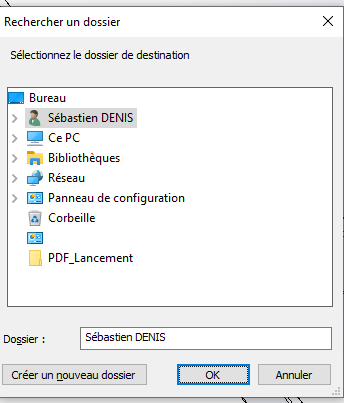
@a_eriaud I just looked at your solution, I had done the same thing but I hate this window (Browse for folder) you can't find the favorites and like on networks to save with multiple folders, it's long and annoying to get the right path. On the other hand, it's functional but impractical.
And here in Quimperlé 30° in the office when I arrived at 6 a.m. this morning. After opening the windows it went back down to 28°. Fortunately, the time shifted to 2:45 p.m., the day is over, but it's going to be complicated today. (Air conditioning in installation, can't wait for it to be finished...)
Admittedly, the navigation is not fluid in the folders with this window. But since I always have a Windows file explorer open on my working folder, I do a vulgar copy/paste of the explorer's path into the " folder " box of the window.
The advantage of the solution via Excel (besides its stability) is that it makes it easy to set a pre-selected location for opening the Windows Explorer window. (InitialFileName) which is very convenient.
See you noonnnn!! I'll have to modify a good part of my macros (Sniff!) ... a chance finally that @sbadenis wiped the plasters before me...
The problem is that we use codes that are starting to date (for my part, I must have been using a similar code for more than 6 years). It's like for FileSystemObject, abandonment coming from Microsoft, for now it's just logged in to the Windows event viewer.
Argh !! Already I only update the Solidworks API functions when they don't work anymore (obsolescence or abandonment) and if I have to deal with Windows / and Excel it becomes complicated.
On the other hand, the Excel solution showed me this:
I already had another excel window open which may explain the problem. The problem appeared after opening the excel window for choosing the folder after 5-10s max. I chose my folder, clicked on retry and here I go again. It did this to me on 3-4 tries and after closing Excel file + solidworks no more worries
Hello, I'll come back to this subject a little late but it's never too late to do the right ^^. The problem is that VBA offers fewer options than C# with .Net In C# it's very simple:
 if (saveFileDialog1.ShowDialog() == DialogResult.OK)
{
       swDoc.SaveAs(saveFileDialog1.FileName);
 }
But if you want to stay in VBA, here's a little bit of code that should fit your needs
Dim swApp As Object
Sub main()
Dim filePath As String
    filePath = ShowNetSaveFileDialog()

    If filePath <> "" Then
        ' Sauvegarde SolidWorks ici
        MsgBox "Fichier choisi : " & filePath
    End If
Set swApp = Application.SldWorks
End Sub

Function ShowNetSaveFileDialog() As String
    Dim psScript As String
    ' Script PowerShell avec du code C# incorporé
    psScript = "Add-Type -AssemblyName System.Windows.Forms; " & _
               "$dialog = New-Object System.Windows.Forms.SaveFileDialog; " & _
               "$dialog.Filter = 'Fichiers SolidWorks (*.sldprt)|*.sldprt'; " & _
               "if ($dialog.ShowDialog() -eq [System.Windows.Forms.DialogResult]::OK) { $dialog.FileName }"

    ' Exécution via WScript.Shell
    Dim wsh As Object
    Set wsh = CreateObject("WScript.Shell")

    Dim exec As Object
    Set exec = wsh.exec("powershell -Command """ & psScript & """")

    ShowNetSaveFileDialog = Trim(exec.StdOut.ReadAll())
End Function
I just tested the code and I have 2 amazing behaviors. The 1st PowerShell window opens between SW and the SW Explorer window. I solved it by replacing:
Set exec = wsh.exec("powershell -Command """ & psScript & """")
Which is more pleasant but does not change the way it works.
On the other hand, if I create a part (name part1 by default when creating) and I launch the macro and save as D:\Test.sldprt) at the end of the macro part 1 is still present and in the D I find a copy of part 1. So for me the macro does a save copy as or instead of save as.
Any idea of why?
Otherwise using PowerShell also seems a good idea to me (Currently I'm still with the Excel method)
I tested it as it is (copy-paste of your code) and very slightly modified and the behavior is the same in both cases it makes me a copy under and keeps the original piece open and not saved. For the test new part (named for me Part1) Launch the macro and save as D:\Test.sldprt. The macro returns the name of the new part in the Msgbox. But room 1 remains the open room and not saved. (as when a saved copies as.
Dim swApp As Object
Sub main()
Dim filePath As String
    filePath = ShowNetSaveFileDialog()

    If filePath <> "" Then
        ' Sauvegarde SolidWorks ici
        MsgBox "Fichier choisi : " & filePath
    End If
Set swApp = Application.SldWorks
End Sub

Function ShowNetSaveFileDialog() As String
    Dim psScript As String
    ' Script PowerShell avec du code C# incorporé
    psScript = "Add-Type -AssemblyName System.Windows.Forms; " & _
               "$dialog = New-Object System.Windows.Forms.SaveFileDialog; " & _
               "$dialog.Filter = 'Fichiers SolidWorks (*.sldprt)|*.sldprt'; " & _
               "if ($dialog.ShowDialog() -eq [System.Windows.Forms.DialogResult]::OK) { $dialog.FileName }"

    ' Exécution via WScript.Shell
    Dim wsh As Object
    Set wsh = CreateObject("WScript.Shell")

    Dim exec As Object
    'Set exec = wsh.exec("powershell -Command """ & psScript & """")
    Set exec = wsh.exec("powershell.exe -NoProfile -NonInteractive -WindowStyle Hidden -Command """ & psScript & """")

    ShowNetSaveFileDialog = Trim(exec.StdOut.ReadAll())
End Function


 (Sniff!)
  ... a chance finally