Ha ok  The snippet of code I gave is just an example to have the window to choose the path, but at no time does it save you have to adapt it and put a SaveAs3
1 Like
Ok I understand better by revnche this window displays save and saves a copy to the indicated location...
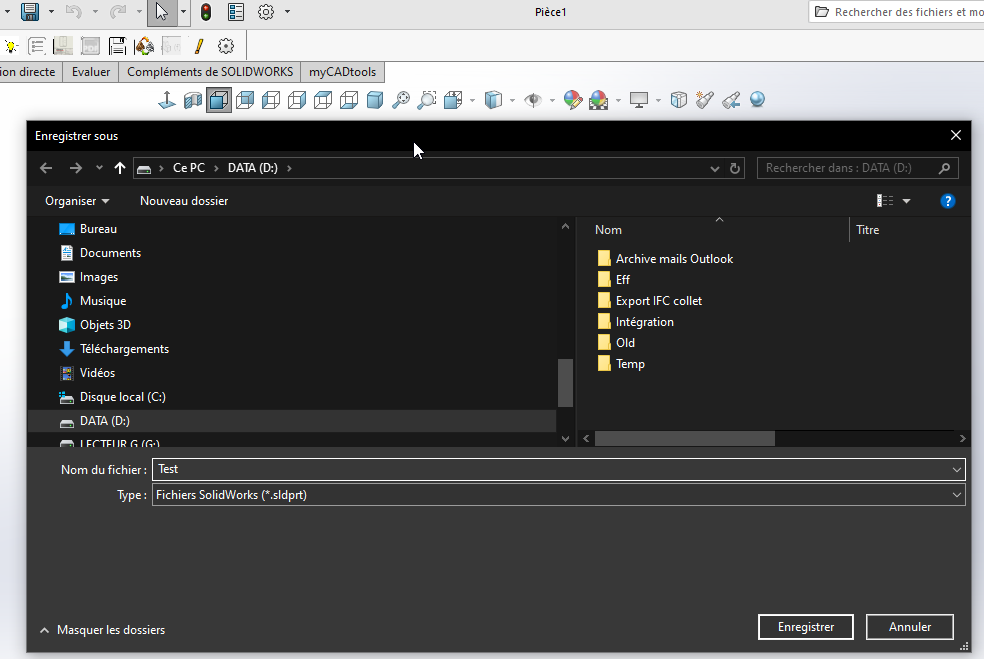
On the other hand, if you escape, the window goes into the background and it's impossible to find this window, so SW crashes forced.
I think I'm going to keep the excel window which works very well.
And if an sw dev passes by the vba feature could also be useful!
I can't leave you with an Excel window, I wouldn't sleep tonight
Here is the full code to save. I tested it works at home
Option Explicit

' ==============================================================================
' DÉCLARATIONS API WINDOWS
' ==============================================================================
#If VBA7 Then
    Private Declare PtrSafe Function GetSaveFileName Lib "comdlg32.dll" Alias "GetSaveFileNameA" (pOpenfilename As OPENFILENAME) As Long
#Else
    Private Declare Function GetSaveFileName Lib "comdlg32.dll" Alias "GetSaveFileNameA" (pOpenfilename As OPENFILENAME) As Long
#End If

Private Type OPENFILENAME
    lStructSize As Long
    hwndOwner As LongPtr
    hInstance As LongPtr
    lpstrFilter As String
    lpstrCustomFilter As String
    nMaxCustFilter As Long
    nFilterIndex As Long
    lpstrFile As String
    nMaxFile As Long
    lpstrFileTitle As String
    nMaxFileTitle As Long
    lpstrInitialDir As String
    lpstrTitle As String
    flags As Long
    nFileOffset As Integer
    nFileExtension As Integer
    lpstrDefExt As String
    lCustData As LongPtr
    lpfnHook As LongPtr
    lpTemplateName As String
End Type


' ==============================================================================
' PROCÉDURE MAIN
' ==============================================================================
Sub main()
    Dim swApp As SldWorks.SldWorks
    Dim swDoc As SldWorks.ModelDoc2
    Dim swModelExt As SldWorks.ModelDocExtension
    Dim savePath As String
    Dim lErrors As Long
    Dim lWarnings As Long
    Dim boolStatus As Boolean

    ' 1. Connexion à SolidWorks
    Set swApp = Application.SldWorks
    Set swDoc = swApp.ActiveDoc

    If swDoc Is Nothing Then
        MsgBox "Aucun document ouvert dans SolidWorks.", vbExclamation
        Exit Sub
    End If

    ' 2. Boîte de dialogue pour récupérer le chemin de destination
    savePath = ShowWin32SaveFileDialog("Pièce SolidWorks (*.sldprt)" & vbNullChar & "*.sldprt" & vbNullChar, "sldprt")

    ' Annulation / Echap
    If savePath = "" Then Exit Sub

    ' S'assurer de l'extension .sldprt
    If LCase(Right(savePath, 7)) <> ".sldprt" Then
        savePath = savePath & ".sldprt"
    End If

    ' 3. Récupération de l'extension du document
    Set swModelExt = swDoc.Extension

    ' 4. Utilisation de IModelDocExtension::SaveAs
    ' Signature : SaveAs(Name, Version, Options, ExportData, Errors, Warnings)
    boolStatus = swModelExt.SaveAs(savePath, _
                                  swSaveAsCurrentVersion, _
                                  swSaveAsOptions_Silent, _
                                  Nothing, _
                                  lErrors, _
                                  lWarnings)

    ' 5. Résultat
    If boolStatus Then
        MsgBox "Pièce enregistrée avec succès :" & vbCrLf & savePath, vbInformation
    Else
        MsgBox "Échec de l'enregistrement." & vbCrLf & _
               "Code d'erreur SOLIDWORKS API : " & lErrors & vbCrLf & _
               "Code d'avertissement : " & lWarnings, vbCritical
    End If
End Sub


' ==============================================================================
' BOÎTE DE DIALOGUE WINDOWS NATIVE
' ==============================================================================
Function ShowWin32SaveFileDialog(ByVal filter As String, Optional ByVal defaultExt As String = "") As String
    Dim ofn As OPENFILENAME
    Dim result As Long

    ofn.lStructSize = LenB(ofn)
    ofn.lpstrFilter = filter
    ofn.lpstrFile = Space$(254)
    ofn.nMaxFile = 255
    ofn.lpstrFileTitle = Space$(254)
    ofn.nMaxFileTitle = 255
    ofn.lpstrTitle = "Enregistrer la pièce sous..."
    ofn.flags = &H2 Or &H4 ' OFN_HIDEREADONLY Or OFN_PATHMUSTEXIST
    ofn.lpstrDefExt = defaultExt

    result = GetSaveFileName(ofn)

    If result <> 0 Then
        ShowWin32SaveFileDialog = Trim$(Replace(ofn.lpstrFile, vbNullChar, ""))
    Else
        ShowWin32SaveFileDialog = ""
    End If
End Function
1 Like
Thanks for sharing, it works great.
I also discover openfilename & ShowWin32SaveFileDialog (which was partly in the @Maclane link on Codestack, but obviously, I didn't understand anything about this function!
On the other hand, I don't have time to go back to the original macro today for modification, I hope it won't disturb your night too much!
And thank you for the discovery!
OPENFILENAME is not native to VBA, this type was created in the code through Private Type OPENFILENAME
1 Like