Ha, ok  , fragment kodu, który podałem, to tylko przykład, żeby mieć okno na wybór ścieżki, ale nigdy nie zapisuje, trzeba go dostosować i dodać SaveAs3
1 polubienie
Ok, lepiej rozumiem, bo to okno pokazuje zapisz i zapis kopii w wskazanej lokalizacji...
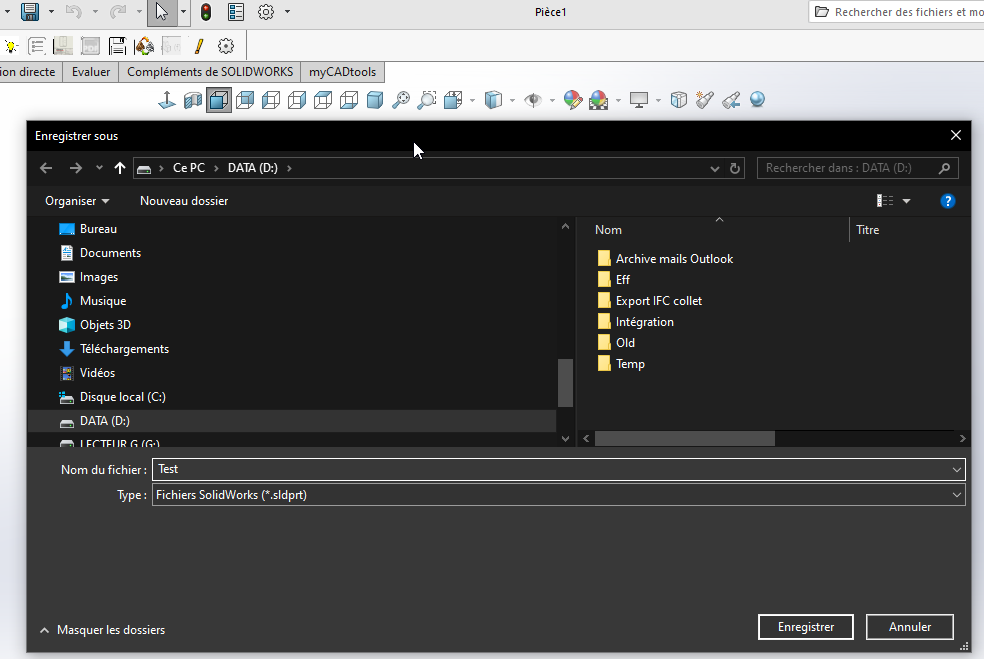
Z drugiej strony, jeśli uciekasz, okno przechodzi w tło i nie da się go znaleźć, więc SW wymusza awarię.
Myślę, że zostawię okno Excel, które działa bardzo dobrze.
A jeśli deweloper oprogramowania przejdzie obok projektu, funkcja VBA też może się przydać!
Nie mogę zostawić cię z oknem Excel, dziś bym nie spał
Oto pełny kod do zapisu. Testowałem, czy działa w domu
Option Explicit

' ==============================================================================
' DÉCLARATIONS API WINDOWS
' ==============================================================================
#If VBA7 Then
    Private Declare PtrSafe Function GetSaveFileName Lib "comdlg32.dll" Alias "GetSaveFileNameA" (pOpenfilename As OPENFILENAME) As Long
#Else
    Private Declare Function GetSaveFileName Lib "comdlg32.dll" Alias "GetSaveFileNameA" (pOpenfilename As OPENFILENAME) As Long
#End If

Private Type OPENFILENAME
    lStructSize As Long
    hwndOwner As LongPtr
    hInstance As LongPtr
    lpstrFilter As String
    lpstrCustomFilter As String
    nMaxCustFilter As Long
    nFilterIndex As Long
    lpstrFile As String
    nMaxFile As Long
    lpstrFileTitle As String
    nMaxFileTitle As Long
    lpstrInitialDir As String
    lpstrTitle As String
    flags As Long
    nFileOffset As Integer
    nFileExtension As Integer
    lpstrDefExt As String
    lCustData As LongPtr
    lpfnHook As LongPtr
    lpTemplateName As String
End Type


' ==============================================================================
' PROCÉDURE MAIN
' ==============================================================================
Sub main()
    Dim swApp As SldWorks.SldWorks
    Dim swDoc As SldWorks.ModelDoc2
    Dim swModelExt As SldWorks.ModelDocExtension
    Dim savePath As String
    Dim lErrors As Long
    Dim lWarnings As Long
    Dim boolStatus As Boolean

    ' 1. Connexion à SolidWorks
    Set swApp = Application.SldWorks
    Set swDoc = swApp.ActiveDoc

    If swDoc Is Nothing Then
        MsgBox "Aucun document ouvert dans SolidWorks.", vbExclamation
        Exit Sub
    End If

    ' 2. Boîte de dialogue pour récupérer le chemin de destination
    savePath = ShowWin32SaveFileDialog("Pièce SolidWorks (*.sldprt)" & vbNullChar & "*.sldprt" & vbNullChar, "sldprt")

    ' Annulation / Echap
    If savePath = "" Then Exit Sub

    ' S'assurer de l'extension .sldprt
    If LCase(Right(savePath, 7)) <> ".sldprt" Then
        savePath = savePath & ".sldprt"
    End If

    ' 3. Récupération de l'extension du document
    Set swModelExt = swDoc.Extension

    ' 4. Utilisation de IModelDocExtension::SaveAs
    ' Signature : SaveAs(Name, Version, Options, ExportData, Errors, Warnings)
    boolStatus = swModelExt.SaveAs(savePath, _
                                  swSaveAsCurrentVersion, _
                                  swSaveAsOptions_Silent, _
                                  Nothing, _
                                  lErrors, _
                                  lWarnings)

    ' 5. Résultat
    If boolStatus Then
        MsgBox "Pièce enregistrée avec succès :" & vbCrLf & savePath, vbInformation
    Else
        MsgBox "Échec de l'enregistrement." & vbCrLf & _
               "Code d'erreur SOLIDWORKS API : " & lErrors & vbCrLf & _
               "Code d'avertissement : " & lWarnings, vbCritical
    End If
End Sub


' ==============================================================================
' BOÎTE DE DIALOGUE WINDOWS NATIVE
' ==============================================================================
Function ShowWin32SaveFileDialog(ByVal filter As String, Optional ByVal defaultExt As String = "") As String
    Dim ofn As OPENFILENAME
    Dim result As Long

    ofn.lStructSize = LenB(ofn)
    ofn.lpstrFilter = filter
    ofn.lpstrFile = Space$(254)
    ofn.nMaxFile = 255
    ofn.lpstrFileTitle = Space$(254)
    ofn.nMaxFileTitle = 255
    ofn.lpstrTitle = "Enregistrer la pièce sous..."
    ofn.flags = &H2 Or &H4 ' OFN_HIDEREADONLY Or OFN_PATHMUSTEXIST
    ofn.lpstrDefExt = defaultExt

    result = GetSaveFileName(ofn)

    If result <> 0 Then
        ShowWin32SaveFileDialog = Trim$(Replace(ofn.lpstrFile, vbNullChar, ""))
    Else
        ShowWin32SaveFileDialog = ""
    End If
End Function
1 polubienie
Dzięki za podzielenie się, działa świetnie.
Odkryłem też openfilename i ShowWin32SaveFileDialog (który częściowo był w linku @Maclane na Codestack, ale oczywiście nic nie zrozumiałem z tej funkcji!
Z drugiej strony, dziś nie mam czasu, żeby wracać do oryginalnego makro i poprawiać je, mam nadzieję, że nie zakłóci to zbytnio twojego wieczoru!
I dziękuję za odkrycie!
OPENFILENAME nie jest natywne dla VBA, ten typ został utworzony w kodzie za pomocą Private Type OPENFILENAME
1 polubienie