Ha ok  Le bout de code que j’ai donné c’est juste un exemple pour avoir la fenêtre de choix du chemin, mais à aucun moment il ne sauvegarde il faut l’adapter et mettre un SaveAs3
1 « J'aime »
Ok je comprends mieux en revnche cette fenêtre affiche enregistrer et enregistre bien une copie vers l’emplacement indiqué…
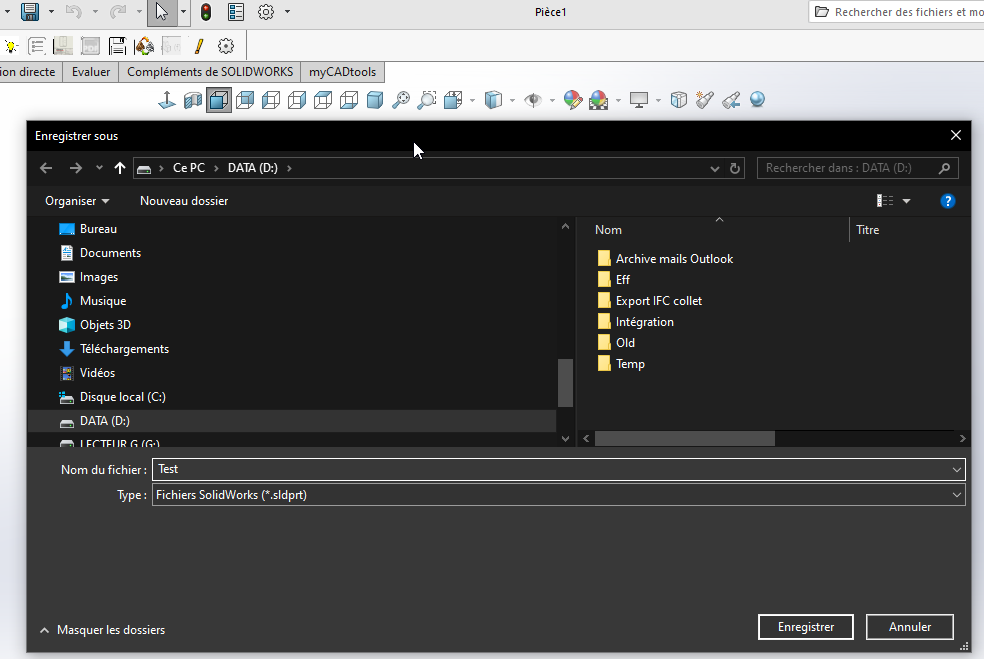
Par contre si on fait échappe la fenêtre passe en arrière plan et impossible de retrouver cette fenêtre donc plantage de SW forcé.
Je pense que je vais conservé la fenêtre excel qui fonctionne très bien.
Et si un dev de sw passe par ici la fonctionnalité en vba pourrait aussi être utile!
Je ne peux pas vous laisser avec une fenêtre Excel j’en dormirais rien cette nuit
Voici le code complet pour enregistrer. J’ai testé ça marche chez moi
Option Explicit

' ==============================================================================
' DÉCLARATIONS API WINDOWS
' ==============================================================================
#If VBA7 Then
    Private Declare PtrSafe Function GetSaveFileName Lib "comdlg32.dll" Alias "GetSaveFileNameA" (pOpenfilename As OPENFILENAME) As Long
#Else
    Private Declare Function GetSaveFileName Lib "comdlg32.dll" Alias "GetSaveFileNameA" (pOpenfilename As OPENFILENAME) As Long
#End If

Private Type OPENFILENAME
    lStructSize As Long
    hwndOwner As LongPtr
    hInstance As LongPtr
    lpstrFilter As String
    lpstrCustomFilter As String
    nMaxCustFilter As Long
    nFilterIndex As Long
    lpstrFile As String
    nMaxFile As Long
    lpstrFileTitle As String
    nMaxFileTitle As Long
    lpstrInitialDir As String
    lpstrTitle As String
    flags As Long
    nFileOffset As Integer
    nFileExtension As Integer
    lpstrDefExt As String
    lCustData As LongPtr
    lpfnHook As LongPtr
    lpTemplateName As String
End Type


' ==============================================================================
' PROCÉDURE MAIN
' ==============================================================================
Sub main()
    Dim swApp As SldWorks.SldWorks
    Dim swDoc As SldWorks.ModelDoc2
    Dim swModelExt As SldWorks.ModelDocExtension
    Dim savePath As String
    Dim lErrors As Long
    Dim lWarnings As Long
    Dim boolStatus As Boolean

    ' 1. Connexion à SolidWorks
    Set swApp = Application.SldWorks
    Set swDoc = swApp.ActiveDoc

    If swDoc Is Nothing Then
        MsgBox "Aucun document ouvert dans SolidWorks.", vbExclamation
        Exit Sub
    End If

    ' 2. Boîte de dialogue pour récupérer le chemin de destination
    savePath = ShowWin32SaveFileDialog("Pièce SolidWorks (*.sldprt)" & vbNullChar & "*.sldprt" & vbNullChar, "sldprt")

    ' Annulation / Echap
    If savePath = "" Then Exit Sub

    ' S'assurer de l'extension .sldprt
    If LCase(Right(savePath, 7)) <> ".sldprt" Then
        savePath = savePath & ".sldprt"
    End If

    ' 3. Récupération de l'extension du document
    Set swModelExt = swDoc.Extension

    ' 4. Utilisation de IModelDocExtension::SaveAs
    ' Signature : SaveAs(Name, Version, Options, ExportData, Errors, Warnings)
    boolStatus = swModelExt.SaveAs(savePath, _
                                  swSaveAsCurrentVersion, _
                                  swSaveAsOptions_Silent, _
                                  Nothing, _
                                  lErrors, _
                                  lWarnings)

    ' 5. Résultat
    If boolStatus Then
        MsgBox "Pièce enregistrée avec succès :" & vbCrLf & savePath, vbInformation
    Else
        MsgBox "Échec de l'enregistrement." & vbCrLf & _
               "Code d'erreur SOLIDWORKS API : " & lErrors & vbCrLf & _
               "Code d'avertissement : " & lWarnings, vbCritical
    End If
End Sub


' ==============================================================================
' BOÎTE DE DIALOGUE WINDOWS NATIVE
' ==============================================================================
Function ShowWin32SaveFileDialog(ByVal filter As String, Optional ByVal defaultExt As String = "") As String
    Dim ofn As OPENFILENAME
    Dim result As Long

    ofn.lStructSize = LenB(ofn)
    ofn.lpstrFilter = filter
    ofn.lpstrFile = Space$(254)
    ofn.nMaxFile = 255
    ofn.lpstrFileTitle = Space$(254)
    ofn.nMaxFileTitle = 255
    ofn.lpstrTitle = "Enregistrer la pièce sous..."
    ofn.flags = &H2 Or &H4 ' OFN_HIDEREADONLY Or OFN_PATHMUSTEXIST
    ofn.lpstrDefExt = defaultExt

    result = GetSaveFileName(ofn)

    If result <> 0 Then
        ShowWin32SaveFileDialog = Trim$(Replace(ofn.lpstrFile, vbNullChar, ""))
    Else
        ShowWin32SaveFileDialog = ""
    End If
End Function
1 « J'aime »
Merci pour le partage cela fonctionne très bien.
Je découvre également openfilename & ShowWin32SaveFileDialog (qui était pourtant en partie dans le lien de @Maclane sur Codestack , mais visiblement, je n’avais rien compris à cette fonction!
Par contre pas le temps de me remettre dans la macro d’origine aujourd’hui pour modification, j’espère que cela ne troublera pas trop ta nuit!
Et merci pour la découverte!
OPENFILENAME n’est pas natif du VBA, ce type a été créé dans le code grâce à Private Type OPENFILENAME
1 « J'aime »