Hello,
Does anyone use FindDocuments to rename Part or Assembly files?
A priori possible before from ProjectExplorer but today it automatically refers to FindDocuments.
I don't understand the logic of using it to look up references.
Thank you
Hello;
Visiativ no longer offers projectExplorer and will abandon it (and I regret it) and they force us to go through FindDocument to rename files, which is incredibly less user-friendly.
FindDocument is however very good for searching by properties on its database, I don't understand its use to rename documents either.
Generally speaking, when you need to rename a document it is because you have just made a copy of it, so they are not yet saved in the FindDocument database => impossible to rename it in this case... you have to rescan all the files (more than 300GB in my case so more than 6 hours of scanning) to intervene on only a few files...
[a few tries later]
A Hope still remains, in search ProjectExplorer (or " explorer " in the Mycadtools hub (The horrible purple button in the system tray or in the taskbar), it is still possible to run it (I am in version 2026-sp2-2) and I managed to rename some files...
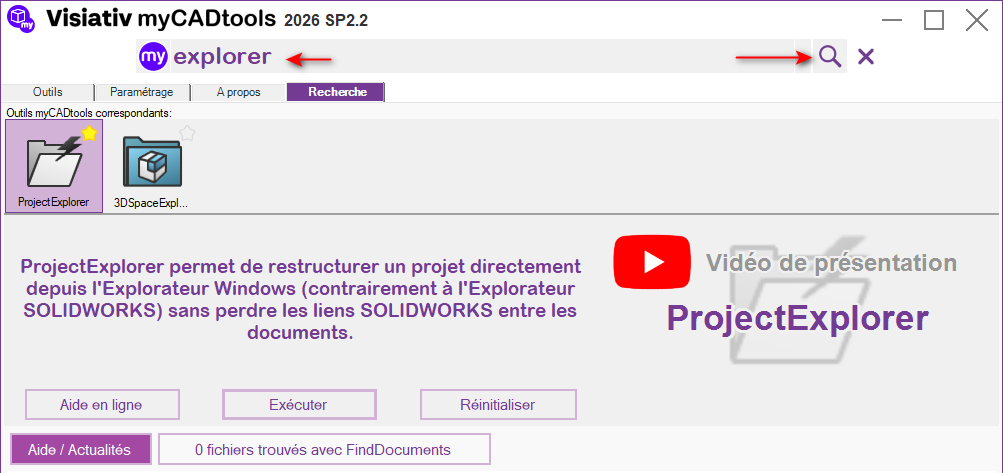
Nota2, I also don't understand the new logic of Visiativ not installing all its tools directly... probably because of the installation time... but it's a pain.
Yes I did find and launch ProjectExplorer but anyway there is no longer the possibility to right-click and rename with ProjectExplorer, only with FindDocument.
Then it opens the utility and there I don't know how to rename my part file 
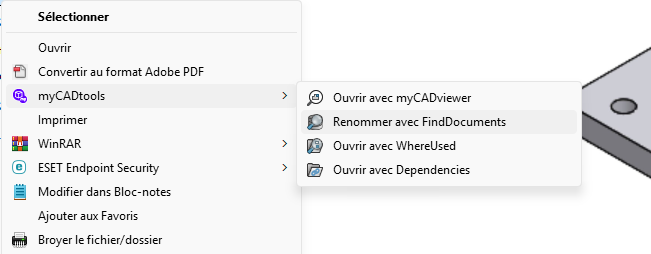
Here's what was possible before.
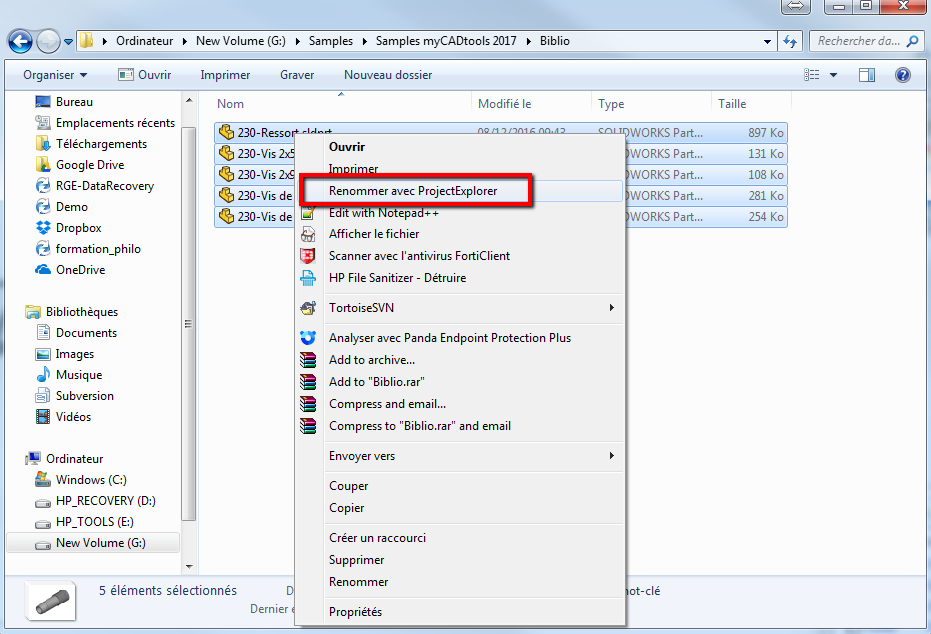
Image taken from the MyCadTools help
No, you shouldn't try to launch with the right click but by the pseudo shortcuts of the taskbar (or in the system tray - the little up arrow next to the clock).
As much as for me, the right click does not offer " rename with projectExplorer " anymore but it can be feigned with batch renaming software such as " AntRenammer ".
Launches project explorer and defines the renaming rules.
Instead of right-clicking on the files to be renamed, use renaming software
(https://www.antp.be/software/renamer)
with this method, the links between the Solidworks files are not broken, you just have to be careful not to take too many files at the same time and try to respect the order:
First we rename the parts (and the drawings)
and only then the assemblies (and drawings)
You just have to make sure that ProjectExplorer is open during the renaming.
note: AntRenammer is an old software but it is still the most efficient I know.
Thanks for the tip but I wouldn't want to install any other software. Especially since MyCadTools is supposed to have tools to do it.
For my part I use Project Explorer, find document doesn't work for that
Too bad they abandoned this program
The problem is that you can no longer use it to rename files.
Maybe @fmarchand (Visiativ) will be able to tell you how to do this rename simply with the new version, and at worst see if you shouldn't restore it in a future version?
1 Like
It is still possible to use it to rename files in losing relationships, but you have to do it manually (renaming) with ProjectExplorer launched and executed on the area to be modified (it's the batch processing that no longer works).
Otherwise, but this is not the most " practical ", you can use ProjectManager to rename a set of files (old version, because it is more " userfriendly " than the new one).
There are also equivalent software such as: BIBOTAC
but since you don't want to install new software...
1 Like
Thank you for the suggestions. I'm looking into this with the support but I think the approach is as follows: rename the files and then find the links with FindDocument.
At home, rebuilding links really doesn't work well (MycadTools 2026_sp2.2)
But if you're going to use FindDocument, you might as well use it to rename your documents, rather than trying to rebuild the links afterwards...
(Have you tried with the " Depedencies " tool for link reconstruction?)
No, not yet