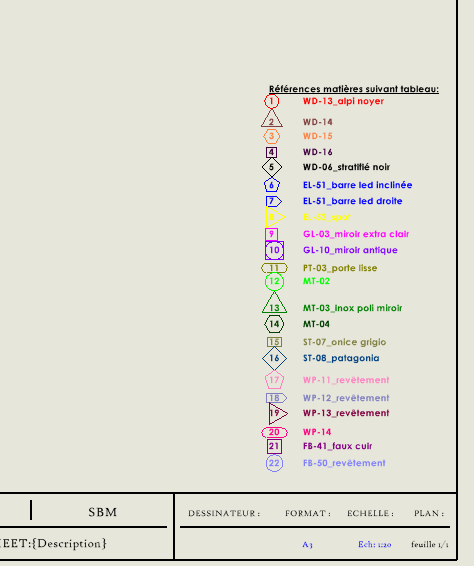
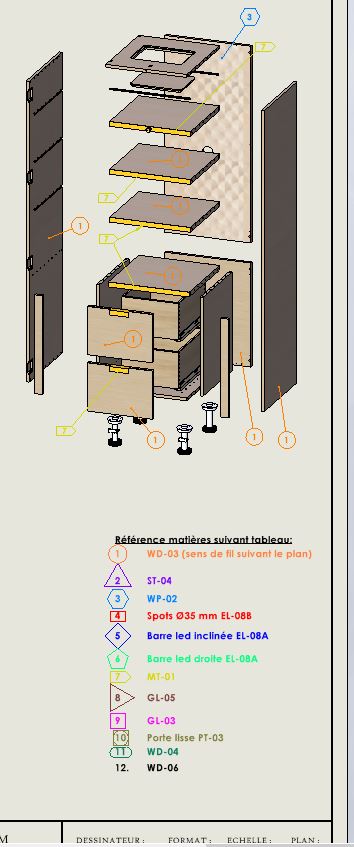
I'll try to explain my problem : I created a Template Drawing Sheet for a client. On this sheet I added a legend by creating annotations with numbers.
Would it be possible to link this annotation to a table or something else so that it can be modified at any time? (FYI we have Mycadtools)
Because I had the problem a few months ago. I created several drawings that I sent to the client and he asked me to modify the caption. I had to manually modify all the drawing files.
However, I don't want to create this caption in the Background.
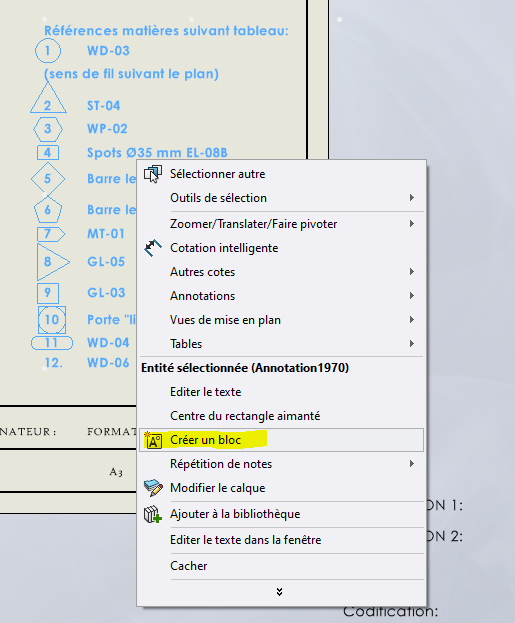
It is possible to create a sketch frame with the callout annotations and save it. Modifying the saved block will affect all clips in which it has been inserted with the link to file option.
The negative point is that the reference library is not usable with the block. A workaround would be to insert the block twice (1 in the empty general annotation view, the second in its own empty view), dissolve the second to redefine a reference library. But we find the initial problem with the need to take up on each plane the content from the dissolved block.
A solution that is as bad as possible (but that should work): create a room. Put your sketch (visible) in it. Put a view of this part in all your drawings with the sketch visible. If you change the room, all the drawings will follow. All you have to do is start a print batch.
NB: If you have a problem with the sketch, you do a sheet metal engraving with the sketch (you will need a font adapted to the engraving).
What you're describing is a classic problem with handling captions in drawings. One solution is to create an external table or annotative block linked to a data source (Excel table or CSV file for example) that you import into Mycadtools. This way, any changes in the source automatically affect your annotations.
Another option is to use dynamic attributes in frames for your annotations. Each number can be an attribute linked to text that can be edited from the attribute manager. This way, you don't change each drawing manually, only the attribute values.
Finally, if Mycadtools offers links between annotations and internal tables, it is even more practical to centralize the modifications without touching the basemap.
Thank you for all your feedback. I've tried a little bit of everything, the problem is that I don't know enough about Mycadtools. In addition, my timing is very tight, I have to move as quickly as possible.
I resigned myself to creating an annotation in my background with all my captions. So I can keep my tracking library with the numbers:
If I have a change, I would have to open up my drawing and update my basemap.
Thank you all for taking the time to answer my problem. When I have more time, I will delve into all of the information you mentioned.
 :
:
 .
.