Hello, Not having a lot of knowledge in macro and VBA code, I am looking to export the current page in PDF and DXF with the following file name: File name Setting plan_Indice page_Nom révision_Numéro of the day's page_Date.
After multiple searches and attempts to write a macro, I arrived at a result that does not satisfy me, I cannot retrieve all the desired data: Number and name of the page. Can anyone help me?
Attached is my code:
Option Explicit
Dim swApp               As SldWorks.SldWorks
Dim swModel             As SldWorks.ModelDoc2
Dim swDrawModel         As SldWorks.ModelDoc2
Dim swDraw              As SldWorks.DrawingDoc
Dim swCustProp          As CustomPropertyManager
Dim swView              As SldWorks.View
Dim swExportPDFData     As SldWorks.ExportPdfData
Dim sFileName           As String
Dim sPathname           As String
Dim Revision            As String
Dim resolvedRevision    As String
Dim sSheetName          As String
Dim sSheetNumber        As String
Dim dateNow             As String
Dim nErrors             As Long
Dim nWarnings           As Long

Sub main()
    Set swApp = Application.SldWorks
    Set swDrawModel = swApp.ActiveDoc
    Set swDraw = swDrawModel

        ' Vérifier si une mise en plan est ouverte
        If swDrawModel Is Nothing Then
                MsgBox "Il n'y a pas de document de mise en plan ouvert."
                Exit Sub
        End If

        If swDrawModel.GetType <> swDocDRAWING Then
                MsgBox "Ouvrez d'abord une mise en plan, puis réessayez "
                Exit Sub
        End If

        If swDrawModel.GetPathName = "" Then
                MsgBox "Enregistrez d'abord le dessin, puis réessayez !"
                Exit Sub
        End If

    Set swView = swDraw.GetFirstView

    Set swView = swView.GetNextView

        ' Déterminer s'il y a une vue existante
        If swView Is Nothing Then
                MsgBox "Insérez d'abord une vue, puis réessayez !"
                Exit Sub
        End If

        ' On récupère le nom du fichier de la mise en plan
    sPathname = Replace(swDraw.GetPathName, ".SLDDRW", "")     ' Récupère le nom du fichier et enlève l'extension .SLDDRW

        ' On récupère les valeurs qui nous intéresse dans les propriétés personnalisées du plan
    Set swCustProp = swDraw.Extension.CustomPropertyManager("")
    swCustProp.Get2 "Révision", Revision, resolvedRevision      ' Récupère l'indice de Révision du fichier Mise en Plan

        ' On récupère la date du jour et on la met dans un format pouvant se mettre dans le nom d'un fichier
    dateNow = Replace(Date, "/", ".")

        ' On récupère les données de la feuille active
    'sSheetName = swDraw.ActivateSheet.GetSheetNames    ' Récupère le nom de la feuille active
    'sSheetNumber = swDraw.GetCurrentSheet              ' Récupère le numéro de la feuille active

        'Obtenir et définir le nom du fichier
    sFileName = sPathname & " - " & resolvedRevision & " - " & dateNow      'Code fonctionnel mais sans le numéro et le nom de la page
    'sFileName = sPathname & " - " & resolvedRevision & " - " & sSheetNumber & " - " & sSheetName  & " - " & dateNow        'Code non-fonctionnel voulu

    Set swExportPDFData = swApp.GetExportFileData(1)

    swExportPDFData.SetSheets swExportData_ExportCurrentSheet, ""

    swExportPDFData.ViewPdfAfterSaving = False

    swApp.SetUserPreferenceIntegerValue swUserPreferenceIntegerValue_e.swDxfMultiSheetOption, swDxfActiveSheetOnly

        'Enregistrer au format DXF

    swDraw.Extension.SaveAs sFileName & ".DXF", 0, 0, Nothing, nErrors, nWarnings

        'Enregistrer au format PDF

    swDraw.Extension.SaveAs sFileName & ".PDF", 0, 0, swExportPDFData, nErrors, nWarnings

    End Sub
vSheetName = swDraw.GetSheetNames
'On boucle sur les feuilles
For i = 0 To UBound(vSheetName)
        sheetName = vSheetName(i)
        'Debug.Print "Nom de feuille:" & sheetName

Next i
To change the name of the sheet:
swDraw.GetCurrentSheet.SetName "nom de la feuille"
For the N° either the i (increment), or you get the N° in the name of the sheet (if necessary)
I thought this conversation was telling me something, it's the Macro DXF export suite sheet by sheet - #23 by Cyril_f right? The previous proposals were not suitable? Apart from the Leaf Name, which is a new request, have you tried to modify your macro? That said, @sbadenis's proposals are quite relevant...
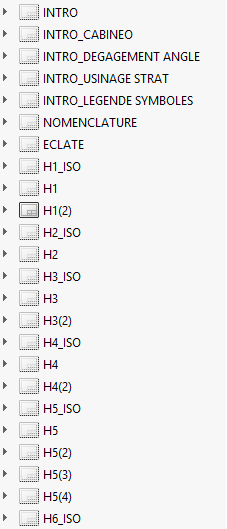
Hello, This is the continuation of this subject indeed. The difference is that here I want to extract the active sheet on the screen and not all the sheets of my drawing. The macro to extract all my sheet by sheet drawing works well, except that it's relatively long (but I realized that even without going through the macro, it takes as long, so the problem is not with the macro but certainly with the heaviness of my drawings) and that I can't put the sheet number at the very beginning of the name of the file, I can't understand why it doesn't work, but I'm happy with it. To come back to this subject for the active sheet I will test what you transmit to me. And attached is a screenshot of an example for the leaf names.
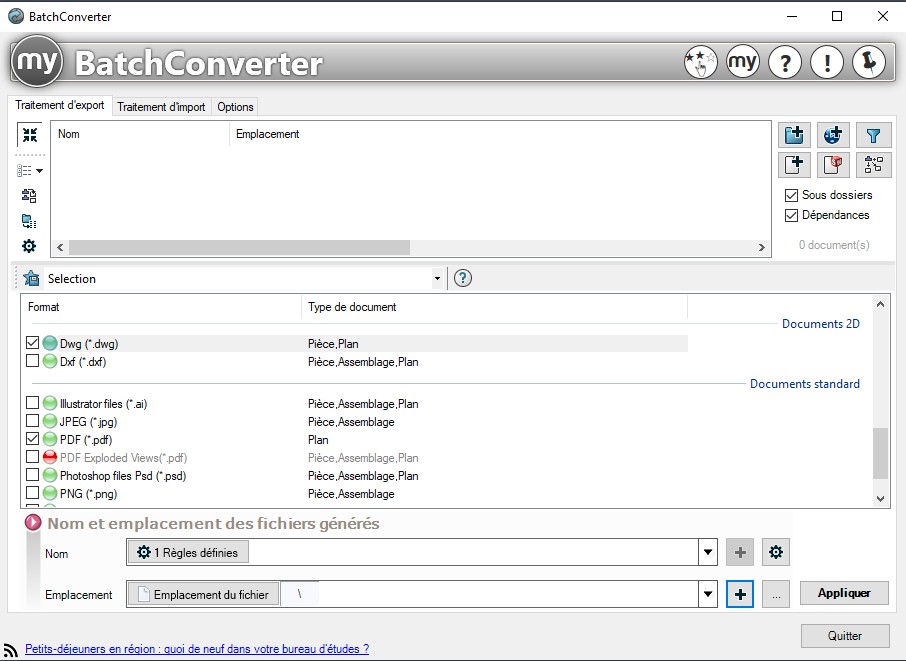
And to answer A_R, I know BatchConverter well because it was used in my previous company, but having changed companies with a very small structure, it is not at all on the agenda to invest in a license for myCad tools.
Thank you for your feedback and the time you devote to answering me in any case This forum is a great help to me
    vSheetName = swDraw.GetSheetNames           ' Récupère le nom de la feuille active
            'On boucle sur les feuilles
                For i = 0 To UBound(vSheetName)
                        sSheetName = vSheetName(i)
                Next i
This generates the name of the last page of my file and not the name of the current page: Here H6(3) while the active page was H1(2)
I tried to modify the code as such:
vSheetName = swDraw.GetSheetNames           ' Récupère le nom de la feuille active
            'On boucle sur les feuilles
                For i = 0 To UBound(vSheetName)
                        sSheetName = swDraw.ActivateSheet(vSheetName(i))
                Next i
This gives me the answer " True " in the filename instead of the page name:
And for the page number, it generates a number equal to the total number of pages in the document. So I understand that the " i " is considered the total number of pages.
How do I do this in the macro, so that the " i " corresponds to the current page and not to the total number of pages?
If this is too complex, I will change my habits and integrate the page number directly into the name of the page (but if for any reason, I have to delete or add a page, I will have to change the name of all the pages...)
With the help of claude.ai here is the functional code obtained:
Option Explicit
Dim swApp               As SldWorks.SldWorks
Dim swModel             As SldWorks.ModelDoc2
Dim swDrawModel         As SldWorks.ModelDoc2
Dim swDraw              As SldWorks.DrawingDoc
Dim swCustProp          As CustomPropertyManager
Dim swView              As SldWorks.View
Dim swExportPDFData     As SldWorks.ExportPdfData
Dim sFileName           As String
Dim sPathname           As String
Dim Revision            As String
Dim resolvedRevision    As String
Dim sSheetName          As String
Dim sSheetNumber        As String
Dim dateNow             As String
Dim nErrors             As Long
Dim nWarnings           As Long

Sub main()
    Set swApp = Application.SldWorks
    Set swDrawModel = swApp.ActiveDoc
    Set swDraw = swDrawModel

    ' Vérifier si une mise en plan est ouverte
    If swDrawModel Is Nothing Then
        MsgBox "Il n'y a pas de document de mise en plan ouvert."
        Exit Sub
    End If
    If swDrawModel.GetType <> swDocDRAWING Then
        MsgBox "Ouvrez d'abord une mise en plan, puis réessayez "
        Exit Sub
    End If
    If swDrawModel.GetPathName = "" Then
        MsgBox "Enregistrez d'abord le dessin, puis réessayez !"
        Exit Sub
    End If

    ' -------------------------------------------------------
    ' Récupération du nom de la feuille active
    ' -------------------------------------------------------
    Dim swSheet         As SldWorks.Sheet
    Dim vSheetNames     As Variant
    Dim i               As Integer

    Set swSheet = swDraw.GetCurrentSheet()
    sSheetName = swSheet.GetName()              ' Nom de la feuille active

    ' Récupération du numéro de la feuille active (index 1-based)
    vSheetNames = swDrawModel.GetSheetNames()   ' Tableau de tous les noms de feuilles
    sSheetNumber = "1"                          ' Valeur par défaut
    For i = 0 To UBound(vSheetNames)
        If vSheetNames(i) = sSheetName Then
            sSheetNumber = CStr(i + 1)          ' i=0 ? feuille n°1
            Exit For
        End If
    Next i

    Debug.Print "Feuille active : " & sSheetName & " (n°" & sSheetNumber & ")"
    ' -------------------------------------------------------

    ' On récupère le nom du fichier de la mise en plan
    sPathname = Replace(swDraw.GetPathName, ".SLDDRW", "")
    sPathname = Replace(sPathname, ".slddrw", "")   ' Sécurité casse minuscule

    ' On récupère les valeurs des propriétés personnalisées
    Set swCustProp = swDraw.Extension.CustomPropertyManager("")
    swCustProp.Get2 "Révision", Revision, resolvedRevision

    ' On récupère la date du jour formatée
    dateNow = Replace(Date, "/", ".")

    ' Construction du nom de fichier avec numéro et nom de feuille
    sFileName = sPathname & " - " & resolvedRevision & _
                " - F" & sSheetNumber & " - " & sSheetName & _
                " - " & dateNow

    ' Export PDF
    Set swExportPDFData = swApp.GetExportFileData(1)
    swExportPDFData.SetSheets swExportData_ExportCurrentSheet, ""
    swExportPDFData.ViewPdfAfterSaving = False

    ' Export DXF (feuille active uniquement)
    swApp.SetUserPreferenceIntegerValue swUserPreferenceIntegerValue_e.swDxfMultiSheetOption, swDxfActiveSheetOnly

    ' Enregistrer au format DXF
    swDraw.Extension.SaveAs sFileName & ".DXF", 0, 0, Nothing, nErrors, nWarnings

    ' Enregistrer au format PDF
    swDraw.Extension.SaveAs sFileName & ".PDF", 0, 0, swExportPDFData, nErrors, nWarnings

End Sub
'``

'**Les deux points clés du changement :**

'GetCurrentSheet()` retourne l'objet `Sheet` de la feuille active, dont on tire le nom via `.GetName()`.

'GetSheetNames()` retourne un tableau `Variant` de tous les noms de feuilles dans l'ordre. On boucle dessus pour trouver la position de la feuille active, en ajoutant 1 car le tableau est indexé à 0.

'Le nom de fichier généré aura la forme :
'``
'C:\...\MonDessin - RevA - F2 - Feuille2 - 23.02.2026.PDF
So thank you Claude, who I admit, I use more and more for this kind of modification made in a few seconds. Even if sometimes it bugs and in this case you have to know how to understand the code to help it correct correctly. But in this case code provides and works on the 1st try. FYI, your whole game with swView is useless.
Edit: for those who are interested in the query: Hello, I have this code in vba that I want to modify, I would like to recover the name of the sheet in the export name as well as the number of the sheet (active) knowing that the 1st sheet will be numbered 1 and then the initial code that I pasted.
 I thought this conversation was telling me something, it's the