Makro-Export DXF in neuen Ordner

Hallo,

Ich habe ein Makro, um meine DRAWING-Datei in mehrere DXF-Dateien mit separaten Tabellen zu exportieren (eine Datei pro Blatt). Dateien werden im Root-Ordner der Zeichnung gespeichert.
Ich würde gerne wissen, ob es einen Befehl gibt, um einen neuen Ordner zu erstellen (falls möglich durch die Wahl des Namens), in dem alle DXF-Blätter zum Zeitpunkt des Exports gespeichert werden können?
Wenn wir einen komprimierten Ordner erstellen können, nehme ich auch.

Vielen Dank
Manu

Hallo,
Alles ist machbar.
Ich persönlich benutze diesen Code, um im Windows Explorer zu navigieren:

Private Declare PtrSafe Function SHBrowseForFolder Lib "shell32.dll" _
Alias "SHBrowseForFolderA" (lpBrowseInfo As BrowseInfo) As Long

Private Declare PtrSafe Function SHGetPathFromIDList Lib "shell32.dll" _
(ByVal pidList As LongPtr, ByVal lpBuffer As String) As Long


Public Declare PtrSafe Function SendMessageA Lib "user32" _
(ByVal hWnd As LongPtr, ByVal wMsg As Long, _
ByVal wParam As LongPtr, lParam As Any) As LongPtr

Private Declare PtrSafe Sub CoTaskMemFree Lib "ole32.dll" (ByVal hMem As LongPtr)

Private Const BIF_RETURNONLYFSDIRS As Long = 1
Private Const CSIDL_DRIVES As Long = &H11
Private Const WM_USER As Long = &H400
Private Const MAX_PATH As Long = 260
'// message from browser
Private Const BFFM_INITIALIZED As Long = 1
Private Const BFFM_SELCHANGED As Long = 2
Private Const BFFM_VALIDATEFAILEDA As Long = 3 '// lParam:szPath ret:1(cont),0(EndDialog)
Private Const BFFM_VALIDATEFAILEDW As Long = 4 '// lParam:wzPath ret:1(cont),0(EndDialog)
Private Const BFFM_IUNKNOWN As Long = 5 '// provides IUnknown to client. lParam: IUnknown*
'// messages to browser
Private Const BFFM_SETSTATUSTEXTA As Long = WM_USER + 100
Private Const BFFM_ENABLEOK As Long = WM_USER + 101
Private Const BFFM_SETSELECTIONA As Long = WM_USER + 102
Private Const BFFM_SETSELECTIONW As Long = WM_USER + 103
Private Const BFFM_SETSTATUSTEXTW As Long = WM_USER + 104
Private Const BFFM_SETOKTEXT As Long = WM_USER + 105 '// Unicode only
Private Const BFFM_SETEXPANDED As Long = WM_USER + 106 '// Unicode only

Public Type BrowseInfo
hWndOwner As LongPtr
pIDLRoot As LongPtr
pszDisplayName As String
lpszTitle As String
ulFlags As Long
lpfnCallback As LongPtr
lParam As LongPtr
iImage As Long
End Type

'====== Folder Browser for 64 bit VBA 7 ========
Public Function FolderBrowse(ByVal sDialogTitle As String, ByVal sInitFolder As String) As String
Dim ReturnPath As String

Dim b(MAX_PATH) As Byte
Dim pItem As Long
Dim sFullPath As String
Dim bi As BrowseInfo
Dim ppidl As Long

sInitFolder = CorrectPath(sInitFolder)

' Note VBA windows and dialogs do not have an hWnd property.
bi.hWndOwner = 0 'Windows Main Screen handle.

' SHGetSpecialFolderLocation bi.hWndOwner, CSIDL_DRIVES, ppidl

bi.pIDLRoot = 0 'ppidl


bi.pszDisplayName = VarPtr(b(0))
bi.lpszTitle = sDialogTitle
bi.ulFlags = BIF_RETURNONLYFSDIRS
If FolderExists(sInitFolder) Then bi.lpfnCallback = PtrToFunction(AddressOf BFFCallback)
bi.lParam = StrPtr(sInitFolder)
pItem = SHBrowseForFolder(bi)

If pItem Then ' Succeeded
sFullPath = Space$(MAX_PATH)
If SHGetPathFromIDList(pItem, sFullPath) Then
ReturnPath = left$(sFullPath, InStr(sFullPath, vbNullChar) - 1) ' Strip nulls
CoTaskMemFree pItem
End If
End If

If ReturnPath <> "" Then
If right$(ReturnPath, 1) <> "\" Then
ReturnPath = ReturnPath & "\"
End If
End If

FolderBrowse = ReturnPath

End Function
' typedef int (CALLBACK* BFFCALLBACK)(HWND hwnd, UINT uMsg, LPARAM lParam, LPARAM lpData);
Private Function BFFCallback(ByVal hWnd As LongPtr, ByVal uMsg As LongPtr, ByVal lParam As LongPtr, ByVal sData As String) As LongPtr
If uMsg = BFFM_INITIALIZED Then
SendMessageA hWnd, BFFM_SETSELECTIONA, True, ByVal sData
End If
End Function
Private Function PtrToFunction(ByVal lFcnPtr As LongPtr) As LongPtr
PtrToFunction = lFcnPtr
End Function
Private Function CorrectPath(ByVal sPath As String) As String
If right$(sPath, 1) = "\" Then
If Len(sPath) > 3 Then sPath = left$(sPath, Len(sPath) - 1) ' Strip backslash from non-root
Else
If Len(sPath) = 2 Then sPath = sPath & "\" ' Append backslash to root
End If
CorrectPath = sPath
End Function

Public Function FolderExists(ByVal sFolderName As String) As Boolean
Dim att As Long
On Error Resume Next
att = GetAttr(sFolderName)
If Err.Number = 0 Then
FolderExists = True
Else
Err.Clear
FolderExists = False
End If
On Error GoTo 0
End Function

Im Hauptcode aufgerufen von:

Dim sDossDest As String
sDossDest = FolderBrowse("Choisir un répertoire à traiter...", "C:\Export") 'A la place de C:\Export mettre ce qui convient ou ne rien mettre pour arriver à la racine

Dann musst du die Variable sDossDest wiederverwenden, um den Datensatzpfad zu formatieren.
Für den ZIp verwende ich die folgende Funktion:

Public Sub ZipRep() 'Fonction reprise du site http://vb.developpez.com/faqvbs/?page=II.2.3#fsoCompresDir
Const ForReading = 1, ForWriting = 2, ForAppending = 8

Dim Source, Destination, MyHex, MyBinary, i
Dim oShell, oApp, oFolder, oCTF, oFile
Dim oFileSys

Source = Rep 'Variable récupérant le nom de dossier à compresser
Destination = "C:\Export\" & NameRep & ".zip" 'Nom final du fichier compressé

MyHex = _
Array(80, 75, 5, 6, 0, 0, 0, 0, 0, 0, 0, 0, 0, 0, 0, 0, 0, 0, 0, 0, 0, 0)

For i = 0 To UBound(MyHex)
    MyBinary = MyBinary & Chr(MyHex(i))
Next

Set oShell = CreateObject("WScript.Shell")
Set oFileSys = CreateObject("Scripting.FileSystemObject")

'Creation du zip
Set oCTF = oFileSys.CreateTextFile(Destination, True)
oCTF.Write MyBinary
oCTF.Close
Set oCTF = Nothing

Set oApp = CreateObject("Shell.Application")

Set oFolder = oApp.NameSpace(Source)
If Not oFolder Is Nothing Then _
    oApp.NameSpace(Destination).CopyHere oFolder.Items
    
Set oFile = Nothing

'Search for a Compressing dialog
    Do While oShell.AppActivate("Compressing...") = False
        If oFolder.Items.Count > i Then
            'There's a file in the zip file now, but
            'compressing may not be done just yet
            Exit Do
        End If
        If l > 30 Then
            '3 seconds has elapsed and no Compressing dialog
            'The zip may have completed too quickly so exiting
            Exit Do
        End If
        DoEvents
        Sleep 100
        l = l + 1
    Loop

    ' Wait for compression to complete before exiting
    Do While oShell.AppActivate("Compressing...") = True
        DoEvents
        Sleep 100
    Loop

On Error Resume Next

End Sub

Außerdem soll in einem anderen Verfahren des Moduls durch einen einfachen ZipRep-Call aufgerufen werden.
Die beiden Codes sollen entsprechend dem Anfangsmakro (Wiederverwendung der verschiedenen Variablen) angepasst werden

1 „Gefällt mir“

Wow, okay, ich dachte nur, ich müsste eine kleine Codezeile hinzufügen :sweat_smile:

Danke jedenfalls für dein Feedback. Ich werde versuchen, mich darüber zu informieren, um zu sehen, ob ich etwas herausfinden kann, aber ich bin weit davon entfernt, ein Experte für MACRO zu sein.

Falls nötig, kann ich das vollständige Makro machen, gib mir einfach den Basiscode

Dein Vorschlag ist so toll.

Unten:

'----------------------------------------------
'
' Préconditions:
'       (1) Document de mise en plan ouvert.
'       (2) La mise en plan contient au moins une feuille.
'
' Postconditions:
'       (1) Un fichier DXF est généré pour chaque feuille,
'           remplace tout fichier existant
'       (2) Les noms des fichiers DXF sont basés sur le nom de la feuille, par exemple Feuille1
'           est enregistrée sous Feuille1.dxf, Feuille2 est enregistré sous Feuille2.dxf, et ainsi de suite
'
'----------------------------------------------

Option Explicit

Public Enum swSaveAsVersion_e
    swSaveAsCurrentVersion = 0  '  default
    swSaveAsFormatProE = 2      '  Enregistre la pièce SolidWorks au format Pro/E.prt/.asm extension (pas comme SolidWorks.prt/.asm)
End Enum

Public Enum swSaveAsOptions_e
    swSaveAsOptions_Silent = &H1            '  Enregistrer le document en mode silencieux ou non
    swSaveAsOptions_Copy = &H2              '  Enregistrer le document en tant que copie ou non
    swSaveAsOptions_SaveReferenced = &H4    '  Enregistrer ou non les documents référencés (dessins et pièces uniquement)
End Enum

Public Enum swFileSaveError_e
    swGenericSaveError = &H1
    swReadOnlySaveError = &H2
    swFileNameEmpty = &H4                       '  Le nom du fichier ne peut pas être vide.
    swFileNameContainsAtSign = &H8              '  Le nom du fichier ne peut pas contenir le caractère arobase (@).
    swFileLockError = &H10
    swFileSaveFormatNotAvailable = &H20         '  Le type de fichier « Enregistrer sous » n'est pas valide.
    swFileSaveAsDoNotOverwrite = &H80           '  L'utilisateur a choisi de ne pas écraser un fichier existant
    swFileSaveAsInvalidFileExtension = &H100    '  L'extension du fichier diffère du type de document SolidWorks.
End Enum

Public Enum swFileSaveWarning_e
    swFileSaveWarning_RebuildError = &H1    '  Le fichier a été enregistré avec une erreur de reconstruction.
End Enum

Public Enum swDxfFormat_e
    swDxfFormat_R12 = 0
    swDxfFormat_R13 = 1
    swDxfFormat_R14 = 2
    swDxfFormat_R2000 = 3
End Enum

Public Enum swArrowDirection_e
    swINSIDE = 0
    swOUTSIDE = 1
    swSMART = 2
End Enum

Public Enum swUserPreferenceToggle_e
    swDxfMapping = 8
    swDXFDontShowMap = 21
End Enum

Public Enum swUserPreferenceIntegerValue_e
    swDxfVersion = 0
    swDxfOutputFonts = 1
    swDxfMappingFileIndex = 2
    swDxfOutputLineStyles = 135
    swDxfOutputNoScale = 136
End Enum

Public Enum swUserPreferenceDoubleValue_e
    swDxfOutputScaleFactor = 79
End Enum

Public Enum swUserPreferenceStringListValue_e
    swDxfMappingFiles = 0
End Enum

Sub main()

    Dim swApp                       As SldWorks.SldWorks
    Dim swModel                     As SldWorks.ModelDoc2
    Dim swDraw                      As SldWorks.DrawingDoc
    Dim swCustProp                  As CustomPropertyManager
    Dim vSheetName                  As Variant
    Dim nErrors                     As Long
    Dim nWarnings                   As Long
    Dim nRetval                     As Long
    Dim sPathname                   As String
    Dim resolvedRevision            As String
    Dim Revision                    As String
    Dim dateNow                     As String
    Dim bShowMap                    As Boolean
    Dim nNumSheet                   As Long
    Dim i                           As Long
    Dim bRet                        As Boolean


    Set swApp = Application.SldWorks
    Set swModel = swApp.ActiveDoc
    Set swDraw = swModel
   
   
    ' Paramètres actuels

    Debug.Print "DxfMapping             = " & swApp.GetUserPreferenceToggle(swDxfMapping)
    Debug.Print "DXFDontShowMap         = " & swApp.GetUserPreferenceToggle(swDXFDontShowMap)

    Debug.Print "DxfVersion             = " & swApp.GetUserPreferenceIntegerValue(swDxfVersion)
    Debug.Print "DxfOutputFonts         = " & swApp.GetUserPreferenceIntegerValue(swDxfOutputFonts)
    Debug.Print "DxfMappingFileIndex    = " & swApp.GetUserPreferenceIntegerValue(swDxfMappingFileIndex)
    Debug.Print "DxfOutputLineStyles    = " & swApp.GetUserPreferenceIntegerValue(swDxfOutputLineStyles)
    Debug.Print "DxfOutputNoScale       = " & swApp.GetUserPreferenceIntegerValue(swDxfOutputNoScale)
    
    Debug.Print "DxfOutputScaleFactor   = " & swApp.GetUserPreferenceDoubleValue(swDxfOutputScaleFactor)
    
    Debug.Print "DxfMappingFiles        = " & swApp.GetUserPreferenceStringListValue(swDxfMappingFiles)
    
    Debug.Print ""
     
    
    ' Désactiver l'affichage de la carte
    swApp.SetUserPreferenceToggle swDXFDontShowMap, True
    
    ' On récupère la date du jour et on la met dans un format pouvant se mettre dans le nom d'un fichier
    dateNow = Replace(Date, "/", ".")
    
    ' On récupère les valeurs qui nous intéresse dans les propriétés personnalisées du plan
    Set swCustProp = swModel.Extension.CustomPropertyManager("")
    swCustProp.Get2 "Révision", Revision, resolvedRevision          'Récupère la donnée Révision du fichier Mise en Plan
 
    ' On récupère le nom du fichier de la mise en plan
    sPathname = Replace(swDraw.GetPathName, ".SLDDRW", "")
    
    ' On récupère le nom des feuilles
    vSheetName = swDraw.GetSheetNames

    For i = 0 To UBound(vSheetName)
        bRet = swDraw.ActivateSheet(vSheetName(i))
        bRet = swModel.SaveAs4(sPathname & " - " & resolvedRevision & " - " & i + 1 & "_" & vSheetName(i) & " - " & dateNow & ".dxf", swSaveAsCurrentVersion, swSaveAsOptions_Silent, nErrors, nWarnings)
        Debug.Assert bRet
    Next i

    ' Retour à la Feuille 1
    bRet = swDraw.ActivateSheet(vSheetName(0))

    ' Remise en place du paramétrage initial
    swApp.SetUserPreferenceToggle swDXFDontShowMap, bShowMap

End Sub

Es gibt sicherlich einige überflüssige Dinge...

Und ich möchte, dass meine DXF-Dateien in einem komprimierten Ordner mit folgendem Namen gespeichert werden:
BEZEICHNUNG – INDEX – AKTUELLES DATUM – DXF
Erhalten Sie also die Variablen:
sPathname & " - " & resolvedRevision & " - " & dateNow & " - DXF"

Wenn der Ordner danach einfach " DXF " heißt, ist das für mich auch in Ordnung.

Vielen Dank für deine Hilfe!!

Ich denke, BATCHCONVERTER von MyCAD Tools sollte zu dir passen

Leider möchte meine Firma keine zusätzliche Lizenz übernehmen...

Hallo,

Ich weiß nicht, ob es dir helfen kann, aber hier ist, was ich vor einiger Zeit mit KI gemacht habe.
Das Ziel ist es, alle MEPs der Assemblies und Subassemblies in PDF-Dateien in einem Ordner zu speichern.

Option Explicit

' --- DÉCLARATIONS GLOBALES ---
Dim swApp As Object
Dim swModel As Object
Dim fs As Object
Dim exportPath As String
Dim xlApp As Object
Dim xlWB As Object
Dim xlSheet As Object
Dim rowCount As Integer

' --- CONSTANTES ---
Const swDocASSEMBLY As Long = 2
Const swDocDRAWING As Long = 3
Const swPDFExportShowPDF As Long = 188
Const swMultiSheetPdf As Long = 187
Const swSaveAsOptions_Silent As Long = 1
Const swOpenDocOptions_Silent As Long = 1

Sub main()
    Set swApp = Application.SldWorks
    Set swModel = swApp.ActiveDoc
    
    If swModel Is Nothing Then MsgBox "Ouvrez un assemblage.": Exit Sub
    If swModel.GetType <> swDocASSEMBLY Then MsgBox "Le document doit être un assemblage.": Exit Sub
    
    Set fs = CreateObject("Scripting.FileSystemObject")
    Set xlApp = CreateObject("Excel.Application")
    
    ' Paramètres PDF
    swApp.SetUserPreferenceToggle swPDFExportShowPDF, False
    swApp.SetUserPreferenceIntegerValue swMultiSheetPdf, 1
    
    ' Dossier d'export
    Dim fullPath As String: fullPath = swModel.GetPathName
    Dim folderPath As String: folderPath = Left(fullPath, InStrRev(fullPath, "\"))
    Dim assemblyName As String: assemblyName = GetCleanName(fullPath)
    
    exportPath = folderPath & "EXPORT_PDF - " & assemblyName & "\"
    If Not fs.FolderExists(exportPath) Then fs.CreateFolder exportPath
    
    ' Init Excel
    Set xlWB = xlApp.Workbooks.Add
    Set xlSheet = xlWB.Sheets(1)
    xlSheet.Cells(1, 1) = "Ordre"
    xlSheet.Cells(1, 2) = "Nom du Fichier"
    xlSheet.Cells(1, 3) = "Statut"
    rowCount = 2
    
    ' --- TRAITEMENT ---
    ' 1. Traiter l'assemblage de tête avec l'indice "01"
    TraiterComposant swModel, "01"
    
    ' 2. Parcourir l'arbre (Ordre visuel via Features)
    TraverserArbreParFeatures swModel, "01"
    
    ' Finalisation
    xlSheet.Columns.AutoFit
    xlWB.SaveAs exportPath & "Rapport_Export.xlsx"
    xlApp.Visible = True
    MsgBox "Export terminé avec succès (Format 01) !"
End Sub

Sub TraverserArbreParFeatures(parentModel As Object, parentIndex As String)
    Dim swFeat As Object
    Dim swComp As Object
    Dim swCompModel As Object
    Dim childIndex As String
    Dim exportCounter As Integer
    Dim localProcessed As Object
    
    ' Variable pour vérifier l'exclusion de nomenclature
    Dim swChildConf As Object
    
    Set localProcessed = CreateObject("Scripting.Dictionary")
    exportCounter = 1
    
    Set swFeat = parentModel.FirstFeature
    
    Do While Not swFeat Is Nothing
        If swFeat.GetTypeName2 = "Reference" Or swFeat.GetTypeName2 = "ContextComponent" Then
            Set swComp = swFeat.GetSpecificFeature2
            
            If Not swComp Is Nothing Then
                ' 1. Vérifier si le composant n'est pas supprimé ET n'est pas exclu de la nomenclature
                ' swComponentExcludeFromBOM = 128 (optionnel si on veut utiliser la constante)
                If swComp.GetSuppression <> 0 And swComp.ExcludeFromBOM = False Then
                    
                    Set swCompModel = swComp.GetModelDoc2
                    
                    If Not swCompModel Is Nothing Then
                        Dim fileName As String: fileName = GetCleanName(swCompModel.GetPathName)
                        
                        ' FILTRE : Assemblage + "-M-A-"
                        If swCompModel.GetType = swDocASSEMBLY And InStr(1, fileName, "-M-A-", vbTextCompare) > 0 Then
                            
                            ' Unicité par niveau
                            If Not localProcessed.Exists(fileName) Then
                                localProcessed.Add fileName, True
                                
                                childIndex = parentIndex & "." & Format(exportCounter, "00")
                                
                                If TraiterComposant(swCompModel, childIndex) Then
                                    exportCounter = exportCounter + 1
                                    ' Récursivité
                                    TraverserArbreParFeatures swCompModel, childIndex
                                End If
                            End If
                        End If
                    End If
                End If
            End If
        End If
        Set swFeat = swFeat.GetNextFeature
    Loop
End Sub

Function TraiterComposant(model As Object, index As String) As Boolean
    Dim filePath As String: filePath = model.GetPathName
    Dim fileName As String: fileName = GetCleanName(filePath)
    Dim drwPath As String: drwPath = Left(filePath, InStrRev(filePath, ".")) & "slddrw"
    
    ' Écriture Excel (le ' force le format Texte)
    xlSheet.Cells(rowCount, 1) = "'" & index
    xlSheet.Cells(rowCount, 2) = fileName
    
    If fs.FileExists(drwPath) Then
        ' Export avec le préfixe formaté
        ExportToPDF drwPath, exportPath & index & " - " & fileName & ".pdf"
        xlSheet.Cells(rowCount, 3) = "OK"
    Else
        xlSheet.Cells(rowCount, 3) = "Plan manquant"
    End If
    
    rowCount = rowCount + 1
    TraiterComposant = True
End Function

Sub ExportToPDF(drwPath As String, pdfPath As String)
    Dim swDraw As Object
    Dim errors As Long
    Dim warnings As Long
    Set swDraw = swApp.OpenDoc6(drwPath, swDocDRAWING, swOpenDocOptions_Silent, "", errors, warnings)
    If Not swDraw Is Nothing Then
        swDraw.Extension.SaveAs2 pdfPath, 0, swSaveAsOptions_Silent, Nothing, "", False, errors, warnings
        swApp.CloseDoc swDraw.GetTitle
    End If
End Sub

Function GetCleanName(fullPath As String) As String
    Dim n As String
    n = Mid(fullPath, InStrRev(fullPath, "\") + 1)
    If InStrRev(n, ".") > 0 Then n = Left(n, InStrRev(n, ".") - 1)
    GetCleanName = n
End Function

Hallo,

Angehängt ist der Code:

'----------------------------------------------
'
' Préconditions:
'       (1) Document de mise en plan ouvert.
'       (2) La mise en plan contient au moins une feuille.
'
' Postconditions:
'       (1) Un fichier DXF est généré pour chaque feuille,
'           remplace tout fichier existant
'       (2) Les noms des fichiers DXF sont basés sur le nom de la feuille, par exemple Feuille1
'           est enregistrée sous Feuille1.dxf, Feuille2 est enregistré sous Feuille2.dxf, et ainsi de suite
'
'----------------------------------------------

Option Explicit

Public Enum swSaveAsVersion_e
    swSaveAsCurrentVersion = 0  '  default
    swSaveAsFormatProE = 2      '  Enregistre la pièce SolidWorks au format Pro/E.prt/.asm extension (pas comme SolidWorks.prt/.asm)
End Enum

Public Enum swSaveAsOptions_e
    swSaveAsOptions_Silent = &H1            '  Enregistrer le document en mode silencieux ou non
    swSaveAsOptions_Copy = &H2              '  Enregistrer le document en tant que copie ou non
    swSaveAsOptions_SaveReferenced = &H4    '  Enregistrer ou non les documents référencés (dessins et pièces uniquement)
End Enum

Public Enum swFileSaveError_e
    swGenericSaveError = &H1
    swReadOnlySaveError = &H2
    swFileNameEmpty = &H4                       '  Le nom du fichier ne peut pas être vide.
    swFileNameContainsAtSign = &H8              '  Le nom du fichier ne peut pas contenir le caractère arobase (@).
    swFileLockError = &H10
    swFileSaveFormatNotAvailable = &H20         '  Le type de fichier « Enregistrer sous » n'est pas valide.
    swFileSaveAsDoNotOverwrite = &H80           '  L'utilisateur a choisi de ne pas écraser un fichier existant
    swFileSaveAsInvalidFileExtension = &H100    '  L'extension du fichier diffère du type de document SolidWorks.
End Enum

Public Enum swFileSaveWarning_e
    swFileSaveWarning_RebuildError = &H1    '  Le fichier a été enregistré avec une erreur de reconstruction.
End Enum

Public Enum swDxfFormat_e
    swDxfFormat_R12 = 0
    swDxfFormat_R13 = 1
    swDxfFormat_R14 = 2
    swDxfFormat_R2000 = 3
End Enum

Public Enum swArrowDirection_e
    swINSIDE = 0
    swOUTSIDE = 1
    swSMART = 2
End Enum

Public Enum swUserPreferenceToggle_e
    swDxfMapping = 8
    swDXFDontShowMap = 21
End Enum

Public Enum swUserPreferenceIntegerValue_e
    swDxfVersion = 0
    swDxfOutputFonts = 1
    swDxfMappingFileIndex = 2
    swDxfOutputLineStyles = 135
    swDxfOutputNoScale = 136
End Enum

Public Enum swUserPreferenceDoubleValue_e
    swDxfOutputScaleFactor = 79
End Enum

Public Enum swUserPreferenceStringListValue_e
    swDxfMappingFiles = 0
End Enum

Dim swApp                       As SldWorks.SldWorks
Dim swModel                     As SldWorks.ModelDoc2
Dim swDraw                      As SldWorks.DrawingDoc
Dim swCustProp                  As CustomPropertyManager
Dim vSheetName                  As Variant
Dim nErrors                     As Long
Dim nWarnings                   As Long
Dim nRetval                     As Long
Dim sPathname                   As String
Dim resolvedRevision            As String
Dim Revision                    As String
Dim dateNow                     As String
Dim bShowMap                    As Boolean
Dim nNumSheet                   As Long
Dim i                           As Long
Dim l                           As Long
Dim bRet                        As Boolean
Dim sDossDest                   As String
Dim Rep                         As String
Dim fs                          As Scripting.FileSystemObject

Declare PtrSafe Sub Sleep Lib "kernel32" (ByVal dwMilliseconds As Long)
Sub main()

    Set swApp = Application.SldWorks
    Set swModel = swApp.ActiveDoc
    Set swDraw = swModel
   
   
    ' Paramètres actuels

    Debug.Print "DxfMapping             = " & swApp.GetUserPreferenceToggle(swDxfMapping)
    Debug.Print "DXFDontShowMap         = " & swApp.GetUserPreferenceToggle(swDXFDontShowMap)

    Debug.Print "DxfVersion             = " & swApp.GetUserPreferenceIntegerValue(swDxfVersion)
    Debug.Print "DxfOutputFonts         = " & swApp.GetUserPreferenceIntegerValue(swDxfOutputFonts)
    Debug.Print "DxfMappingFileIndex    = " & swApp.GetUserPreferenceIntegerValue(swDxfMappingFileIndex)
    Debug.Print "DxfOutputLineStyles    = " & swApp.GetUserPreferenceIntegerValue(swDxfOutputLineStyles)
    Debug.Print "DxfOutputNoScale       = " & swApp.GetUserPreferenceIntegerValue(swDxfOutputNoScale)
    
    Debug.Print "DxfOutputScaleFactor   = " & swApp.GetUserPreferenceDoubleValue(swDxfOutputScaleFactor)
    
    Debug.Print "DxfMappingFiles        = " & swApp.GetUserPreferenceStringListValue(swDxfMappingFiles)
    
    Debug.Print ""
     
    
    ' Désactiver l'affichage de la carte
    swApp.SetUserPreferenceToggle swDXFDontShowMap, True
    
    ' On récupère la date du jour et on la met dans un format pouvant se mettre dans le nom d'un fichier
    dateNow = Replace(Date, "/", ".")
    
    ' On récupère les valeurs qui nous intéresse dans les propriétés personnalisées du plan
    Set swCustProp = swModel.Extension.CustomPropertyManager("")
    swCustProp.Get2 "Révision", Revision, resolvedRevision          'Récupère la donnée Révision du fichier Mise en Plan
    
    'On récupère le chemin d'accès de la mise en plan
    sPathname = swDraw.GetPathName
    sPathname = Left(sPathname, InStrRev(sPathname, "\"))
    sDossDest = GetFolder("Sélectionner le dossier d'enregistrement...") & "\"
    Debug.Print sDossDest

    ' On récupère le nom du fichier de la mise en plan
    sPathname = swDraw.GetPathName
    sPathname = Mid(sPathname, InStrRev(sPathname, "\") + 1) 'Purge le chemin d'accès
    sPathname = Replace(sPathname, ".SLDDRW", "")
    sDossDest = sDossDest & sPathname & "-" & resolvedRevision & "-" & dateNow & "-DXF" & "\"
    Call TestRep
    ' On récupère le nom des feuilles
    vSheetName = swDraw.GetSheetNames

    For i = 0 To UBound(vSheetName)
        bRet = swDraw.ActivateSheet(vSheetName(i))
        bRet = swModel.SaveAs4(sDossDest & sPathname & " - " & resolvedRevision & " - " & i + 1 & "_" & vSheetName(i) & " - " & dateNow & ".dxf", swSaveAsCurrentVersion, swSaveAsOptions_Silent, nErrors, nWarnings)
        Debug.Assert bRet
    Next i

    ' Retour à la Feuille 1
    bRet = swDraw.ActivateSheet(vSheetName(0))

    ' Remise en place du paramétrage initial
    swApp.SetUserPreferenceToggle swDXFDontShowMap, bShowMap
    Call ZipRep

End Sub
Sub TestRep()
Set fs = New Scripting.FileSystemObject
    ' test si le repertoire existe
        If Not fs.FolderExists(sDossDest) Then
         '  création du repertoire si besoin
            fs.CreateFolder (sDossDest)
         End If
    Set fs = Nothing
End Sub
Sub ZipRep() 'Fonction reprise du site http://vb.developpez.com/faqvbs/?page=II.2.3#fsoCompresDir
Const ForReading = 1, ForWriting = 2, ForAppending = 8

Dim Source, Destination, MyHex, MyBinary, i
Dim oShell, oApp, oFolder, oCTF, oFile
Dim oFileSys

Source = sDossDest
Destination = Left(sDossDest, Len(sDossDest) - 1) & ".zip"

MyHex = _
Array(80, 75, 5, 6, 0, 0, 0, 0, 0, 0, 0, 0, 0, 0, 0, 0, 0, 0, 0, 0, 0, 0)

For i = 0 To UBound(MyHex)
    MyBinary = MyBinary & Chr(MyHex(i))
Next

Set oShell = CreateObject("WScript.Shell")
Set oFileSys = CreateObject("Scripting.FileSystemObject")

'Creation du zip
Set oCTF = oFileSys.CreateTextFile(Destination, True)
oCTF.Write MyBinary
oCTF.Close
Set oCTF = Nothing

Set oApp = CreateObject("Shell.Application")

Set oFolder = oApp.Namespace(Source)
If Not oFolder Is Nothing Then _
    oApp.Namespace(Destination).CopyHere oFolder.Items
    
Set oFile = Nothing

'Search for a Compressing dialog
    Do While oShell.AppActivate("Compressing...") = False
        If oFolder.Items.Count > i Then
            'There's a file in the zip file now, but
            'compressing may not be done just yet
            Exit Do
        End If
        If l > 30 Then
            '3 seconds has elapsed and no Compressing dialog
            'The zip may have completed too quickly so exiting
            Exit Do
        End If
        DoEvents
        Sleep 100
        l = l + 1
    Loop

    ' Wait for compression to complete before exiting
    Do While oShell.AppActivate("Compressing...") = True
        DoEvents
        Sleep 100
    Loop

On Error Resume Next

    Set fs = New Scripting.FileSystemObject
    fs.DeleteFolder Left(sDossDest, Len(sDossDest) - 1), True


End Sub
Function GetFolder(Title As String)
    Dim folder As FileDialog
    Dim selected_folder As String
    Set folder = Excel.Application.FileDialog(msoFileDialogFolderPicker)
    With folder
        .AllowMultiSelect = False
        .ButtonName = "Ok"
        .Filters.Clear
        .InitialFileName = sPathname
        .Title = Title
        If .Show <> -1 Then GoTo NextCode
        selected_folder = .SelectedItems(1)
    End With
NextCode:
    Debug.Print selected_folder
    GetFolder = selected_folder
    Set folder = Nothing
End Function

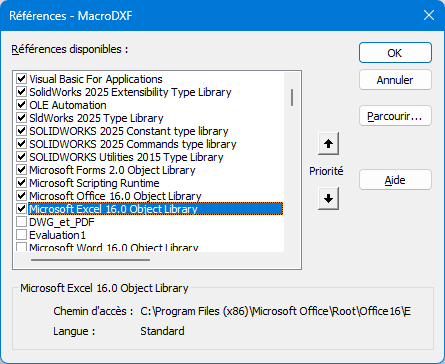
Sie müssen die untenstehenden Bibliotheken aktivieren:
image

2 „Gefällt mir“

Und nur zur Klarstellung: Bezüglich meiner ersten Antwort: Der Windows-Explorer-Code, den ich bisher verwendet habe, scheint nicht mehr mit Windows 11 25H2 kompatibel zu sein (zufälliger Absturz des Makros und des SW als Nebeneffekt).

2 „Gefällt mir“

Hallo,
Perfekt, danke, ich beende gerade die Zeichnung, an der ich arbeite, und teste sie gleich danach.

1 „Gefällt mir“