L’obectif: définir une taille de texte proportionnel à une étiquette à l’aide d’un coefficient qui redimensionnerai l’étiquette et le texte quelle contient dans l’esquisse d’une pièce.
Je vous fournis le code écris par une IA, ci-dessous :
*' Définir la hauteur de base du texte*
*Dim hauteurBase As Double = 5 ' Hauteur initiale en mm*
*Dim hauteurFinale As Double*
* *
*' Calculer la nouvelle hauteur*
*hauteurFinale = hauteurBase * CoeffMultiplicateur*
* *
*' Appliquer au texte dans l'esquisse nommée "Esquisse1"*
*Dim oDoc As PartDocument = ThisApplication.ActiveDocument*
*Dim oCompDef As PartComponentDefinition = oDoc.ComponentDefinition*
*Dim oSketch As Sketch = oCompDef.Sketches.Item("Esquisse1")*
* *
*' Parcourir les objets texte de l'esquisse*
*For Each oTextBox As TextBox In oSketch.TextBoxes*
*    oTextBox.Height = hauteurFinale*
*Next*
* *
*' Mettre à jour le modèle*
*InventorVb.DocumentUpdate()*
Le problème dès que je lance la macro, inventor plante (Inventor 2022 5.2)
Je suis un ignare complet, quelqu’un serait il me corriger le code, ou me proposer un code adapter pour ce que je souhaite obtenir?
Pas spécialise des macros sous Inventor, donc compliqué de voir le problème.
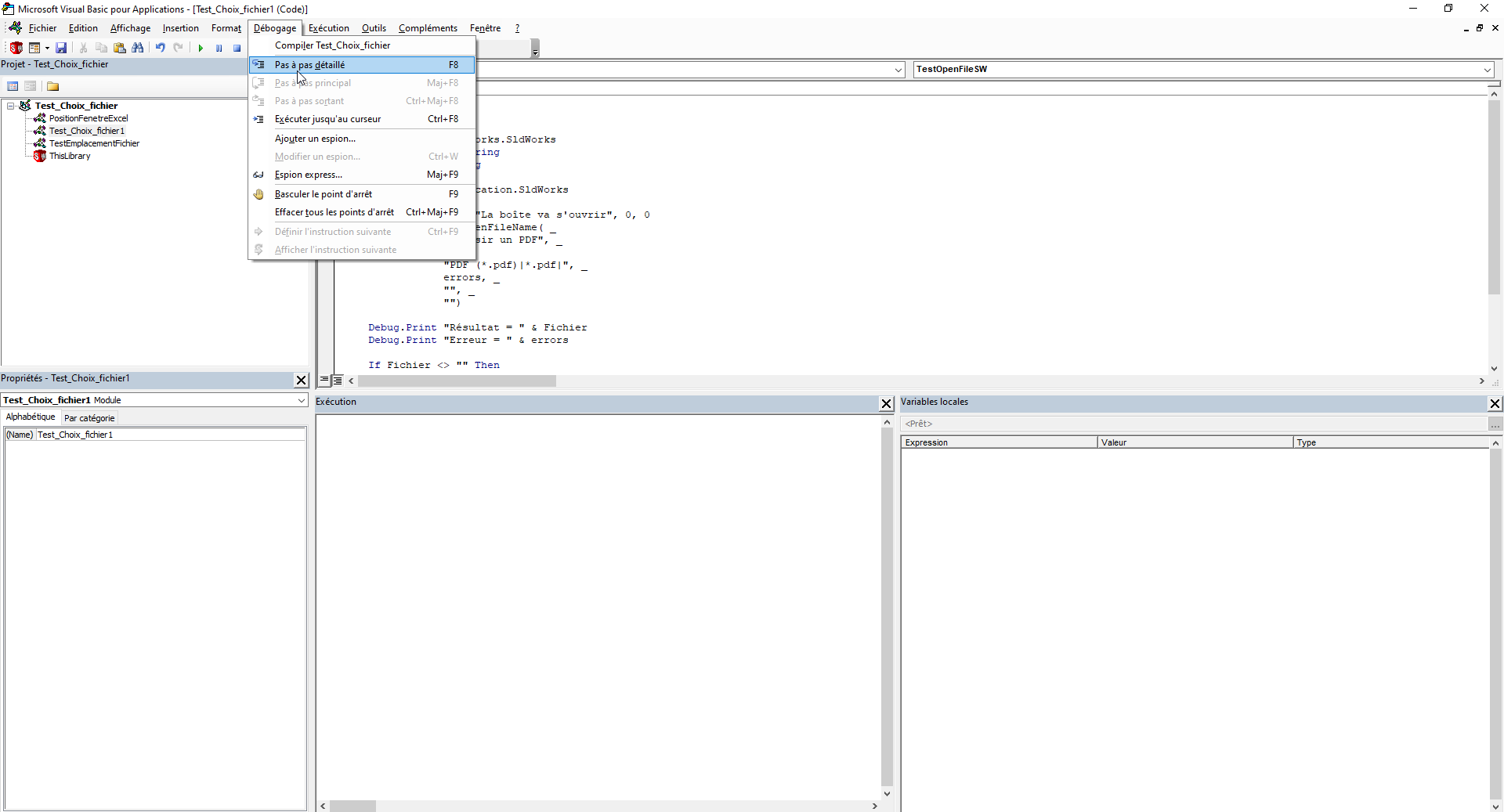
Mais pour débugger une macro en général il faut passer par l’éditeur et la lancer en pas à pas (Mode débug et F8) afin de voir la ligne qui pose problème:
Regarde ce lien en anglais certes, mais compréhensible pour débugger une macro suivant le type d’erreur:
Pour info l’IA est top pour des macros non spécifique (VBA exel ok) mais vba spécifique SW, inventor ou autre, là c’est autre chose car trop de fonctions, et peu d’exemple pour l’IA qui a donc une fâcheuse tendance à inventer des fonctionnalité non existante dans l’API du logiciel CAO et donc faire bugguer le tout. Et sans conaissance en VBA compliqué de détecter là ou l’IA se plante.
Au que non !
A l’origine c’est pour un de mes collègues qui souhaitait parametrer du txt sur une etiquette en fonction de la dimension de celle -ci
Il m’a dit se servir d’une IA, et comme tu me l’as expliqué c’est de la m.
Le petit jeune a laissé tomber, mais si quelqu’un à la réponse je suis preneur, pour ma culture.
Le problème c’est de récupérer le paramètre du txt, et j’ai lu sur le support Autodesk (2020) que cela n’est pas possible. Et que c’est une évolution mineure donc pas dans possible de le récupérer dans la version de mon Inventor.
Je reste à l’écoute
Pour moi l’IA est très bien pour coder ou autre, il faut juste comprendre et savoir corrigé ou re dirigé en cas d’erreur.
Comme pour un calcul RDM il ne faut absolument pas faire une confiance aveugle à l’IA sans un minimum de connaissance impossible de savoir le vrai du faux dans ce qu’elle nous apporte.
L’IA m’a apporté beaucoup de solutions en macro notamment, mais rarement fonctionnel du 1er coup et très souvent avec beaucoup de débug et coorectif.
Un peu d’accord avec ça, cependant j’ai déjà fait des macro sldws qui fonctionnent avec l’IA alors que je ne beat rien en codage. beaucoup de debugg et beaucoup de corrections mais c’est possible pour un noob.
Pour la RDM je te rejoins, l’IA est un support qui sert me sert à valider des calculs, elle apporte aussi quelques informations intéressantes sur certaines fonctionnalités parfois obscures des réglages des solveurs.