Hello,
After reading all the internet, I can't answer my question...
Is it possible, in a Solidworks drawing, to mark which sheets to print and which ones are not?
Background:
Sometimes a study sheet, an abacus plot, etc.
When my drawing is validated, a PDM task prints the drawing (PDF record), so that it goes to the ERP.
I would like to be able to mark a sheet of my drawing as " non-printable ", so that it doesn't end up in the PDF record.
Do you see a way to do that?
Note: I am in Solidworks Premium 2023 SP3.0 + Solidworks PDM v31.3
Thank you,
Normally when you save the pdf you can choose the pages needed for the bundle
2 Likes
For my part, I do it by macro, all non-printable sheets start with a prefix.
If I detect this prefix, no export in pdf. (I delete the sheets with the prefix, export to pdf and close the document without saving)
Maybe some tasks can be transposed to PDM.
4 Likes
Thank you for the answers,
@Le_Bidule, yes, it's possible, but only if you do the export manually. If the record is handled by a PDM export job, you cannot choose the sheets.
@sbadenis, Interesting as a technique, I'll see if I can marry the PDM task configuration with a macro.
Thank you,
I found a trick.
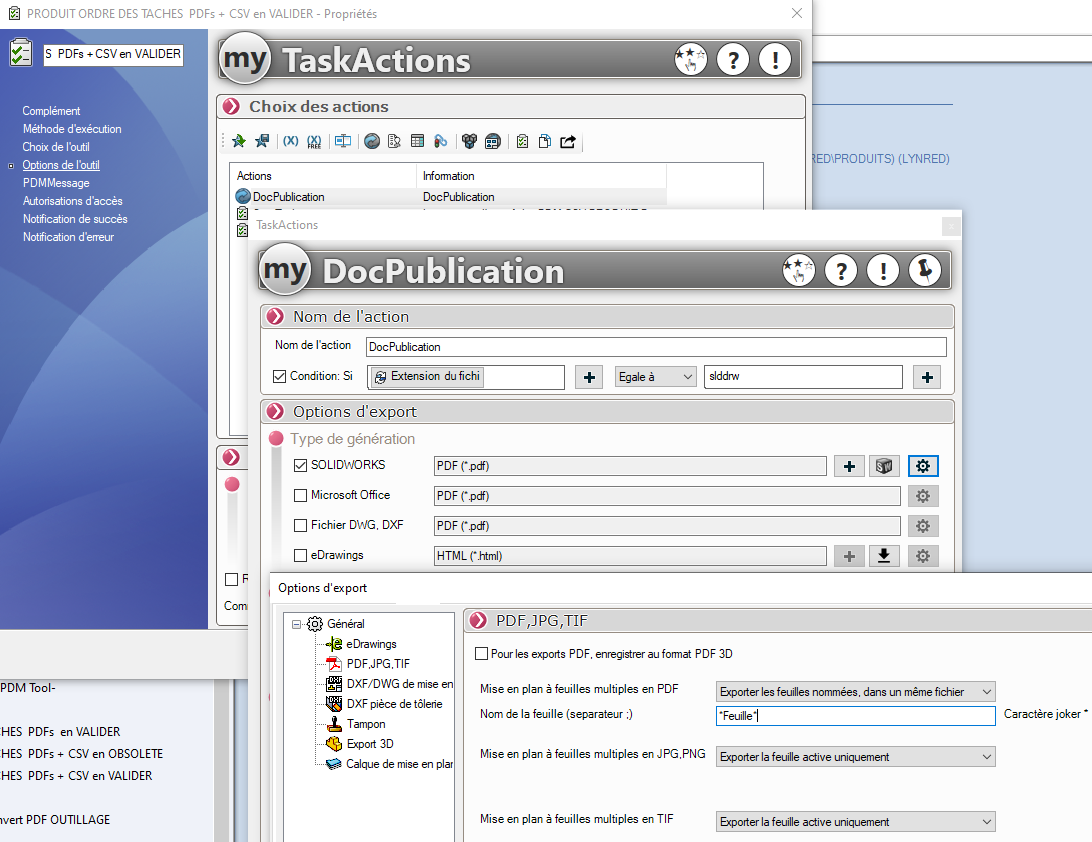
In the Solidworks PDM job configurator, there's a nice option.
When creating a DocPublication task to generate a PDF, there is an option to output only sheets whose name contains a defined string.
By default, you can leave the string = sheet, since this is the standard name when creating a drawing.
As a result, if you create a new sheet that you rename " study ", it will not come out in print.
On the other hand, the number of pages indicated on each folio will be wrong, it will always take into account the sheets with a specific name.
I will see if I can resolve this point of detail.
2 Likes