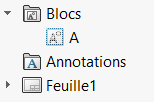
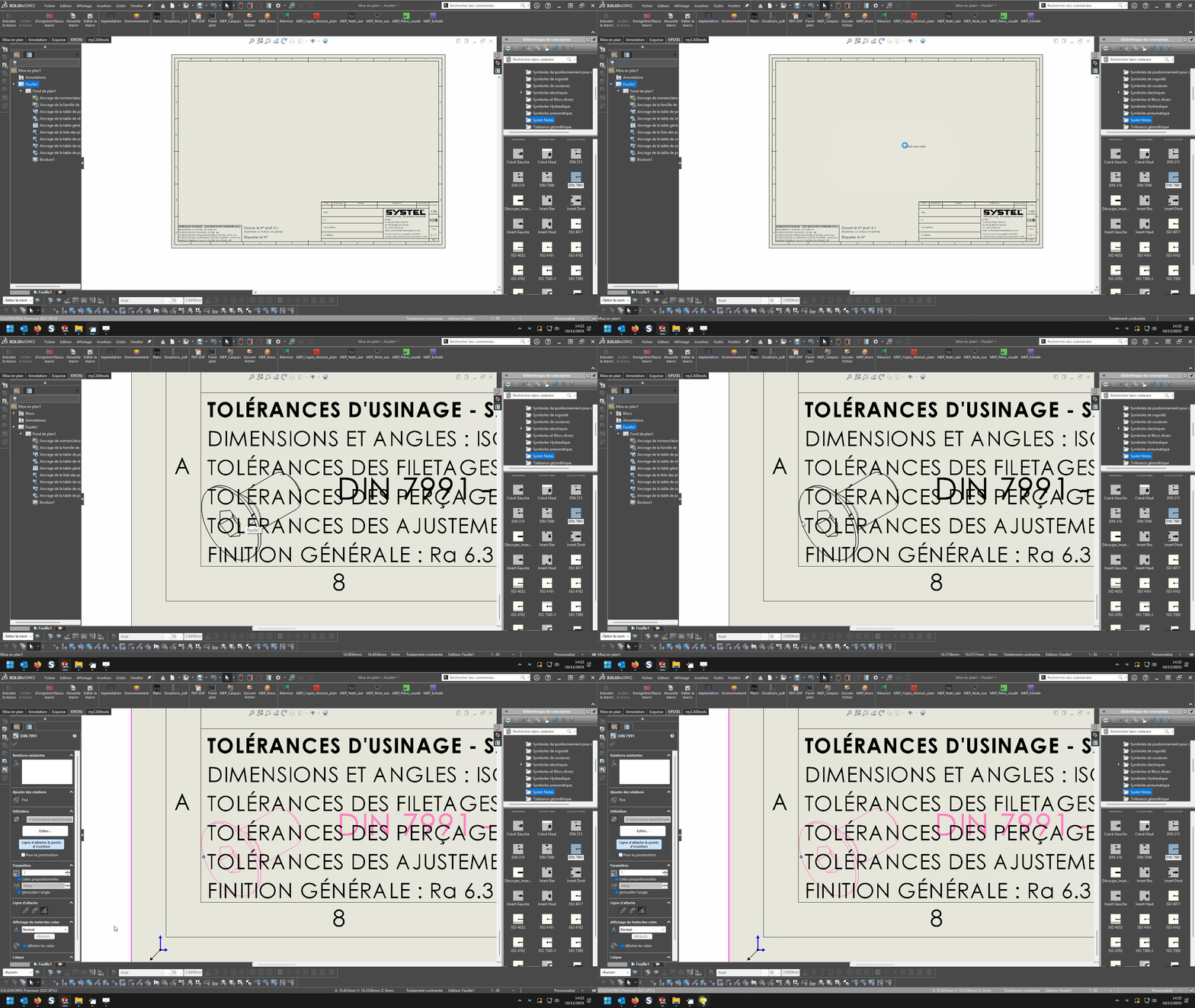
Mise en plan note par macro

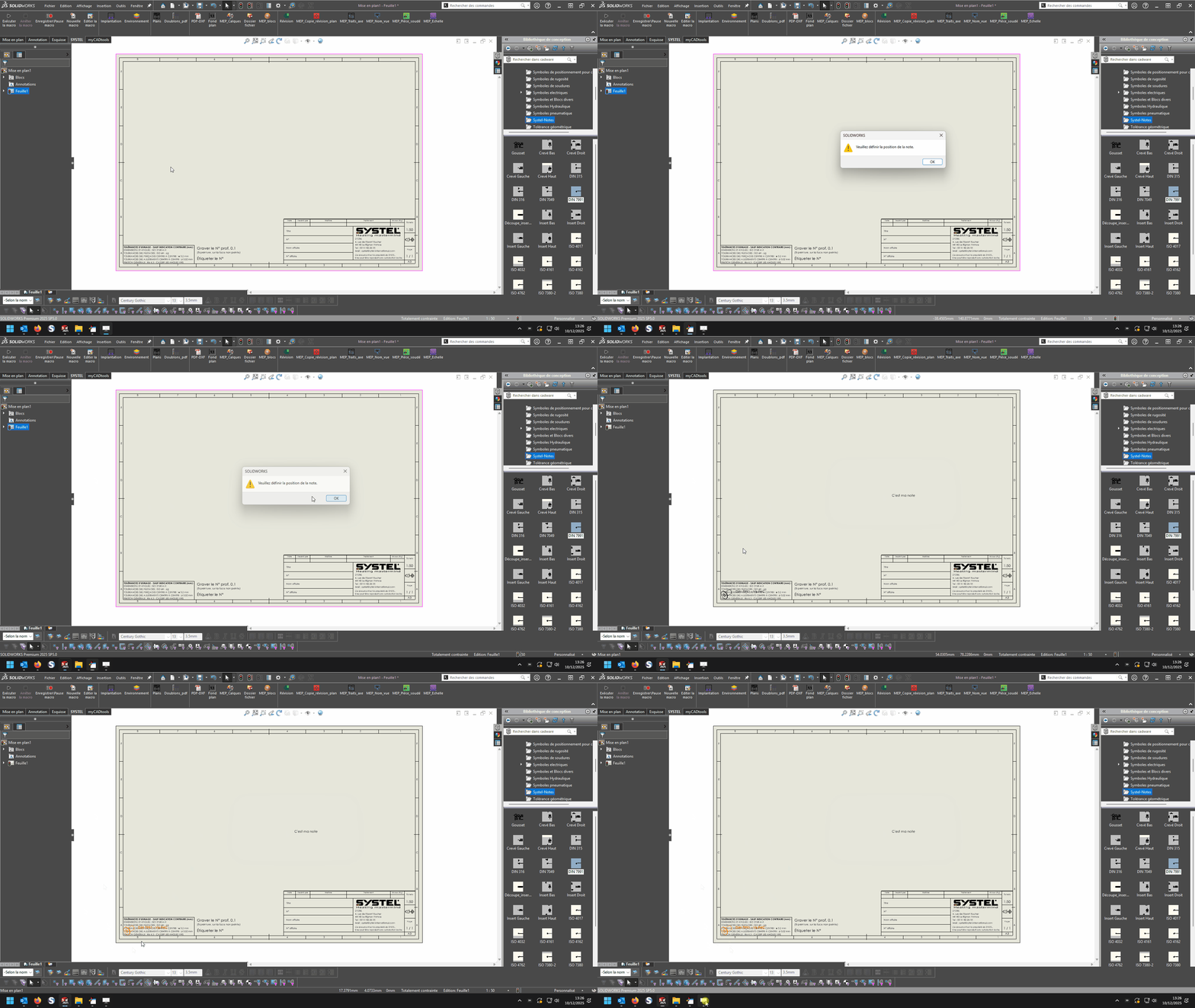
le point d’insertion de mon bloc est bien proche du bloc, l’insertion ne se fait pas à la vrai position x y mais à 0,0
Animation

pourtant quand je fais F8, les points x et y indiquent bien la bonne valeur
le pb est ici
Set swMathPoint = swMathUtil.CreatePoint(pt)

Set swBlockDef = rModel.SketchManager.MakeSketchBlockFromFile(swMathPoint, blkName, False, sScale, sAngle)

il n’intègre pas bien x et y

Difficile de résoudre le souci, chez moi ça fonctionne :

2 « J'aime »

A tout hasard, il ne reste pas des traces de blocs effacés dans l’arbre de création ?

image

pas de trace d’anciens blocs que j’ai supprimé avant lancement
Animation

Après essai, j’ai un peu le même soucis avec un bloc sous forme de tableau.
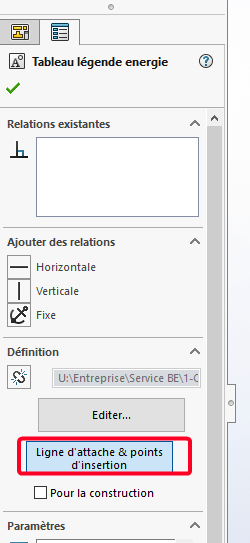
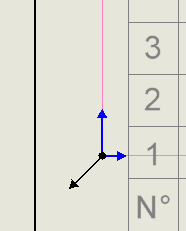
Et si je clique sur ligne d’attache et point d’insertion il y à ces 2 symboles (noir + bleu)

Possiblement l’un des 2, force une certaine position peut-être:
image

Bonjour,
Est-il possible de faire des tests sur un plan à l’échelle 1:1, le seul moment ou je mets en défaut le code proposé c’est quand je suis à une autre échelle de plan.
Cordialement,

1 « J'aime »

J’en étais arrivé à la même conclusion, problème d’échelle.
Après essai avec une échelle 1:1 et unité en mètre au lieu de mm cela fonctionne parfaitement donc simple conversion a faire + mise à l’échelle pour avoir le bon point d’insertion.
image

Et l’échelle du bloc est également à prendre en considération éventuellement avec l’échelle.

chez moi echelle 1/1 ca positionne toujours à zero

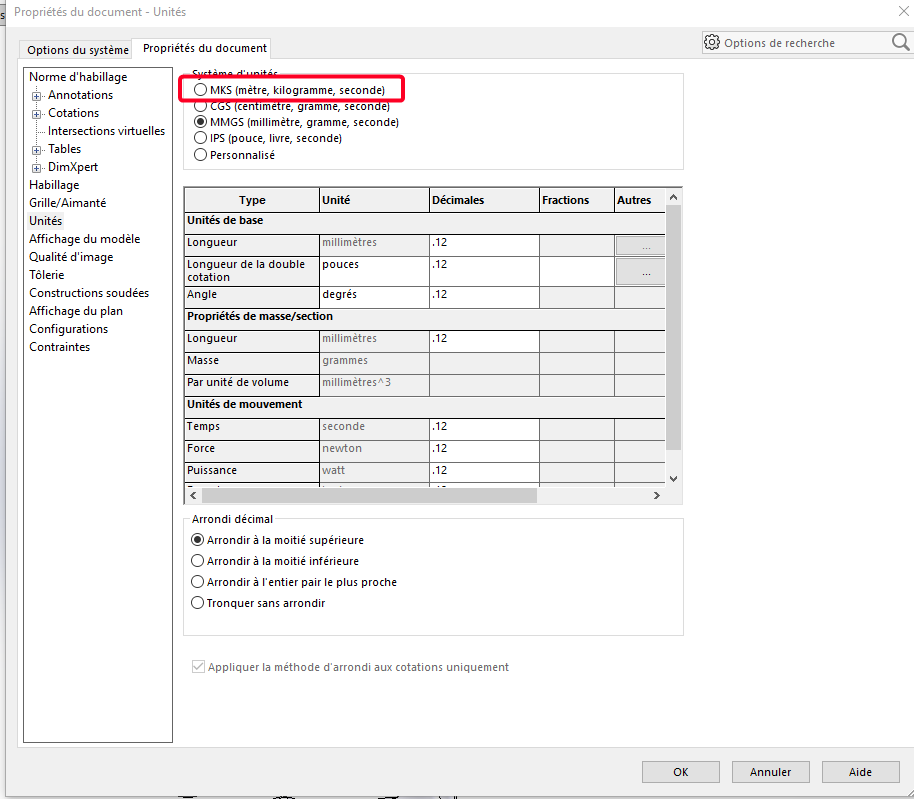
En changeant l’unité du document en mks également?
Outil/options/Propriétés du document:


Et j’ai coché pour tester cette unité MKS (au lieu du MMGS habituel)

Cela me semble plutôt normal, les unité de bases des API Solidworks sont :
Le mètre et le radian (allez-savoir pourquoi).

Donc techniquement il faudrait : pour retrouver les coordonnées en millimètres (Échelle 1/1)

    Dim pt(2) As Double
    pt(0) = Xpt/1000
    pt(1) = Ypt/1000
    pt(2) = 0

Reste aussi à récupérer le facteur d’échelle de la feuille:

Dim sheetScale As Double
sheetScale = swModel.Extension.GetSheetScale

et donc on devrait obtenir:

Dim pt(2) As Double
pt(0) = Xpt*sheetScale/1000
pt(1) = Ypt*sheetScale/1000
pt(2) = 0

Un truc un peu comme cela quoi (je n’ai pas accès à Solidworks donc c’est une proposition à l’aveugle…)

1 « J'aime »

Bonjour,

Voici une petite copie d’un code que j’ai effectuez pour l’insertion de texte sur solidworks dans une mise en plan

Sous-titre privé CommandButton2_Click()

Set swApp = Application.SldWorks

Set Part = swApp.ActiveDoc
Partie.FontPoints 13

Atténuez myNote en tant qu’objet
Atténuez myAnnotation As Object
Dim myTextFormat As Object
Set myNote = Part.InsertNote(« TECH. IDENT. : »)
Sinon, myNote n’est rien alors
myNote.LockPosition = Faux
myNote.Angle = 0
boolstatus = monNote.BallonSet(0, 0)
Définir monAnnotation = monNote.ObtenirAnnotation()
Si non, myAnnotation n’est rien alors
longstatus = monAnnotation.SetLeader3(swLeaderStyle_e.swNO_LEADER, 0, Vrai, Faux, Faux, Faux)
boolstatus = monAnnotation.SetPosition(0.099, 0.286, 0)

  Set myTextFormat = Part.GetUserPreferenceTextFormat(0)
  myTextFormat.Italic = False
  myTextFormat.Underline = False
  myTextFormat.Strikeout = False
  myTextFormat.Bold = False
  myTextFormat.Escapement = 0
  myTextFormat.LineSpacing = 0.001
  myTextFormat.CharHeightInPts = True
  myTextFormat.TypeFaceName = "Century Gothic"
  myTextFormat.WidthFactor = 1
  myTextFormat.ObliqueAngle = 0
  myTextFormat.LineLength = 0
  myTextFormat.Vertical = False
  myTextFormat.BackWards = False
  myTextFormat.UpsideDown = False
  myTextFormat.CharSpacingFactor = 1
  boolstatus = myAnnotation.SetTextFormat(0, False, myTextFormat)

Fin si
Fin si
Partie.ClearSelection2 Vrai
Partie.FenêtreRedessiner

Fin du Remplaçant

Bonne soirée

Pour l’insertion d’un bloc :

Dim swApp As SldWorks.SldWorks
Dim swModel As SldWorks.ModelDoc2
Dim swModelView As SldWorks.ModelView
Dim TheMouse As SldWorks.mouse
Dim obj As New Classe1

Sub main()
    Set swApp = Application.SldWorks
    Set swModel = swApp.ActiveDoc
    Set swModelView = swModel.GetFirstModelView
    Set TheMouse = swModelView.GetMouse

    obj.init TheMouse, swApp, swModel
    
    swApp.SendMsgToUser "Veuillez définir la position du bloc."
End Sub

Et pour la classe :

'Classe1
Dim WithEvents ms As SldWorks.mouse

Private cSwApp As SldWorks.SldWorks
Private cswModel As SldWorks.ModelDoc2
Private cswModelView As SldWorks.ModelView
Private cswDraw As SldWorks.DrawingDoc
Private cswSheet As SldWorks.Sheet
Private cswView As SldWorks.View
Private ech As Variant
Private cScale As Variant

Private Sub Class_Initialize()

End Sub

Public Sub init(mouse As Object, sldw As SldWorks.SldWorks, slddoc As SldWorks.ModelDoc2)
    Set ms = mouse
    Set cSwApp = sldw
    Set cswModel = slddoc
    Set cswDraw = cswModel
    Set cswSheet = cswDraw.GetCurrentSheet
    Set cswView = cswDraw.GetFirstView
End Sub

Private Function ms_MouseSelectNotify(ByVal Ix As Long, ByVal Iy As Long, ByVal x As Double, ByVal y As Double, ByVal z As Double) As Long
    ech = cswView.ScaleRatio
    cScale = ech(0) / ech(1)

    Dim sBlockPath As String
    sBlockPath = "C:\Users\dro\Documents DRO-P10\SW local\Bibliotheque_Annotations et blocs\Tableau engrenage.SLDBLK"
    Set swBlkInst = Insert_Block(cswModel, sBlockPath, x / cScale, y / cScale)
    
    End
End Function

Private Function ms_MouseLBtnDownNotify(ByVal x As Long, ByVal y As Long, ByVal WParam As Long) As Long
    
End Function

Function Insert_Block(ByVal rModel As ModelDoc2, ByVal blkName As String, ByVal Xpt As Double, ByVal Ypt As Double, Optional ByVal sAngle As Double = 0, Optional ByVal sScale As Double = 1) As Object
    Dim swBlockDef As SketchBlockDefinition
    Dim swMathPoint As MathPoint
    Dim swMathUtil As MathUtility
    
    Set swMathUtil = cSwApp.GetMathUtility
    
    Dim pt(2) As Double
    pt(0) = Xpt
    pt(1) = Ypt
    pt(2) = 0

    Set swMathPoint = swMathUtil.CreatePoint(pt)

    Set swBlockDef = rModel.SketchManager.MakeSketchBlockFromFile(swMathPoint, blkName, False, sScale, sAngle)

    rModel.GraphicsRedraw2
End Function
2 « J'aime »

@d_roger macro, parfaitement fonctionnelle pour moi , avec un code très propre et lisible comme à ton habitude!
@Bob_2000 à toi de valider si cela fonctionne également pour toi.
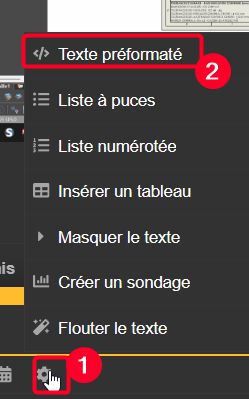
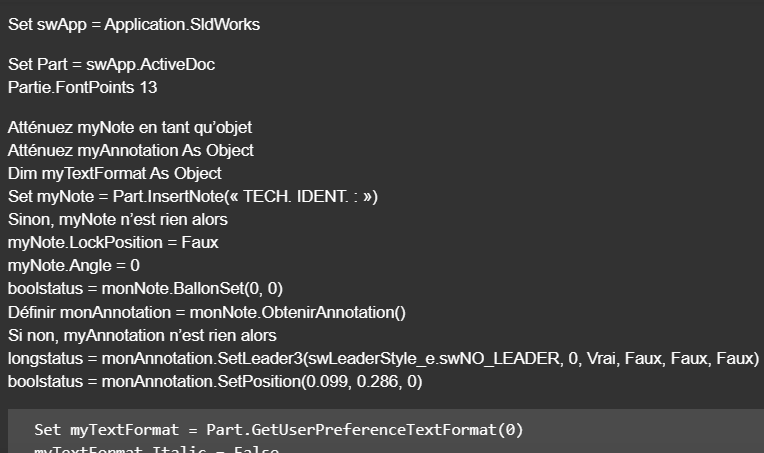
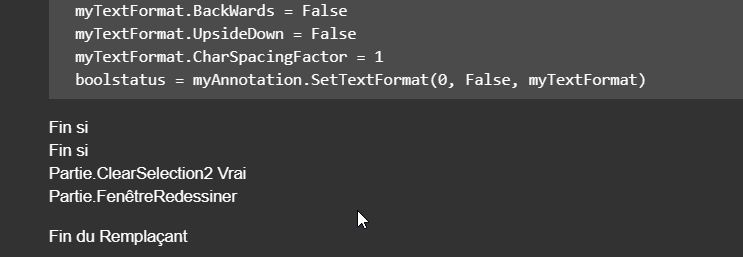
@Centor ta macro c’est transformée, il faut l’éditer dans une fenêtre spécial (texte préformaté), sinon la conversion linguistique fait de l’humour:
image

Pour rigoler :stuck_out_tongue_winking_eye: :crazy_face::

Par contre la fin du sous-marin à disparu, pour faire place à la fin du remplaçant! :rofl: :rofl: :rofl:

2 « J'aime »

mdr oui effectivement je viens de remarquer xD

Private Sub CommandButton2_Click()

Set swApp = Application.SldWorks

Set Part = swApp.ActiveDoc
Part.FontPoints 13

Dim myNote As Object
Dim myAnnotation As Object
Dim myTextFormat As Object
Set myNote = Part.InsertNote("<FONT size=13PTS>TECH. IDENT.:")
If Not myNote Is Nothing Then
   myNote.LockPosition = False
   myNote.Angle = 0
   boolstatus = myNote.SetBalloon(0, 0)
   Set myAnnotation = myNote.GetAnnotation()
   If Not myAnnotation Is Nothing Then
      longstatus = myAnnotation.SetLeader3(swLeaderStyle_e.swNO_LEADER, 0, True, False, False, False)
      boolstatus = myAnnotation.SetPosition(0.099, 0.286, 0)

      Set myTextFormat = Part.GetUserPreferenceTextFormat(0)
      myTextFormat.Italic = False
      myTextFormat.Underline = False
      myTextFormat.Strikeout = False
      myTextFormat.Bold = False
      myTextFormat.Escapement = 0
      myTextFormat.LineSpacing = 0.001
      myTextFormat.CharHeightInPts = True
      myTextFormat.TypeFaceName = "Century Gothic"
      myTextFormat.WidthFactor = 1
      myTextFormat.ObliqueAngle = 0
      myTextFormat.LineLength = 0
      myTextFormat.Vertical = False
      myTextFormat.BackWards = False
      myTextFormat.UpsideDown = False
      myTextFormat.CharSpacingFactor = 1
      boolstatus = myAnnotation.SetTextFormat(0, False, myTextFormat)
   End If
End If
Part.ClearSelection2 True
Part.WindowRedraw

End Sub

Private Sub CommandButton3_Click()
Set swApp = Application.SldWorks

Set Part = swApp.ActiveDoc
Part.FontPoints 13

Dim myNote As Object
Dim myAnnotation As Object
Dim myTextFormat As Object
Set myNote = Part.InsertNote("<FONT size=13PTS>{Identification}")
If Not myNote Is Nothing Then
   myNote.LockPosition = False
   myNote.Angle = 0
   boolstatus = myNote.SetBalloon(0, 0)
   Set myAnnotation = myNote.GetAnnotation()
   If Not myAnnotation Is Nothing Then
      longstatus = myAnnotation.SetLeader3(swLeaderStyle_e.swNO_LEADER, 0, True, False, False, False)
      boolstatus = myAnnotation.SetPosition(0.130806397772014, 0.286, 0)

      Set myTextFormat = Part.GetUserPreferenceTextFormat(0)
      myTextFormat.Italic = False
      myTextFormat.Underline = False
      myTextFormat.Strikeout = False
      myTextFormat.Bold = False
      myTextFormat.Escapement = 0
      myTextFormat.LineSpacing = 0.001
      myTextFormat.CharHeightInPts = True
      myTextFormat.TypeFaceName = "Century Gothic"
      myTextFormat.WidthFactor = 1
      myTextFormat.ObliqueAngle = 0
      myTextFormat.LineLength = 0
      myTextFormat.Vertical = False
      myTextFormat.BackWards = False
      myTextFormat.UpsideDown = False
      myTextFormat.CharSpacingFactor = 1
      boolstatus = myAnnotation.SetTextFormat(0, False, myTextFormat)
   End If
End If
Part.ClearSelection2 True
Part.WindowRedraw

End Sub

1 « J'aime »

la macro de D roger fonctionne mais moi je suis toujours dans les choux, ca me place à 0,0 malgré un x et y different

Dim swApp As SldWorks.SldWorks
Dim swModel As SldWorks.ModelDoc2
Dim swModelView As SldWorks.ModelView
Dim TheMouse As SldWorks.mouse
Public obj As New Classe1
Public X_Value As Double
Public Y_Value As Double
Public Z_Value As Double
'Public cScale As Double
'Public ech As Variant

Sub Notes_00()
Set swApp = Application.SldWorks
Set swModel = swApp.ActiveDoc
Set swModelView = swModel.GetFirstModelView
Set TheMouse = swModelView.GetMouse

obj.init TheMouse, swApp, swModel

UserForm2.Show vbModeless
End Sub

Sub Notes_01()
Dim swApp As Object
Dim Part As Object
Dim myBlockDefinition As Object
Dim myAnnotation As Object
Dim URL As String
Dim NR As String
Dim NUM As String 'Pas byte sinon bt annulé impossible
Dim REPONSE As String

Dim swMathUtil As Object
Dim insPt As Object
Dim vInsertPoint(2) As Double

Set swApp = Application.SldWorks
Set Part = swApp.ActiveDoc


URL = "C:\Users\Notes\"

NUM = InputBox("1 : Tableau découpe insert hexagonal" & vbCrLf & _
               "2 : Gousset" & vbCrLf & _
               "3 : Soudure" & vbCrLf & vbCrLf & _
               "Entrez le numéro du bloc à insérer", "Choix de la note")

Select Case NUM
    Case "1": NR = "Découpe_insert_hex.SLDBLK": Echelle = 1: EXT = "A"
    Case "2": NR = "Gousset.sldnotestl": EXT = "B"
    Case "3": NR = "Soudure.SLDBLK": Echelle = 0.045: EXT = "A"
    Case Else: Exit Sub
End Select

REPONSE = URL & NR

If EXT = "B" Then
Set myAnnotation = Part.Extension.InsertAnnotationFavorite(REPONSE, X_Value, Y_Value, 0)
Else
Set swMathUtil = swApp.GetMathUtility

vInsertPoint(0) = X_Value
vInsertPoint(1) = Y_Value
vInsertPoint(2) = Z_Value


Set insPt = swMathUtil.CreatePoint(vInsertPoint)
Set myBlockDefinition = Part.SketchManager.MakeSketchBlockFromFile(insPt, REPONSE, False, Echelle, 0)
End If

End Sub


Dim WithEvents ms As SldWorks.mouse
Private cSwApp As SldWorks.SldWorks
Private cswModelView As SldWorks.ModelView
Private cswModel As SldWorks.ModelDoc2
Private cswDraw As SldWorks.DrawingDoc
Private cswSheet As SldWorks.Sheet
Private cswView As SldWorks.View
Public ech As Variant
Public cScale As Double

Public Sub init(mouse As Object, sldw As SldWorks.SldWorks, slddoc As SldWorks.ModelDoc2)
Set ms = mouse
Set cSwApp = sldw
Set cswModel = slddoc
Set cswDraw = cswModel
Set cswSheet = cswDraw.GetCurrentSheet
Set cswView = cswDraw.GetFirstView
'If cswView Is Nothing Then Set cswView = cswDraw.GetFirstView

End Sub
Private Function ms_MouseSelectNotify(ByVal Ix As Long, ByVal Iy As Long, ByVal x As Double, ByVal y As Double, ByVal z As Double) As Long
ech = cswView.ScaleRatio
cScale = ech(0) / ech(1)

UserForm2.TextBox1.Value = Round(x/ cScale, 4)
UserForm2.TextBox2.Value = Round(y/ cScale, 4)

End Function

Public Sub Terminer()
Set ms = Nothing
Set cSwApp = Nothing
Set cswModel = Nothing
End Sub

Private Sub CommandButton1_Click()
'OK

If TextBox1.Value = "" Or TextBox2.Value = "" Then Exit Sub
X_Value = CDbl(Me.TextBox1.Value)
Y_Value = CDbl(Me.TextBox2.Value) 
Z_Value = 0#
    
obj.Terminer
Set obj = Nothing
Unload UserForm2
Set UserForm2 = Nothing

Notes_01
End Sub

@d_roger :
Tu as aussi prévu un « event » sur le clic Gauche ?

Private Function ms_MouseLBtnDownNotify(ByVal x As Long, ByVal y As Long, ByVal WParam As Long) As Long
End Function

non, je valide avec l’usf, comme ca je peux cliquer plusieurs fois au besoins

Dans ton Sub Notes_01() essaye en remplaçant

Else
Set swMathUtil = swApp.GetMathUtility

vInsertPoint(0) = X_Value
vInsertPoint(1) = Y_Value
vInsertPoint(2) = Z_Value


Set insPt = swMathUtil.CreatePoint(vInsertPoint)
Set myBlockDefinition = Part.SketchManager.MakeSketchBlockFromFile(insPt, REPONSE, False, Echelle, 0)

par :

Else
        *vInsertPoint(0) = X_Value* 'peut être supprimé
        *vInsertPoint(1) = Y_Value* 'peut être supprimé
        *vInsertPoint(2) = Z_Value* 'peut être supprimé

        Set swBlkInst = Insert_Block(Part, REPONSE, X_Value, Y_Value, 1, 0)

et en ajoutant la fonction :

Function Insert_Block(ByVal rModel As ModelDoc2, ByVal blkName As String, ByVal Xpt As Double, ByVal Ypt As Double, Optional ByVal sScale As Double = 1, Optional ByVal sAngle As Double = 0) As Object
    Dim swBlockDef As SketchBlockDefinition
    Dim swMathPoint As MathPoint
    Dim swMathUtil As MathUtility
    
    Set swMathUtil = swApp.GetMathUtility
    
    Dim pt(2) As Double
    pt(0) = Xpt
    pt(1) = Ypt
    pt(2) = 0

    Set swMathPoint = swMathUtil.CreatePoint(pt)

    Set swBlockDef = rModel.SketchManager.MakeSketchBlockFromFile(swMathPoint, blkName, False, sScale, sAngle)

    rModel.GraphicsRedraw2
End Function

après ton End Sub

1 « J'aime »

J’ai laissé la fonction vide en place car au début je ne savais pas si j’en aurais besoin, elle peut être supprimée.

Problème résolu avec une bonne modification
il y a en effet pour l’insertion des sldnotestl, pas de mise à l’échelle
pour SLDBLK, mise à l’échelle

Rien de cohérent dans tout ça

N’étant pas un expert, les ia non plus, j’ai passé beaucoup de temps avec pour un résultat nul

Un grand merci à D ROGER, sans qui ce projet n’aurais jamais pu aboutir pour ma part

Dim swApp As SldWorks.SldWorks
Dim swModel As SldWorks.ModelDoc2
Dim swModelView As SldWorks.ModelView
Dim TheMouse As SldWorks.mouse
Public obj As New Classe1
Public X_Value As Double
Public Y_Value As Double
Public Z_Value As Double

Sub Notes_00()
Set swApp = Application.SldWorks
Set swModel = swApp.ActiveDoc
Set swModelView = swModel.GetFirstModelView
Set TheMouse = swModelView.GetMouse

obj.init TheMouse, swApp, swModel

UserForm2.Show vbModeless
End Sub

Sub Notes_01()
Dim swApp As Object
Dim Part As Object
Dim myBlockDefinition As Object
Dim myAnnotation As Object
Dim URL As String
Dim NR As String
Dim NUM As String 'Pas byte sinon bt annulé impossible
Dim REPONSE As String

Dim swMathUtil As Object
Dim insPt As Object
Dim vInsertPoint(2) As Double

Set swApp = Application.SldWorks
Set Part = swApp.ActiveDoc


URL = "C:\Users\Notes\"

NUM = InputBox("1 : Tableau découpe insert hexagonal" & vbCrLf & _
               "2 : Gousset" & vbCrLf & _
               "3 : Soudure" & vbCrLf & vbCrLf & _
               "Entrez le numéro du bloc à insérer", "Choix de la note")

Select Case NUM
    Case "1": NR = "Découpe_insert_hex.SLDBLK": Echelle = 1: EXT = "A"
    Case "2": NR = "Gousset.sldnotestl": EXT = "B"
    Case "3": NR = "Soudure.SLDBLK": Echelle = 0.045: EXT = "A"
    Case Else: Exit Sub
End Select

REPONSE = URL & NR

If EXT = "B" Then
Set myAnnotation = Part.Extension.InsertAnnotationFavorite(REPONSE, X_Value, Y_Value, 0)
Else


Set swBlkInst = Insert_Block(Part, REPONSE, X_Value, Y_Value, Echelle, 0)
End If

End Sub

Function Insert_Block(ByVal rModel As ModelDoc2, ByVal blkName As String, ByVal Xpt As Double, ByVal Ypt As Double, Optional ByVal sScale As Double = 1, Optional ByVal sAngle As Double = 0) As Object
Dim swBlockDef As SketchBlockDefinition
Dim swMathPoint As MathPoint
Dim swMathUtil As MathUtility

Set swMathUtil = swApp.GetMathUtility

Dim pt(2) As Double
pt(0) = Xpt / obj.cScale
pt(1) = Ypt / obj.cScale
pt(2) = 0

Set swMathPoint = swMathUtil.CreatePoint(pt)

Set swBlockDef = rModel.SketchManager.MakeSketchBlockFromFile(swMathPoint, blkName, False, sScale, sAngle)

rModel.GraphicsRedraw2
End Function

module de classe1

Dim WithEvents ms As SldWorks.mouse
Private cSwApp As SldWorks.SldWorks
Private cswModelView As SldWorks.ModelView
Private cswModel As SldWorks.ModelDoc2
Private cswDraw As SldWorks.DrawingDoc
Private cswSheet As SldWorks.Sheet
Private cswView As SldWorks.View
Public ech As Variant
Public cScale As Double

Public Sub init(mouse As Object, sldw As SldWorks.SldWorks, slddoc As SldWorks.ModelDoc2)
Set ms = mouse
Set cSwApp = sldw
Set cswModel = slddoc
Set cswDraw = cswModel
Set cswSheet = cswDraw.GetCurrentSheet
Set cswView = cswDraw.GetFirstView
End Sub

Private Function ms_MouseSelectNotify(ByVal Ix As Long, ByVal Iy As Long, ByVal x As Double, ByVal y As Double, ByVal z As Double) As Long
ech = cswView.ScaleRatio
cScale = ech(0) / ech(1)

UserForm2.TextBox1.Value = Round(x, 4)
UserForm2.TextBox2.Value = Round(y, 4)
End Function

Public Sub Terminer()
Set ms = Nothing
Set cSwApp = Nothing
Set cswModel = Nothing
End Sub

userform2

Private Sub CommandButton1_Click()
'OK

If TextBox1.Value = "" Or TextBox2.Value = "" Then Exit Sub
X_Value = CDbl(Me.TextBox1.Value)
Y_Value = CDbl(Me.TextBox2.Value)
Z_Value = 0#
    
obj.Terminer
Unload UserForm2
Set UserForm2 = Nothing

Notes_01
Set obj = Nothing
End Sub
2 « J'aime »