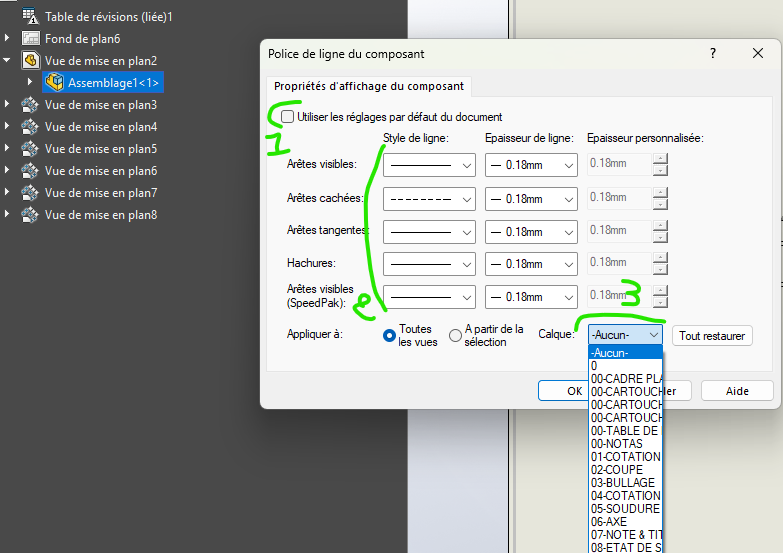
I have a problem with a drawing. I have several of one configuration and other views of another configuration of the same model. I change the font of some part and assemble on 3 views of a configuration. When I want to do the same on the other 3 views of another configuration, it doesn't want to apply this change. To do this, I right-click on the template in the tree and I choose the elements and apply it to all the views (see below)
I validate and nothing happens, I start again, I right click in the tree and I see that the dialog box has not saved my choices.
We have done several tests of the separate configurations on two different MEPs and it works. We reinsert the problematic views with the same result
Does it come from the configurations? Should it be applied to each view specifically font and color? In short, I bug
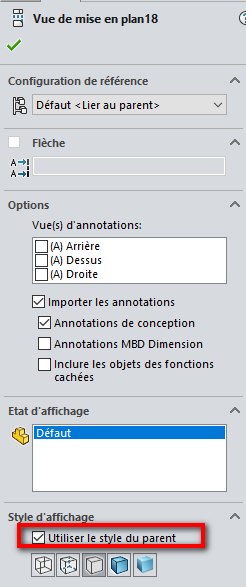
Hello @DoubleL No, it was for the example, I usually select it. Anyway, the selections I make don't take into account if I already have font changes in another view/configuration.
Hello @Maclane Indeed I didn't look, for two views (view + section) The 3rd view is an isometric view that has no parent, but still bound by configuration. And in the dialog box the information apply to other views is checked .
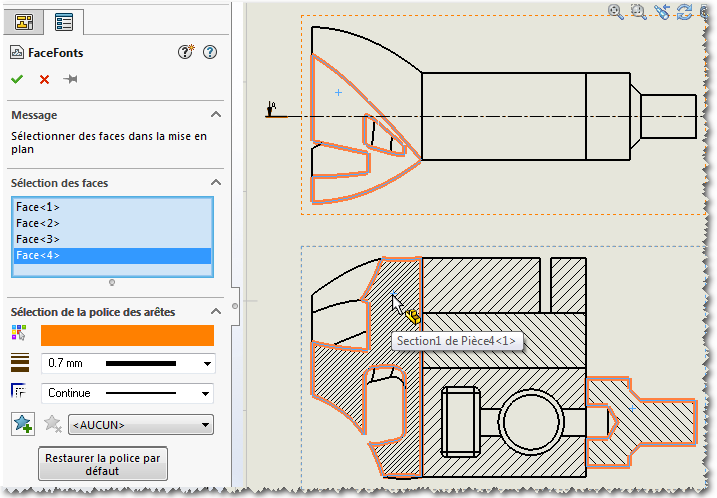
I don't remember if you own the MycadTools suite... butif yes, Look at the " FaceFonts " tool, I wonder if it won't answer your requests for changes to your view fonts...
@Maclane No, I don't have any myCADtools suite I read you about the different topics, and tools, reporting to myCADtools some are interesting. That said, I also see future problems in internal management. We don't have a PDM-type box for good management, no one to take care of the CAD. Not to mention the many SW bugs, some known, others purely internal .
So far, we can do what we want without the myCADtools. Sometimes after 3 PC reboots. Sometimes the next day , sometimes not.

 .
.
 .
. , sometimes not.