Cześć,
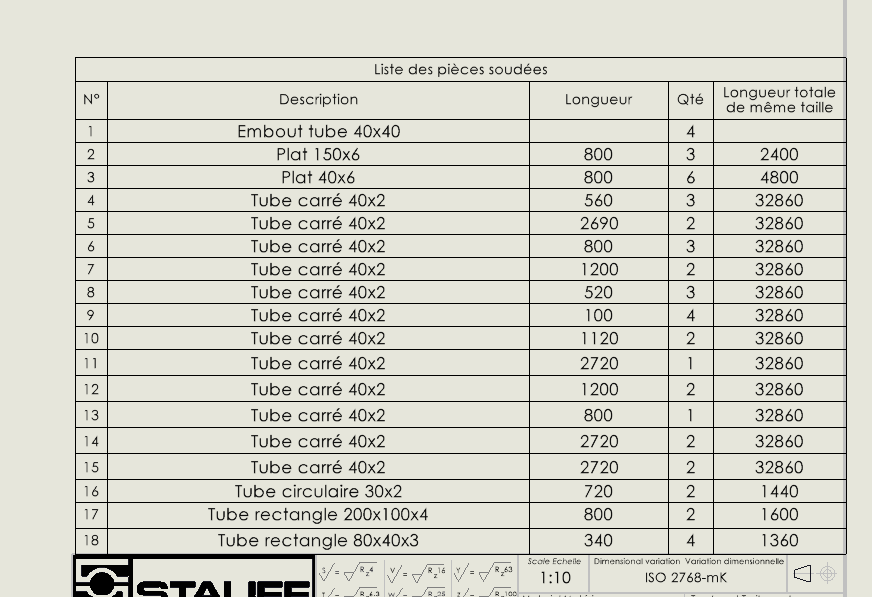
Chciałbym pogrupować rurki tej samej długości na tych samych liniach, aby uniknąć duplikatów na końcu. Czy to możliwe?
I jak uporządkować tę nomenklaturę według własnego uznania, jakby to była standardowa nomenklatura?
Z góry dziękuję
Cześć,
Chciałbym pogrupować rurki tej samej długości na tych samych liniach, aby uniknąć duplikatów na końcu. Czy to możliwe?
I jak uporządkować tę nomenklaturę według własnego uznania, jakby to była standardowa nomenklatura?
Z góry dziękuję
SW grupuje identyczne ciała, nie identyczne długości, więc nie jest możliwy podstawowy.
Jeśli nie, to te same cięcia, nawet jeśli LG identyczne, nie ten sam marker, więc inna linia.
Nie wiem, do jakiego celu grupować, ale ogólnie ta nomenklatura (lista spawanych części) służy do określania przepływów i konieczne jest określenie kątów cięcia, aby uzyskać dokładny przepływ.
Cześć,
Mówiąc prosto, dla SW identyczne lampy mają:
Aby połączyć je w celu uzyskania listy przepływów, jest CuttingOptimization od MyCADTools, który bardzo dobrze spełnia tę zadanie.
Miłego dnia.
Cześć,
Długości i profil są takie same, więc korpusy muszą być identyczne, prawda?
Czyli muszę używać MyCadtools do grupowania? której nie mam^^
Nie, zwykle chodzi o zarządzanie mechanicznie spawanymi nadwoziami. W widoku drzewa.
Nie są identyczne, ponieważ różnią się długością. Musimy więc zebrać je w drzewie, w teczce z ciałami.
Niekoniecznie, zobacz komentarze @a_eriaud o identycznej rurce.
Można mieć rurę 30x30x2 Lg 500mm z dwoma prostymi cięciami i tę samą rurę z cięciem pod kątem 45° (lub 1 lub więcej otworów...)
Miałem już przypadek identycznych pierwiastków, ale o różnej długości.
Cześć,
To przypomina mi drobny szczegół: czy automatyczna aktualizacja listy nadwozia jest aktywna?
To może tłumaczyć, dlaczego identyczne ciała nie są grupowane razem.
Jeszcze jeden trik (uważaj, może być chwiejnie...), SW tworzy podfoldery na liście spawanych ciał, aby grupować identyczne ciała. Możesz przenieść (przeciągnąć i upuść) ciało z jednego folderu do drugiego. Ale to wyłącza automatyczną aktualizację, jeśli zostanie ponownie aktywowana, całe ręczne sortowanie zostaje anulowane i musimy wszystko robić od nowa...
Już eksperymentowałem z tą metodą na identycznych korpusach blachy, ale bardzo nieznacznie różniących się (wymiar zmieniał się o 0,0001) po ich importie przez niezbyt czysty WWTP...
Innym rozwiązaniem, jeśli jest taka potrzeba, jest posiadanie wiarygodnej listy przepływów:
Pozostaje do zobaczenia, która metoda/organizacja najlepiej będzie pasować do Twoich projektów...
Moim zdaniem to najprostsze rozwiązanie – przeniesienie z jednego pliku do drugiego.
Wyjaśniłem to trochę powyżej. Ale twoje wyjaśnienie jest jaśniejsze