Bonjour, je cherche à savoir si une forme d’emboutissage peut être modifiable, donc paramétrique.
Lorsque j’insère une forme sur ma pièce de tôlerie, je ne peux modifier ses dimensions. Pour contourner le problème j’ai créé plusieurs configurations de ma forme en différentes tailles, mais c’est forcément très limité.
J’avais eu le même problème avec les configurations et un outil de forme.
J’avais eu un message d’erreur comme quoi l’outil de forme ne peut pas avoir de config.
Bonjour;
Il faut bien distinguer les cotes de l’outil de forme (Souvent en lecture seule) et les cotes de la forme résultante…cela peut expliquer que vos modifications ne soient pas prises en compte, en faisant attention aux références externes.
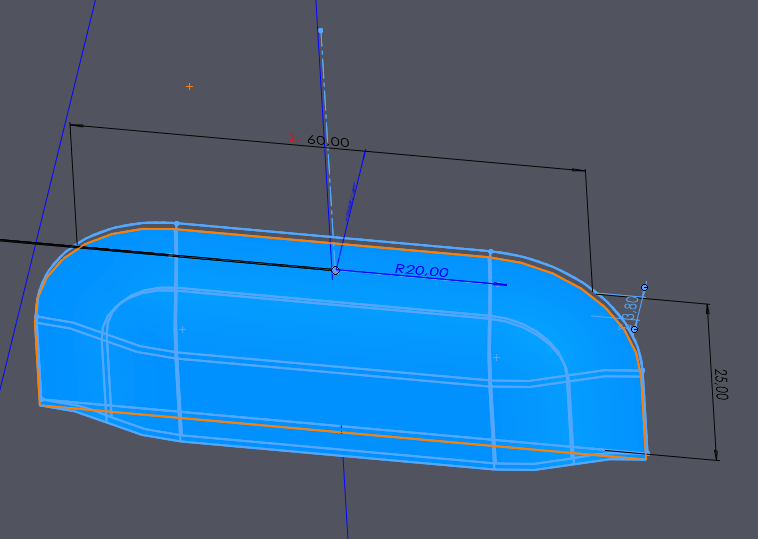
Je n’ai peut-être pas compris la question, mais je n’ai aucun problème pour modifier les dimensions de la forme emboutie depuis la pièce.
Y compris en utilisant des équations.
A noter que sur mon PC, le fichier de l’outil se trouve dans un dossier accessible en lecture/écriture… Est-ce là l’origine du problème ?
@m_blt
Je viens de regarder votre vidéo
LE problème de la mise à jour n’est pas sur l’outil en lui-même, mais quand l’outil est utilisé dans une pièce.
LÀ j’avais un problème de mise à jour
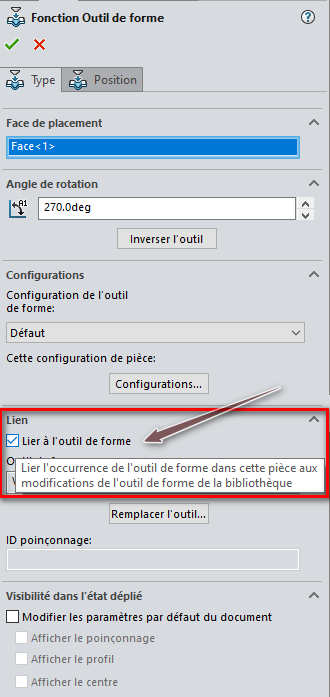
=> Si c’est coché : La pièce de bibliothèque est « Maitre » et les modifications apportées sur la pièce n’auront aucuns effet (Références externes Outil => Pièce).
=> Et / ou le fichier de l’outil (*.SLDFTP) est en lecture seule et vous ne pouvez donc pas modifier les valeurs…


 Merci!