I have 3 rooms in which I vary the radius of a balayage.
In order to avoid modifying the 3 parts one by one, I want to put them in an assembly so that I only enter the radius once, but the 3 parts must be updated.
How can I do this?
Method 1:
Draw the sketch with the radius in an assembly or in a part of this assembly, then link the sketches of the 3 parts to this sketch (skeleton method)
Method 2:
Make the 1st part then in the other 2 of the assembly, from the assembly edit the dimension equal and go find the 1st radius side of the 1st part (and it is this that will drive the suibante).
Edit for method 2, possibility also to create a variable in the assembly driving the other 3 sides as well.
1 Like
Hello;
Wouldn't it be " simpler " to do a material removal by scanning directly in the assembly with the " Propagate the function to the parts " option?
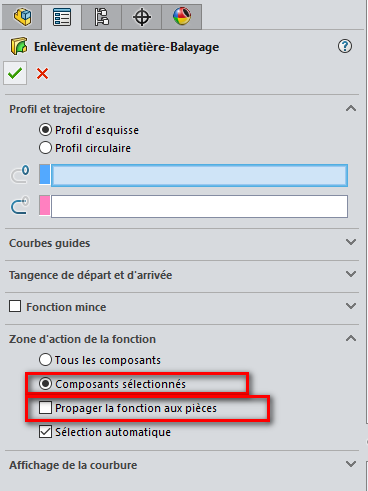
(Be careful to remember to uncheck " automatic selection").
The scan radius would be directly controllable in the assembly with a global variable.
It all depends on the geometry of the assembly ... but without screenshots...
@Maclane , there is nothing in the basic data to say that it is a removal of material.
Possibly 3 different profiles from the same radius?
1 Like
Hello
Like @sbadenis
-
In the skeleton you link the 3 pieces by linking the dimensions of one or 3 sketches.
In the assembly you link the 3 parts to the skeleton via external references, where you integrate the skeleton into the parts.
But if this skeleton method has not been used since the beginning of the project, it does not make much sense. -
The configuration if the parts are simple modeled in the same file the 3 parts.
-
Another possibility is to link a part family to an external Excel file, allowing you to manage your project by updating your part family each time the Excel is modified.
If you had a context, to understand your needs.
Wanting to link 3 rays doesn't make much sense except that the need. Modifying 3 dimensions is always easier and I consume energy for SolidWorks.