Hello,
I have problems with an assembly. I can't edit some parts in the assembly. I can edit it but there's no arrow to scroll down the functions.
Has anyone ever encountered this problem?
Thank you,
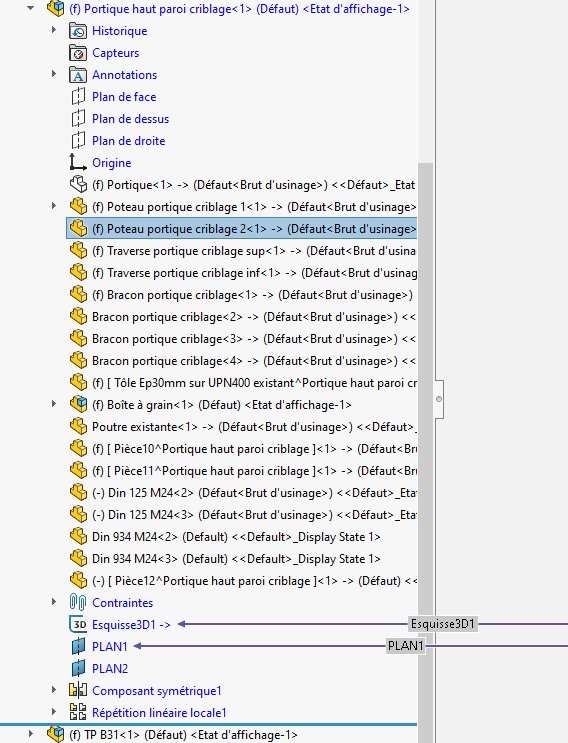
Hello,
I have problems with an assembly. I can't edit some parts in the assembly. I can edit it but there's no arrow to scroll down the functions.
Has anyone ever encountered this problem?
Thank you,
Hello cymin,
Just what small details would it be possible to have the Solidworks version,...
@+.
AR
Thank you for your feedback.
This is the 2025 SP5 version
Hello;
It is a symmetrical component that is used to improve the quality of the product.
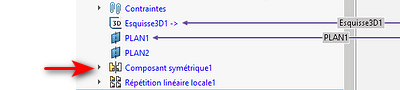
Use breadcrumbs to find the original component and edit it or alternatively, save as and make it independent.
Thank you for your feedback Maclane.
No, these are the parts I have sectioned in this photo where there is no arrow to unroll. If I open the assembly I can modify it but the problem is that the external references are in the main assembly.
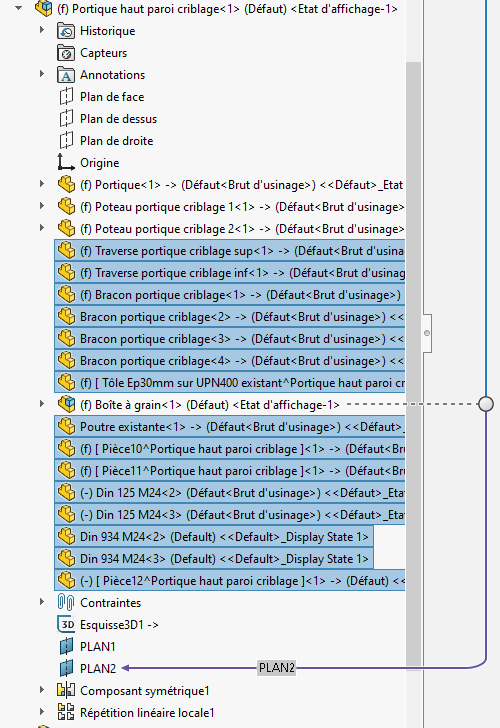
Sorry for the inconvenience, I just found it by chance.
I think it's a bug after isolating parts in the assembly. I just hid the pieces and then showed them and the drop-down arrow reappeared...
In your place, I'll get rid of external references, or at least lock them (if it's possible)
This kind of problem is very similar to those posed by imported components with the " 3D interconnect enabled "...
Thank you for your time.