Bonjour à tous,
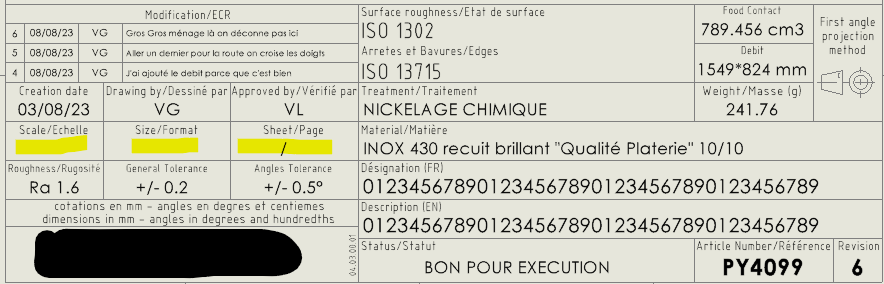
Je travaille dans une équipe de 6 dessinateurs projeteurs et on est tous sous SW avec PDM. On est tous paramétrés de la même manière. Il y a un an environ, j’ai changé de PC et depuis la réinstallation du pack SW+PSM, lorsque je créé un plan ou que c’est moi qui valide un plan (passage attente de validation > Bon Pour Execution) je perds systématiquement les 3 infos du cartouches : Echelle / Format / Page. Si j’ouvre un plan Bon Pour Execution dans SW, les 3 infos sont là et disparaissent une demie seconde après l’ouverture du plan.
Si je fais valider le plan par un collègue, ces 3 informations reviennent. Elles ne sont certes pas essentielles à la compréhension du plan mais c’est quand même important de les avoir surtout pour des fournisseurs qui ont besoin de précision. Du coup je ne valide plus de plan et ça peut devenir problématique durant des périodes où personne d’autre ne peut valider.
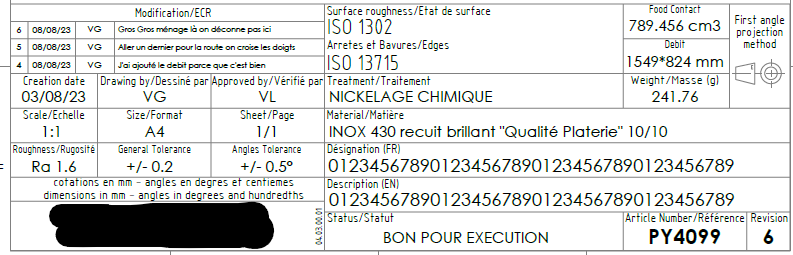
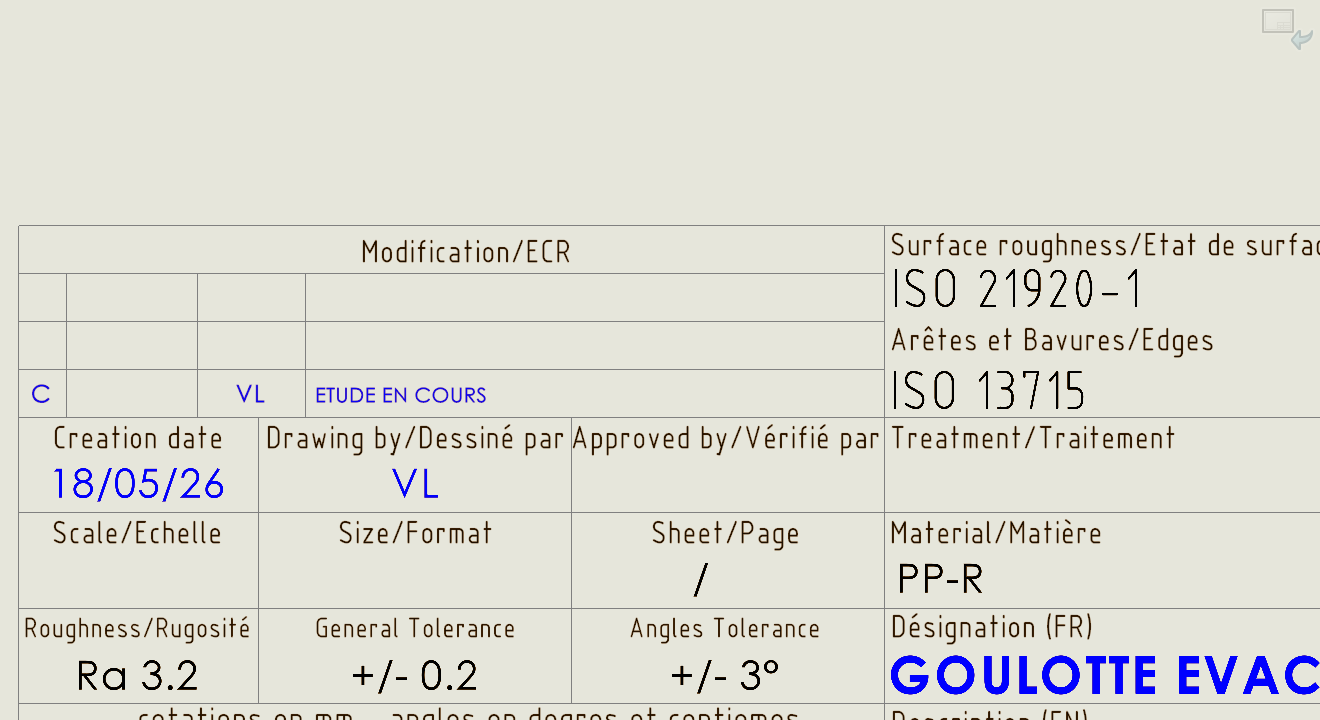
Voici le cartouche d’une pièce test en pdf validée par un collègue
Le même cartouche depuis le plan ouvert dans SW avec mon PC
J’ai bien vérifié les liens des templates cartouches et j’ai les mêmes que mes collègues. On pense qu’il y a un conflit avec la langue car mon SW a été installé en anglais et d’après la société IT engagée par mon employeur - qui a fait l’installation - on ne peut pas changer la langue après coup, il faudrait réinstaller SW entièrement ainsi que le PDM (une demi journée à distance). Je précise également que je ne peux rien faire de moi-même niveau installation software car tout est soumis à un mdp admin uniquement utilisable par un responsable IT de mon employeur.
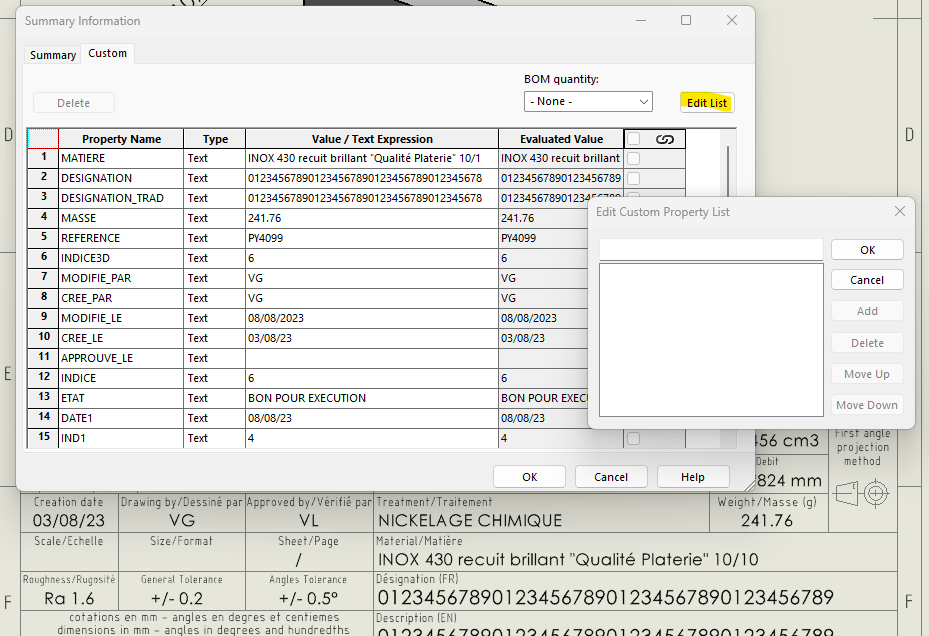
Aussi, en vérifiant les paramètres du plan dans custom, les lignes Echelle / Format / Page n’apparaissent pas et il est impossible d’en ajouter en faisant Edit List.
Je ne sais plus où chercher et c’est vraiment très spécifique j’ai l’impression, si quelqu’un sait, merci d’avance 
Bonjour,
Il faut commencer par voir ce que vous avez comme appel de propriété dans vos fond de plans.
Normalement ça devrait être ça pour l’échelle :
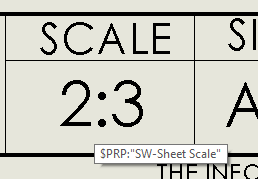
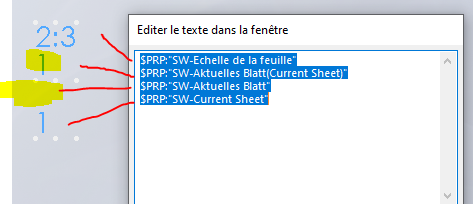
Nb : il faut « Editer le texte dans la fenetre » pour voir le $PRP:« SW-Sheet Scale » lors de l’édition
Vous avez peut être la traduction française $PRP:« SW-Echelle de la feuille » dans vos modèles de fond de plans.
Utiliser la version anglaise dans vos modèles devrait résoudre le pb pour vous (et ne devrait normalement pas avoir d’incidence pour vos collègues : faites un test sur une nouvelle version de votre fond de plan et faites un rollback si cela met le bazar pour vos collègues).
$PRP:« SW-Taille du fond de plan(Sheet Format Size) » →
$PRP:« SW-Sheet Format Size »
et
$PRP:« SW-Feuille actuelle(Current Sheet) »/$PRP:« SW-Nbre total de feuilles(Total Sheets) » →
$PRP:« SW-Current Sheet »/$PRP:« SW-Total Sheets »
ATTENTION : l’éditeur Visiativ a modifié mes guillemets
Nb : je pense que ce n’est pas pour rien que SW a rajouté le texte de base en anglais entre parenthèse sur les versions récentes ( 2020 l’a déjà) : pouvoir facilement modifier le nom de l’appel de propriété afin d’avoir un truc universel simplement. Le truc ‹ rigolo › c’est que l’aide française SW2020 a gardé la vieille syntaxe : sans la traduction entre parenthèse.
La traduction entre parenthèse permet bien d’avoir un truc universel (ligne 2 ci dessous dans l’image qui fonctionne alors que la 3 buggue).
Un exemple avec l’allemand (non installé sur mon poste)
2 « J'aime »
Refaites un modèle de plan de votre coté en recreant ces formules qui ne fonctionnent pas, donnez les à vos collègues et voyez si ils les lisent
Merci beaucoup à vous deux pour ces précieuses infos. C’est déjà incroyable pour moi que vous ayez mis le doigt direct sur le problème.
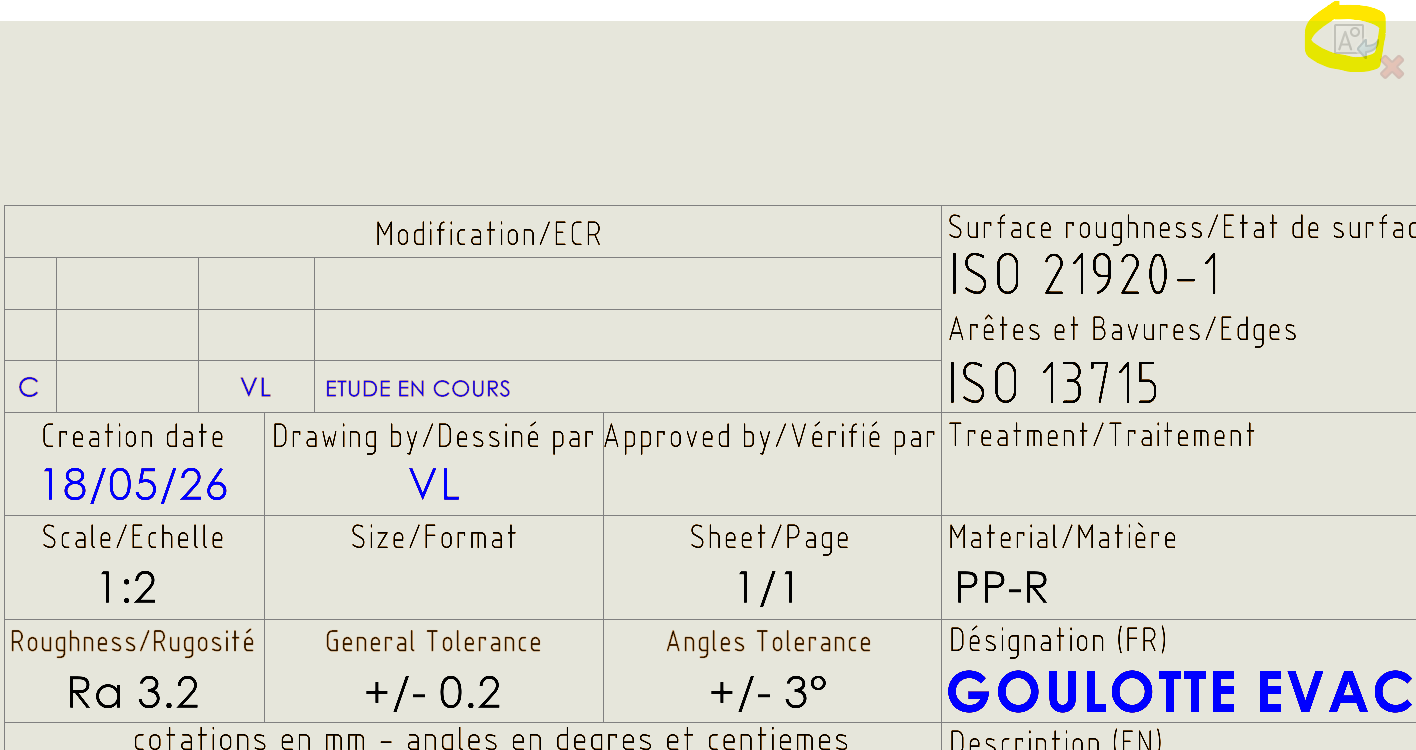
Après avoir atteint la zone d’édition (non sans mal car elle est vide et il faut la trouver), j’ai pu modifier l’appel de propriété en ajoutant le texte en anglais entre parenthèses. Ca fonctionne tant que je ne sors pas de l’édition de fond de plan. Dès que je sors, les infos disparaissent. C’est aussi pour cette raison qu’on ne voit pas l’info Size/Format ci-dessous car il est sur un autre bloc et donc idem, si je ne suis pas dedans l’info n’apparait pas.
Mon collègue à modifié le template source de la même manière et ça donne exactement le même résultat : j’ouvre un plan au hasard, je mets à jour le lien du template (ici A3), les infos apparaissent seulement si on va dans le fond de plan puis qu’on clique sur Edit.
J’ai fait des Ctrl+B et Ctrl+Q, enregistré le plan, archivé, fermé, rouvert puis extrait à nouveau. Ca ne veut pas.
En faisant nouveau plan c’est la même chose.
Il semblerait qu’il y ait autre chose qui bloque.
Bonjour,
Jamais eu ce problème, quelle version de SW?
Juste une précision, quand vous dites bloc. La note est dans un bloc ?
Il me semble qu’elles ne sont pas recalculées automatiquement donc il faut mettre la note directement dans le fond de plan
2 « J'aime »
@Cyril_f
C’est peut être bien la source du problème car chez nous les notes sont bien dans le fond de plan en direct (et pas dans un bloc qui serait sur le fond de plan).
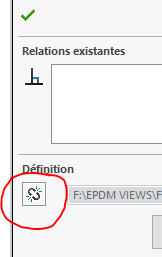
Et moi qui voulais mettre des blocs liés à ma bibliothèque dans mes fonds de plan via cette case à cocher dont je viens de prendre connaissance pour pouvoir plus facilement faire une maj de cartouche 
1 « J'aime »
De mon côté, le cartouche est un bloc inséré dans le fond de plan avec la liaison conservé de sorte à ce que tous les plans pris en édition se mette à jour automatiquement si le bloc cartouche est modifié.
Jamais eu de soucis pour la mise à jour des notes contenues dans le bloc.
L’important est de définir les attributs !!
1 « J'aime »
Merci @Silver_Surfer
Donc pour toi les blocs (contenant des $PRP) fonctionnent bien dans les fond de plans et ton fond de plan se met à jour automatiquement lors de l’ouverture si jamais il a été modifié entre le moment de création du plan et sa réouverture ?
Je me disais que c’était une bonne idée de mettre des blocs liés au fichier dans les fonds de plan et une confirmation de ta part serait la bienvenue.
Merci pour la preuve (et pour les galons de vérificateurs  )
)
1 « J'aime »
Tout ça ne résout pas le problème de l’ami @Valentin_Unic_SA …
Est-ce que vos informations format, échelle et pages n/n appelle des valeurs de propriété et ses propriétés appellent des propriétés par défaut (SW-…) ?
Exemple :
Dans les propriétés de la mise en plan : Format = $PRP:« Taille du fond de plan(Sheet Format Size) »
Dans le cartouche : Note = $PRP:« Format »
Si oui, vérifier la présence des propriétés dans le fichier après ouverture.
1 « J'aime »
Bonjour;
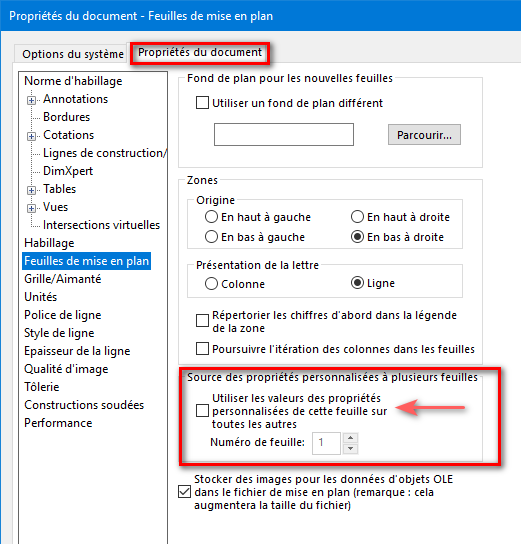
Ne serait-ce pas lié aux réglages des Feuilles de mises en plan ?
Bonjour à tous,
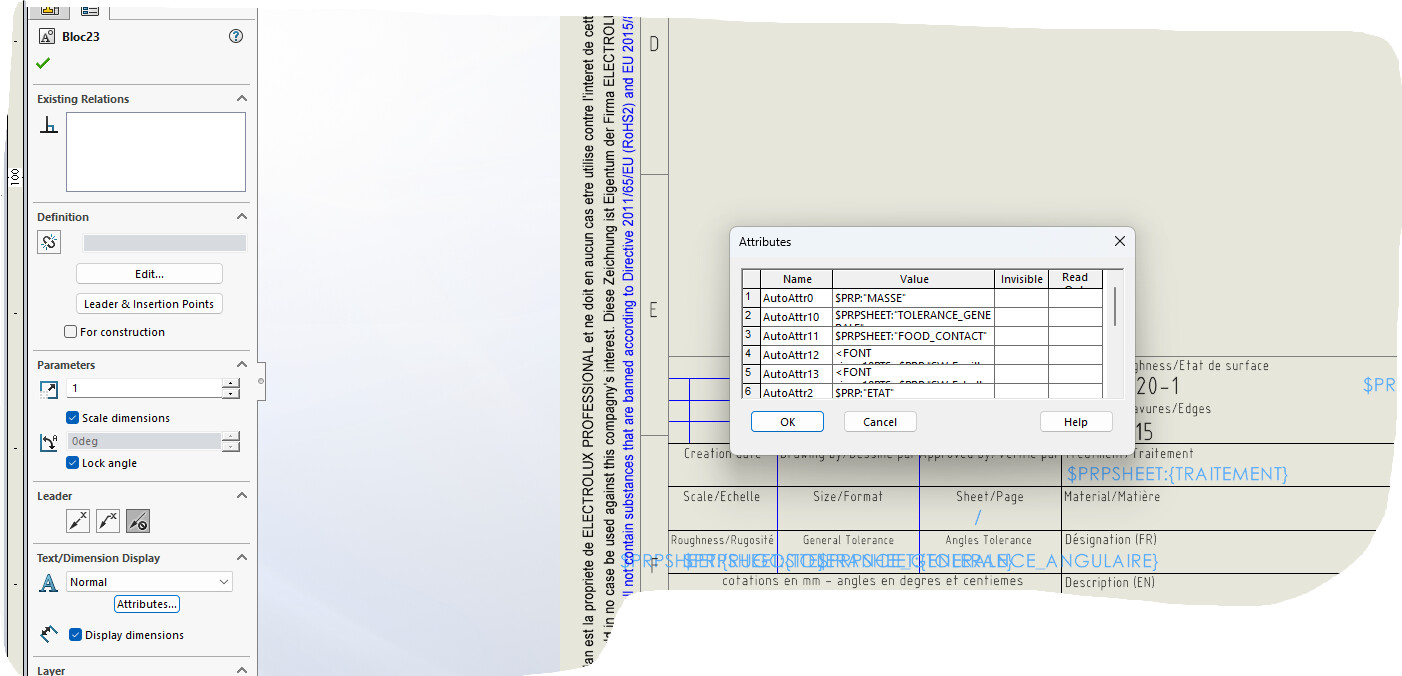
Avec mon collègue on a essayé tous vos conseils et rien n’a fonctionné, jusqu’à ce que j’essaie un peu par hasard la colonne de gauche « Attributes » dans laquelle se retrouvent en fait les appels de propriété : j’avais beau modifier ces propriétés dans « éditer le texte dans la fenêtre », elles n’étaient pas modifiées dans les « attributes ». Du coup j’ai appliqué les textes en anglais entre parenthèses et ça a fonctionné.
J’ai modifié chaque attribute pour chaque bloc concerné, ainsi que pour chaque template de cartouche sur notre serveur : c’est un succès ! Voici quelques images pour illustrer la démarche, si ça peut aider d’autres personnes
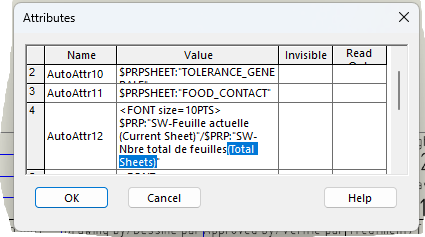
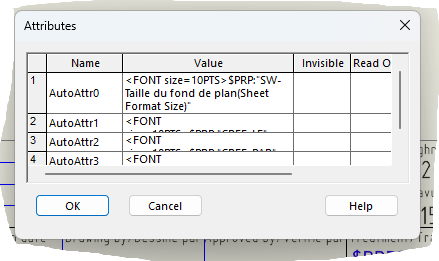
Voilà problème résolu, et on est d’accord ya rien de logique ou bien pensé dans le fonctionnement de ce bazard O_o
C’est pourtant ce que j’avais dit :
3 « J'aime »
En effet, c’est passé au dessus car il y a eu un échange comportant une vidéo qui traitait une question qui semblait plus ciblée pour froussel, donc j’y ai moins prêté attention. De plus, définir les attributs sans vraiment expliquer qu’ils peuvent également se trouver ailleurs que dans l’édition dans la fenêtre, c’est pas super clair. L’utilisation de capture d’écran est vraiment plus parlant. Mais merci d’avoir pris le temps d’aider, on s’est juste mal compris