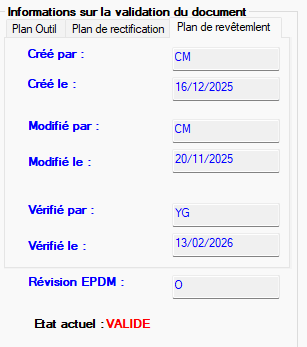
I'm having a problem with the commit variables in my SolidWorks " phase plans." On the @ configuration, the variables are correctly considered:
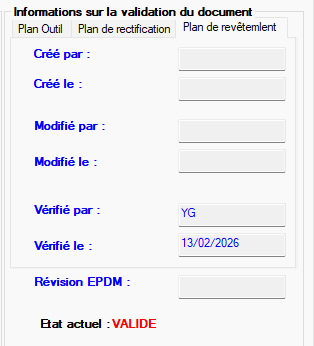
On the other hand, in another configuration (same room), the variables do not update:
The strangest thing is that the other configurations work fine. In the Variable Administrator, the options "all configurations" and "update all configurations" are checked.
The problem appears randomly and does not only concern the COATING part.
If you implemented EPDM a long time ago (around 2014 or earlier), it was effectively a mess between the parts related properties (@ tab) and the configurations related properties. I had made specific data cards to prevent the filling of parts data in the configs and vice versa.
Pretty hard to fix if you've had EPDM for a long time with a lot of inputs.
A priori if you have installed EPDM recently this management has been improved (but it is possible that it is buggy or that your data maps are incorrectly configured).
Thank you for this information, indeed we have had our PDM since about 2015. But today, we are with the PDM 2022 and we still have the problem.
When you say "Pretty hard to fix if you've had EPDM for a long time with a lot of inputs.", are you implying the number of variables in the data map? When you say " that your data maps are incorrectly configured ", are there other parameters than the two I mentioned?
You have to go and configure the data cards in EPDM admin mode. It's the kind of thing we do at the EPDM installation and then we don't touch it anymore.
If all your EPDM entries since 2015 are incorrectly populated, it will be very difficult to update them (changing the data map will not update the EPDM SQL database or the 3D files to correct all this).
If you really want to correct, try to see if the problem is general or only exists for one or 2 files (unlikely if the cards are well configured: it will be either all or nothing).
Your screenshots are from the EPDM user mode, not the admin datamap editor (and all its bunch of esoteric settings/options for each field in the datamap)
Thank you. I only encounter this problem on certain files, so it's not a general case. And yes precisely I am thinking of contacting Visiativ directly to find a solution. Hoping that this will solve the situation.
Hello, From memory, it happens from time to time that Solidworks fails to write to the properties of the files. As a result, the card's mechanisms to propagate in all configurations cannot work properly.
I had the case recently, indeed a file card configuration problem. In the properties of the edit box, the " Update all configurations " box was not checked. In practice, this was a problem on 3D with several configurations, and 2D with several sheets.
In my case, I had thousands of files to fix. I processed it with DataRecovery, which allows you to process batches of files in large numbers, and which has the good taste to update the SQL database.
Thank you for your feedback. I just checked: all the variables in this control area are checked on "Update all configurations", except for two that are hidden. Do you think that the fact that only two variables are unchecked could disturb the others in this area? Because elsewhere in the data map, everything works fine.
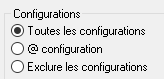
In the same ' edit box property', when you select one of the fields on the file card, there is a Configurations option to select:
If not, are there any differences in the settings of the variables? In your image, we can see that the problem does not occur for the variable ' verified by' and ' verified on '. We should see if these variables are declared in the same way, especially at the level of the $PRPSHEET and CustomProperty attributes.