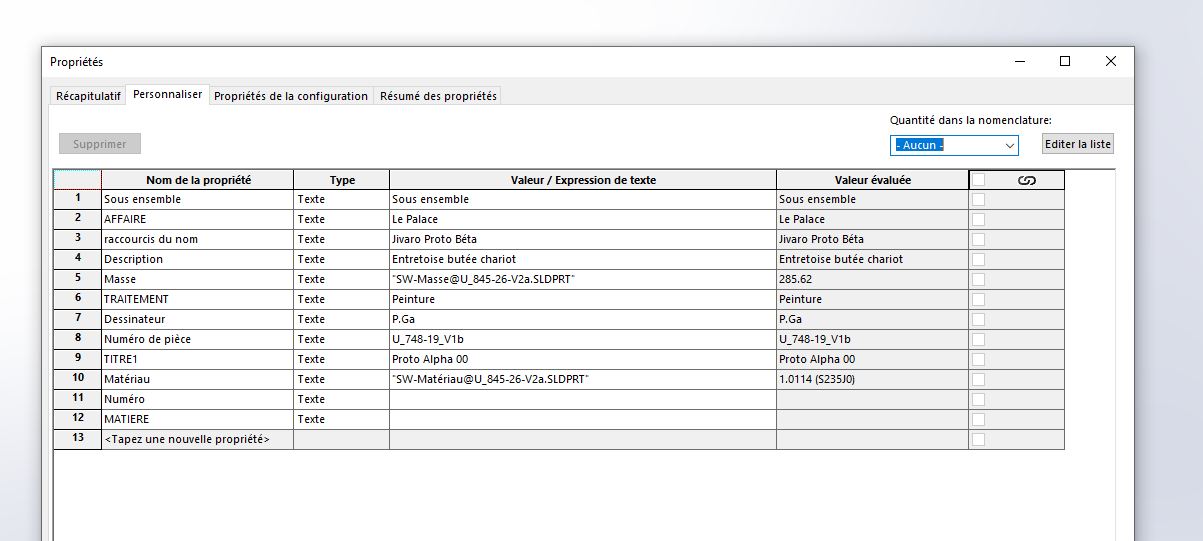
Hello I never understood anything about the sheet system for MEPs it does what it wants GRrrrrrrr Our friend @stefbeno had helped me to make the models for the MEP but he doesn't come to the forum anymore ( ‹ SNIF ›)
In short, every time I create a part, I have to recreate the data contained in the attached image. For every room
Also, even though I ask him to update the basemaps, he doesn't give a damn.
Ask how to retrieve the information from the image and that it appears every time I create a piece or here how to update a posteriori.
Hello, First, the custom properties must be in the model part (.prtdot). To check (or to create them...), start a new room and check or create the properties you need. Then re-register your model. With each new room, all the properties will be present but empty... Secondly, if you have MyCadTools, there is BatchProperty which allows you to copy the properties of a part to a multitude of other parts. Without BatchProperty it will be a bit more tedious:
Create the first part of the same project
Fill in all properties
have it saved as a copy and give it the name of the second piece of the same project
open this part, change the properties that need to be changed (part ref...)