Bonjour à tous,
Peut-on savoir si une pièce fait partie d’un ou plusieurs assemblage ? sans ouvrir chaque assemblage… (je n’ai pas de PDM)
Merci
Bonjour à tous,
Peut-on savoir si une pièce fait partie d’un ou plusieurs assemblage ? sans ouvrir chaque assemblage… (je n’ai pas de PDM)
Merci
Je viens de regarder et non impossible ou alors je ne trouve pas l’astuce…
Bonjour,
Si vous avez les outils MyCad, il y a WhereUsed qui fait ce travail.
Bon courage.
Bonjour;
Si l’étendue des recherches (quantité des assemblages à contrôler) n’est pas trop importante, vous pouvez renommer ou déplacer le fichier de votre pièce et ouvrir vos assemblages, Solidworks affichera un message d’erreur à l’ouverture comme quoi il ne trouve plus son composant…
=> Oui c’est la méthode « bourrin ». (mais elle reste efficace)
Pas de méthode native.
Le seul moyen comme @a_eriaud c’est une solution Visiativ ou méthode @Maclane mais si beaucoup d’assemblage impossible de tout ouvrir et donc de connaitre l’utilisation d’une pièce.
Malheureusement je ne l’ai pas…
Bonjour,
Clic droit sur le fichier dont tu veux connaitre les dépendances puis Solidworks/emplacement des fichiers
Tu mets tes emplacements de recherches :
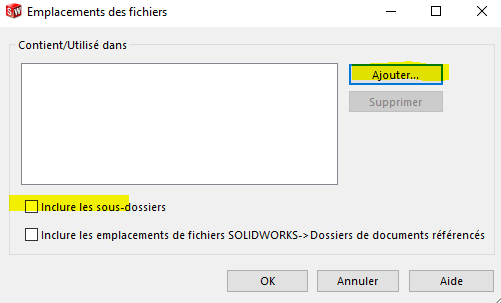
Et tu lances
Un ou deux jours après tu devrais avoir un résultat… (L’outil va scanner TOUS tes assemblages et MEP contenus dans tes dossiers pour voir si ton document et utilisé ou non).
C’est un des intérêts d’EPDM : tous les liens d’utilisations sont stockés dans une base de données donc tu obtiens le résultat en quelques secondes vs quelques heures/jours/semaines
Bonjour,
Comment sait on si la recherche a bien été lancé ?
Merci
Bonjour @Anthony_PITON ,
Tu ajoutes tes emplacements de recherche comme l’a expliqué @froussel.
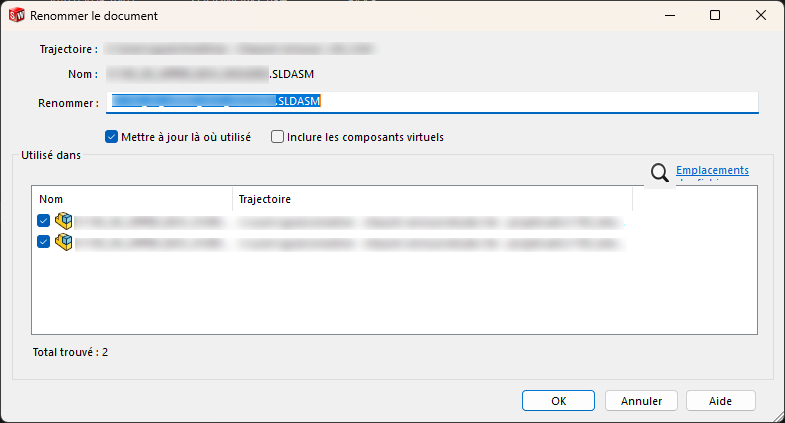
Ensuite, tu fais un clic droit sur ton fichier SolidWorks : SOLIDWORKS → Renommer (ou Déplacer)
Cette fenêtre apparaît, et c’est ici que tu retrouves les liens des assemblages utilisés :
++
Nicolas