Bonjour,
Je reviens à un problème de pré-remplissage des propriétés des corps MS à partir des bibliothèques.
Nous créons des PRT de mécano-soudés en utilisant les corps MS et leur propriétés pour faire des plans de chacun des débits et nomenclature pour les achats.
Ces corps MS sont créés de 3 façons :
1- des fonctions classiques (extrusion, enlèvement de matières perçages) pour des débits type laser. Il peut aussi y avoir des fonctions de tolerie pour des pièces réalisées en laser+pliage
2- des fonctions « Elément mécano-soudés » pour touts les profilés type H, I, etc. Ils sont faits à partir des fichiers sldlfp
3- des fonctions via la bibliothèque de conception pour des fonctions regroupées en bibliothèque.
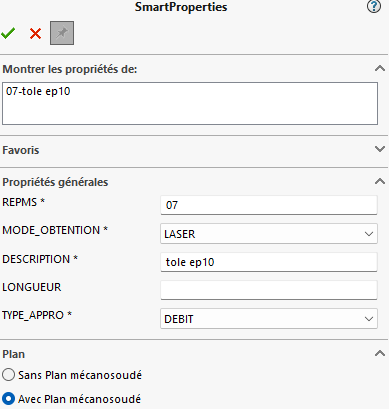
On crée donc la PRT en 3D et on rempli les propriétés des coprs MS avec Smart Properties
Pour le 1er cas, on, on doit tout remplir à chaque fois. Normal on crée à partir de « rien »
Pour le 2ème cas, les config des fichiers sldlfp contiennent des propriétés que l’on va retrouver automatiquement dans le corps MS, ça c’est tip-top !
Bonjour;
Cela me semble être un comportement normal des Smartproperties, il préféré écrire des propriétés plutôt que les lires.
Et à moins que les propriétés soient déjà incluses dans vos modèles de documents (les propriétées hein, pas les valeurs) il est normal que, sans lancer les Smartproperties, elles ne se créent pas dans vos documents Solidworks…
Attention dans le 2ème cas Description (pour la mécano soudées) dans le 3ème DESCRIPTION (pour la fonction) pour Smartproperties c’est pas la même chose (Et dans le smartpropertie (DESCRIPTION).
Ton problème ne viendrais pas de la?
Sinon on ne voit pas comment tu récupère la propriété Description du mécanosoudées dans ta propriété DESCRIPTION du smart.
Bonjour,
Merci de vos réactions
Je précise que :
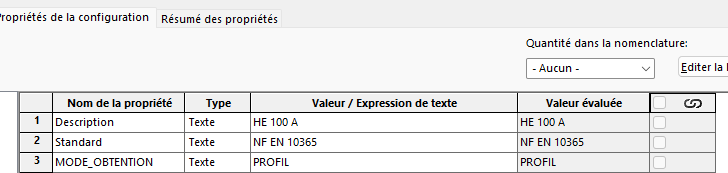
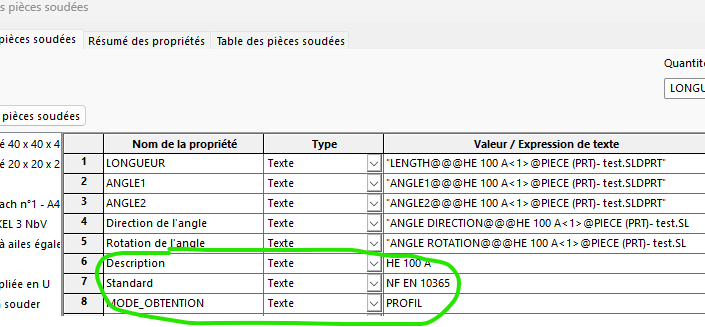
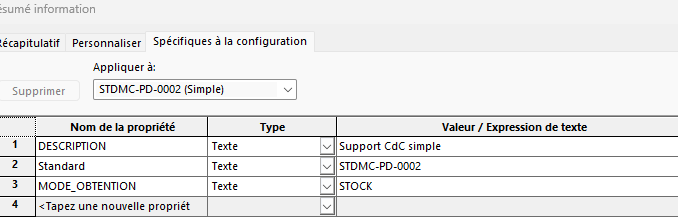
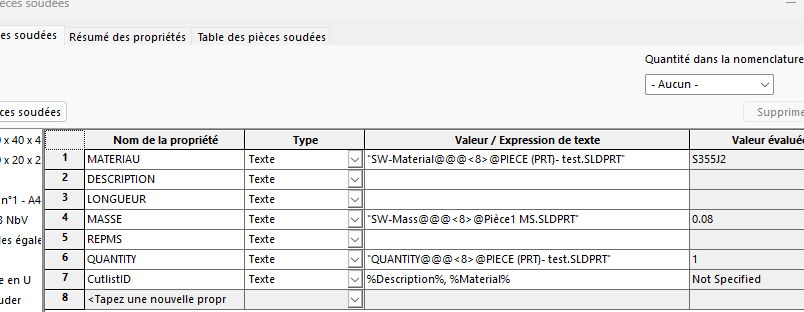
Dans le cas 2, le fichier sldlfp qui contient l’esquisse des profilés a dans ses propriétés (liées à la config) les propriétés montrées dans la vue : Description (HEA100), Standard (NF EN…), et MODE_OBTENTION.
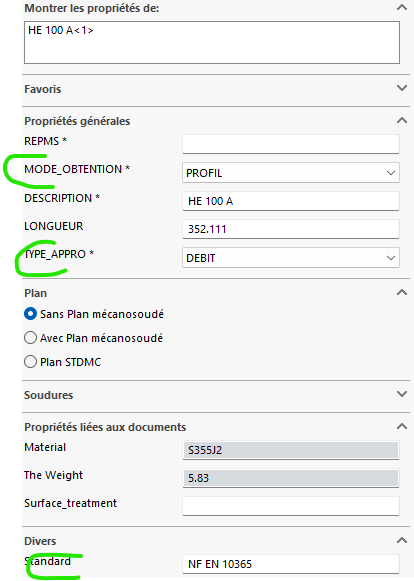
Lors de l’utilisation de la fonction « Elément MS », le corps MS qui est crée automatiquement, contient les champs Description, Standard et MODE_OBT.) et ils sont remplis avec les valeurs correspondantes.
le Smart ne fait que relire ces valeurs et on peut rentrer les autres valeurs : REPMS, le choix si plan ou pas, etc
et SW ne fait de différence entre un nom de propriété en majuscule ou minuscule
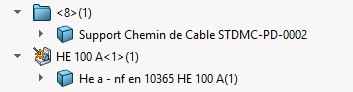
Il s’agit d’un comportement normal : l’insertion d’une fonction de bibliothèque ne fonctionne pas de la même façon que la fonction élément mécano-soudé dans le sens où elle n’amène avec elle aucune des propriétés du fichier.
La fonction Elément mécano-soudé, va, elle, insérer en tant que prorpiété de l’élément soudé, les propriétés du fichier qui défini le profil.
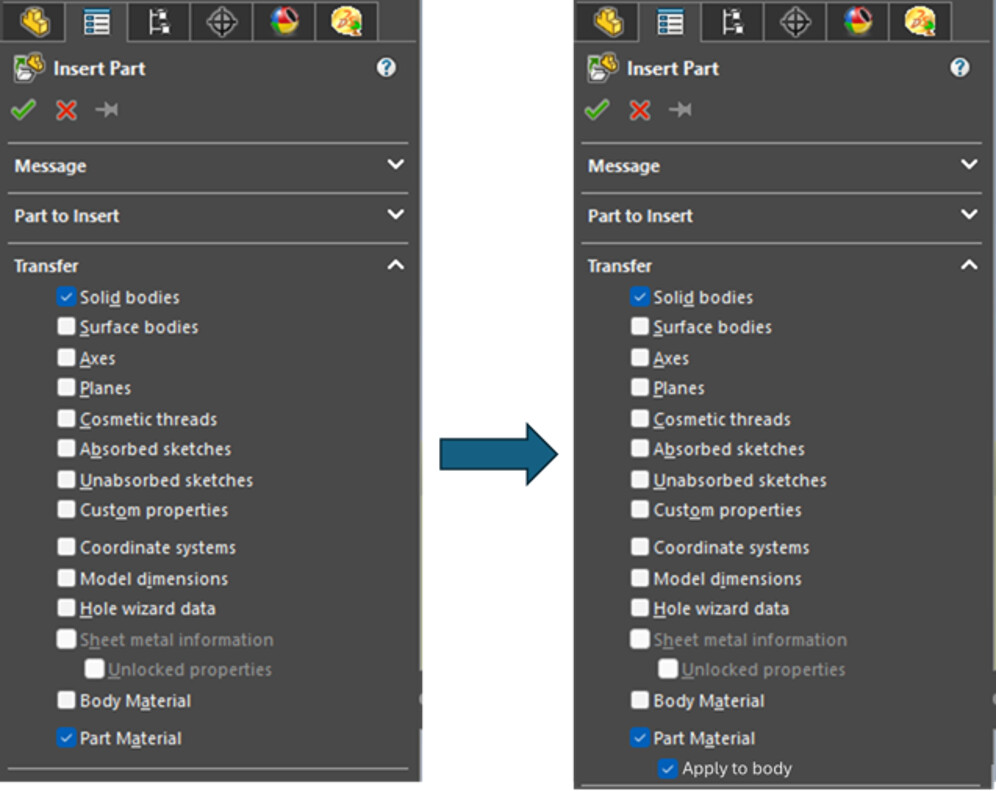
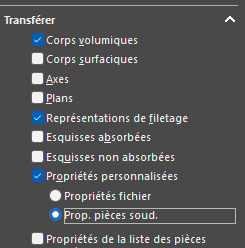
On retrouve ce comportement dans la fonction Insérer pièce où il est possible de choisir ,dans les éléments à transférer, les propriétés personnalisées, soit en tant que propriété perso du fichier de destination, soit en tant que propriété de l’élément soudé :
Par conséquent, la seule façon d’obtenir ce que vous voulez, est de gérer par exemple votre Support Chemin de Cable comme un composant, et de l’insérer via la fonction Insérer pièce dans votre construction soudé en choisissant ces options de transfert.
Ce défaut dans les fonctions de bibliothèque fait l’objet d’une demande d’amélioration depuis de nombreuses années.
Merci pour le retour. J’avais espoir d’avoir loupé qqch, mais c’est effectivement ce que je craignais. Y-a-t’il une possibilité de mettre une mettre une pièce de plus pour appuyer la demande ?
Oui bien sûr.
Créez votre compte et connectez-vous à la communauté public SOLIDWORKS Enhancement Ideas sur la plateforme 3DSwym de Dassault Système : ICI
Recherchez votre idée (ou Enhancement Request, ER) : vous n’êtes peut-être pas le seul à y avoir pensé, c’est pourquoi il vous faut vérifier qu’elle n’a pas déjà été soumise.
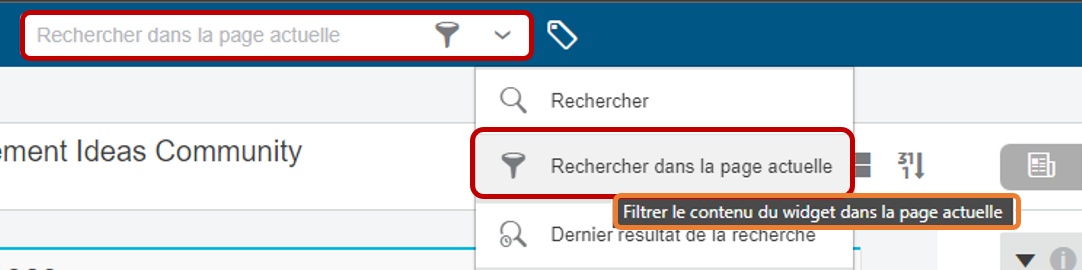
Utilisez la Recherche dans la page actuelle avec des mots-clés en anglais.
Si vous la trouvez, vous pouvez voter pour cette idée en ajoutant un « LIKE » .
Si je peux néanmoins me permettre de préciser 2-3 choses à propos de ce comportement et de la demande d’amélioration qui en a résulté… et qui a suscité de virulents débats dans certains SWUG.
Comme je l’ai préciser, il est tout a fait possible de récupérer les propriétés d’un fichier en tant que propriété d’un élément mécano-soudé via la fonction Insérer pièce .
Si cette solution ne satisfait pas un grand nombre d’utilisateurs c’est pour les raisons suivantes :
On génère une référence externe… ces fameux liens qui sont diaboliser par une majorité (dont je ne fais pas parti !)
Cette fonction ne suffit pas à elle-même : il faut bien souvent utiliser des fonctions complémentaire en amont et/ou en aval, ne serait-ce que pour placer le corps de pièce inséré à l’emplacement voulut.
Le remplacement de la référence se fait à l’ouverture du document, pas depuis le PropertyManager de la fonction d’insertion.
Par contre, elle présente un avantage non négligeable : les cas d’emplois.
Il est possible dans un PDM de visualiser les dérivations.
Et nous pouvons inverser avantage et inconvénient pour les fonctions de bibliothèque !
Avantages :
Pas de références externes créée, puis qu’on recopie les des fonctions (quoique… il faut quand même faire attention à la construction)
Se suffit à elle même
Du moment qu’elle n’est pas dissoute, il très facile de supprimer et remplacer par une autre fonction.
Inconvénients:
Pas d’import de propriétés
Pas de visibilité des cas d’emplois.
On est donc à la croisée des chemins : Améliorer la fonction d’insertion de pièce ou améliorer les fonctions de bibliothèque.
Personnellement, je suis plus pour une amélioration de la fonction d’insertion de pièce
(je n’ai pas développé de névrose phobique à l’encontre des référence externes) :
Rendre possible l’utilisation des fonctions intelligente d’une pièce quand elle est insérée dans une autre.
Rendre possible la modification de la référence depuis le PropertyManager de la fonction
Pouvoir récupérer le matériau de la pièce insérer au niveau du corps dans la pièce dérivée.
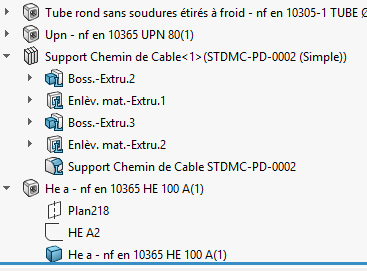
Je me demande si ce n’est pas possible de récupérer les informations des mécanosoudés si on « Décompose » la fonction de bibliotheque dans l’arbre de construction…(clic droit sur fonction => Décomposer).
Je n’ai pas testé mais cela vaut le coup d’essayer non ?
Bonjour,
Merci pour cette réponse claire et posée
Effectivement, sans être extrémiste, j’évite les références externes. Mais un assemblage, ou une mise en plan, c’est forcément un fichier avec des références externes ! Donc tout n’est question que de compromis. Il faut poser le curseur au bon endroit.
L’inconvénient que je vois aux pièces insérées, c’est les versions : si l’on doit modifier une pièce de bibliothèque, on modifie tout ce qui est dessous… Alors oui le PDM peut voir les cas d’emploi, et on devrait avoir les éléments pour agir en conséquence.
Mais donner l’option de pouvoir transférer les propriétés répondrait à certaines demandes, sans pénaliser les autres utilisateurs.
Faire en sorte que l’esquisse transférée soit complètement définie<
J’en ai parlé dans un sujet, hors sujet ici
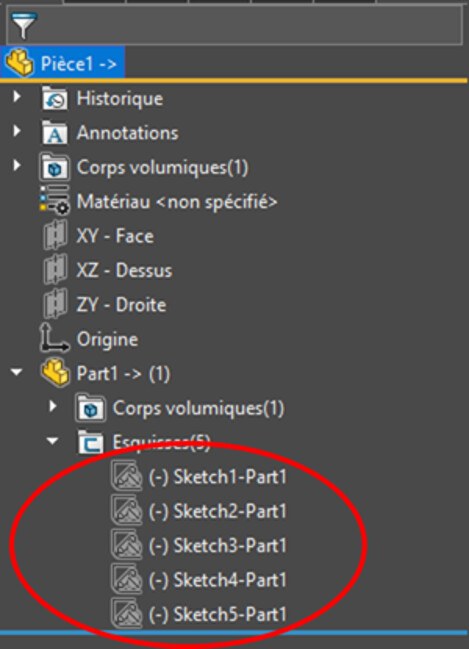
Les pièces insérer de cette manière et les esquisses notamment, completement contrainte « ou completement défini » dans la pièce dérivée, lors de l’insertion, perdent toutes contraintes et cotes.
D’ailleur (Il était question d’un bug??), si vous utilisez directement cette esquisse dans une extrusion (ce qui n’est pas le cas ici) et lors de l’édition de cette fonction vous pouvez jouer avec cette esquisse. Elle n’est plus contrainte !
Préter une attention particulière à cette méthode.
Bonjour,
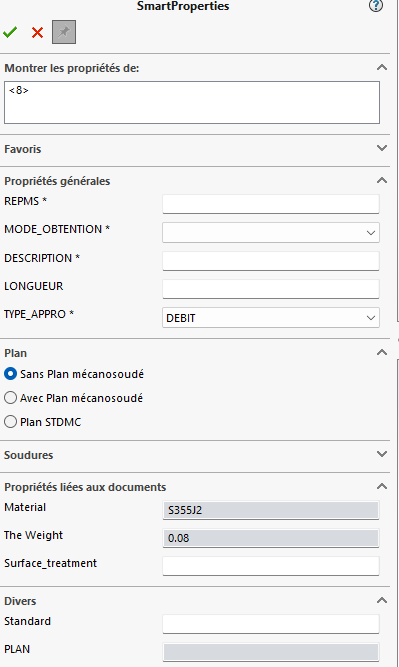
J’ai essayé : on décompose la fonction de bibliothèque en plusieurs fonctions de base, mais on n’a aucune propriété de plus dans les corps de la liste des pièces soudées.
 .
.
 .
.