Bonjour à tous,
Je me relance dans les scripts Dispatch.
Dans ma carte de donnée fichier, j’ai une variable PROJET.
A la création d’un fichier, la valeur de cette variable est héritée de la variable PROJET de la carte de donnée du dossier père.
Problème, les chef/fes de projet et les marketeux aiment bien changer de nom de projet en cours de développement…
Je cherche donc à écrire un script qui me permettrait de modifier la valeur d’une variable de carte de donnée de fichier.
Jusqu’ici, j’ai :
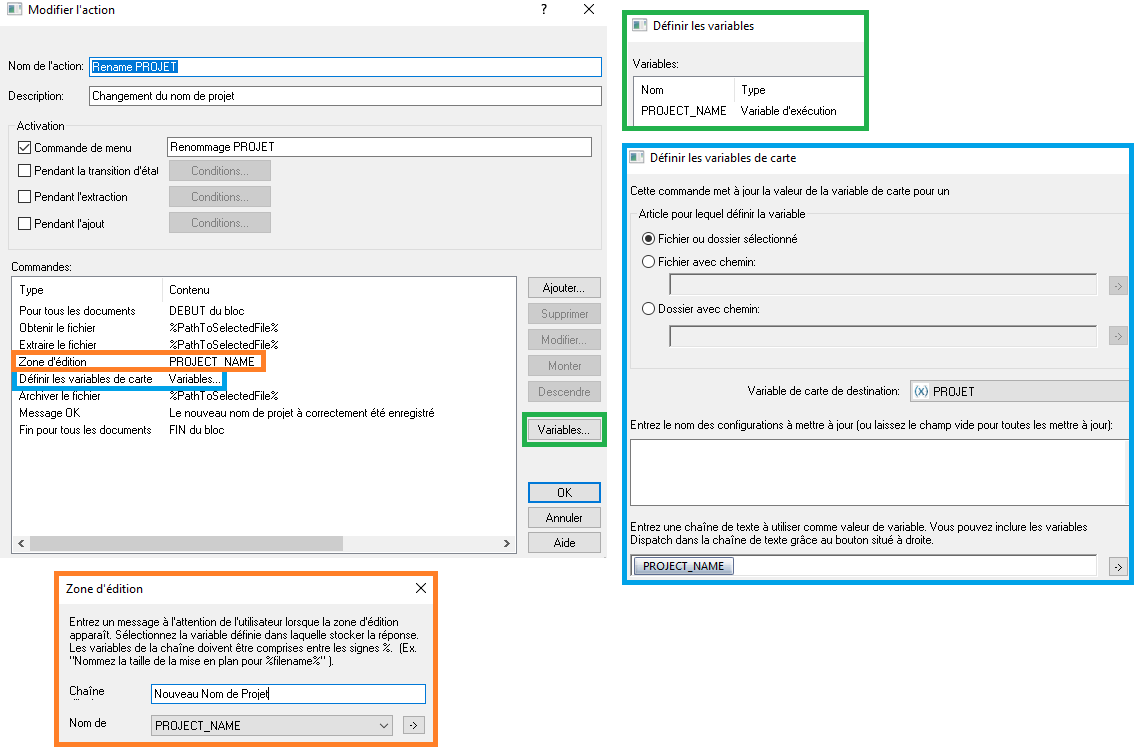
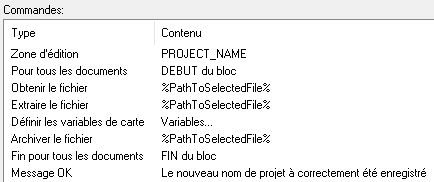
Pour tous le documents DEBUT du bloc
Obtenir le fichier %PathToSelectedFile%%NameOfSelectedFile%
Extraire le fichier %PathToSelectedFile%%NameOfSelectedFile%
Zone d’édition NEW_PROJECT_NAME
Définir les variables de carte Variables…
(.) Fichier ou dossier selectionné
Variable de la carte de destination = (X) PROJET
Variable Dispatch a utiliser comme valeur de variable = PROJECT_NAME
Archiver le fichier %PathToSelectedFile%%NameOfSelectedFile%
Message OK Renommage ok
Fin pour tous les documents FIN du bloc
En définition des variables dispatch :
PROJECT_NAME // type : Static String // Valeur : %NEW_PROJECT_NAME%
Ça me parait propre, sauf que ça coince dès la première étape. Je n’arrive pas à obtenir/extraire le fichier cible.
J’ai un message d’erreur : Erreur lors de l’obtention du fichier Le procédé a été exécuté avec succès, mais a retourné ‹ faux ›.
Est-ce que quelqu’un aurait une idée ?
Merci,
Jérôme
Config : SolidWorks 2023 SP3 / PDM 2023