Bonjour,
J’ai créé des annotations de soudure dans la 3D d’une part en utilisant la fonction « cordon de soudure ».
Au total il y a 360 cordons de soudure.
Je souhaite pouvoir récupérer ces annotations sur des vues de mise en plan.
Je sais le faire en utilisant la fonction « importer les objets du modèle ». Le problème est que les 360 annotations s’affichent.
Y a t il un moyen d’afficher en automatique uniquement les annotations liées aux cordons de soudure visible sur une vue de mise en plan (comme c’est possible de faire avec les côtes importées du modèle) ?
Ou, d’utiliser la fonction « symbole de soudure », de sélectionner un cordon de soudure sur une vue de mise en plan et de récupérer automatiquement l’annotation renseignée dans la 3D ?
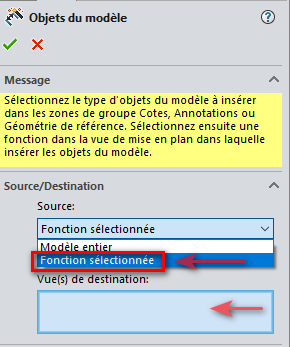
Dans les options disponibles à l’import des objet du modèle, il est possible de ne choisir « que » la fonction sélectionnée et de ne les importer « que » dans une vue sélectionnée…
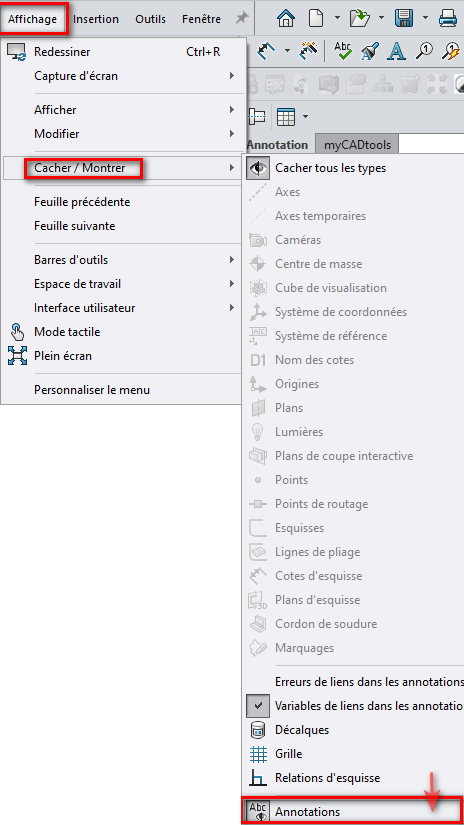
Une seconde méthode consiste à tout importer (via les objet du modèle) puis de toutes les cacher pour ne re-montrer uniquement les annotations voulues.
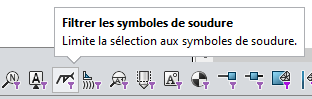
le Raccourcis « F5 » permet d’activer les filtres de sélection:
=> Sélection symboles et annotations de soudures
CTRL+A sur la feuille => clic droit => Cacher
Puis dans « Affichage » / « Cacher-Montrer » / => Annotation
Je comprends… Les vues d’annotation, c’est un peu comme les références externes : il faut s’y confronter dès le plus jeune âge au risque de développer une névrose phobique.
C’est dingue je suis infoutu de trouver un tuto vidéo en français ou anglais sur le sujet (la seule que j’ai trouvé est faite par un indien et entre l’accent et la mauvaise qualité du micro ça fait trop saigner les oreilles…).
L’aide SW étant au mieux laconique et pas très claire sur ce sujet.