Hello, I created solder annotations in the 3D on the one hand using the " solder seam" function. In total there are 360 weld seams. I want to be able to retrieve these annotations on drawing views. I know how to do this using the " import objects from the template " function. The problem is that all 360 annotations are displayed. Is there a way to automatically display only the annotations related to the weld seams visible on a drawing view (as is possible with the dimensions imported from the model)? Or to use the " weld symbol" function, to select a weld bead on a drawing view and automatically retrieve the annotation entered in the 3D?
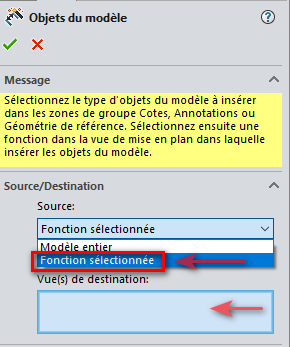
In the options available for importing objects from the model, it is possible to choose " only " the selected function and to import them " only " in a selected view...
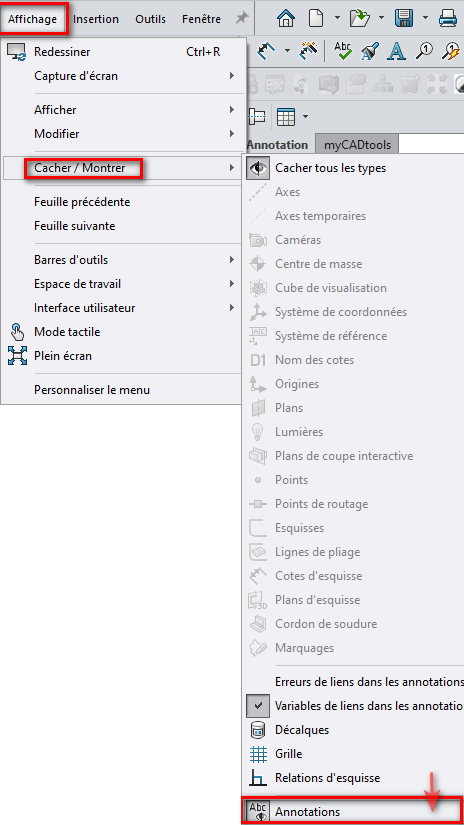
A second method is to import everything (via the objects of the model) and then hide them all to re-show only the desired annotations.
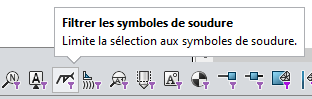
The " F5 " Shortcuts enable selection filters: => Selection of weld symbols and annotations CTRL+A on sheet => right-click => Hide
I understand... Annotation views are a bit like external references: you have to confront them from an early age at the risk of developing a phobic neurosis.
It's crazy, I'm unable to find a video tutorial in French or English on the subject (the only one I found is made by an Indian and between the accent and the poor quality of the microphone it makes the ears bleed too much...). The SW aid being laconic at best and not very clear on this subject.