Visualization Cube

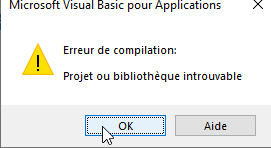
When launching the main sub from the editor via F8, it shows me a missing project or library error:
image

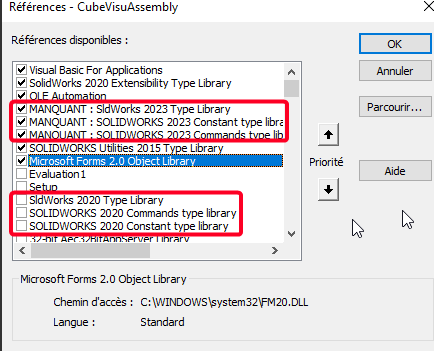
And looking at the error I understand better missing library (SW2023)
Maybe you have the same problem. Which version of SW do you have?
image

@m.blt I wanted to take a look out of curiosity and interest since in general your macros captivate me! :crazy_face:

Edit: by unchecking what is missing and checking the 3 libraries version 2020 it works!
Once again I am amazed by this code:

3 Likes

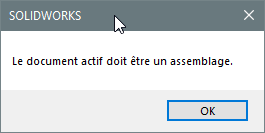
The macro does not work on a part because it travels through the build tree of an assembly. Already there, you should have this message:
image

Personally, I tested the macro on several assemblies, the " heaviest " one having 278 parts, without noticing any anomaly. If you run the macro without selecting any objects, you should at least see the UserForm card.

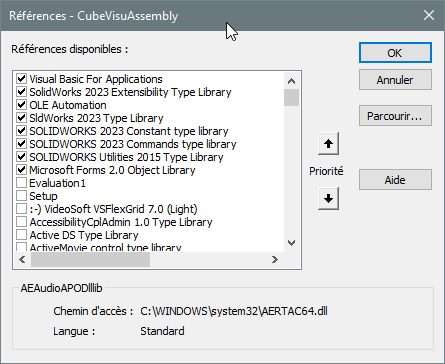
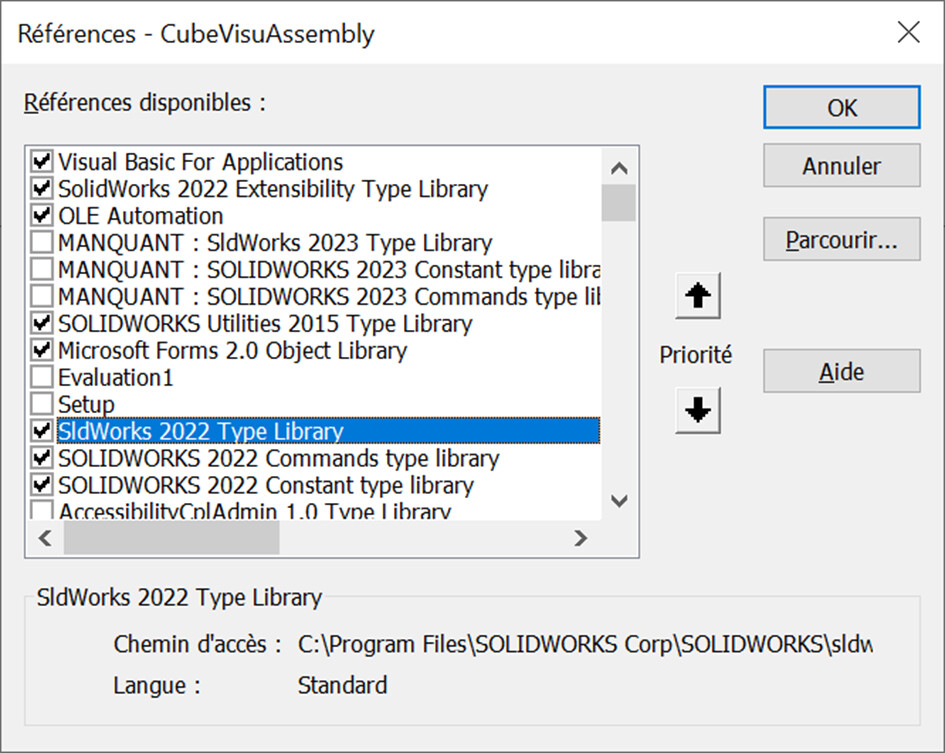
I confirm @sbadenis's suspicion: the malfunction may be due to the absence of certain references to VBA objects. Here are the ones I use with the 2023 version of SolidWorks:
image
Also check that the sketch display is activated in the assembly, you never know...

Another clue: the macro was written with SW 2023. Maybe there's a non-existent feature if you're using an older version. Even though you should see an error message... Judging by the illustration of his message, @sbadenis made it work with a 2020 version
Does the assembly on which you tested the macro have a peculiarity that prevents it from working properly? You should share one of your assemblies and specify which version of SW you are using.

2 Likes

@m.blt
When I see this work, I tell myself that it was more than time for me to take the tangent that is parallel to the plane. Besides, a good deal is always appreciated.

C dlt

4 Likes

Hello @m.blt & @sbadenis,

I applied the changes to the references by checking the 2022 for my version:

And the macro worked well, it's TOP @m.blt :+1: :

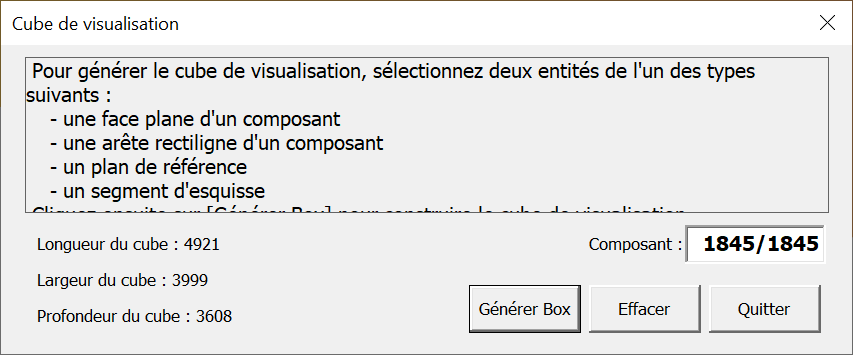
I just changed the ptLoc of the length and depth of the cube which for me, were inverted (ptLoc(4) and (1)), as well as the precision so as not to have a decimal:

        UserForm1.Label3.Caption = "Longueur du cube : " & Format(longueur(ptLoc(0), ptLoc(4)), "#####0")
        UserForm1.Label4.Caption = "Largeur du cube : " & Format(longueur(ptLoc(0), ptLoc(2)), "#####0")
        UserForm1.Label5.Caption = "Profondeur du cube : " & Format(longueur(ptLoc(0), ptLoc(1)), "#####0")

It's PERFECT.

On the other hand I would like to retrieve these values and associate them with variables in all the configs but I don't know where and how (sub, function ...) I have to insert this:

    Dim i As Integer
    Dim tConfig() As String
    Dim swErrors As Long
    Dim swWarnings As Long
    
    Do
    'récupère le document actif dans SW
    Set swModel = swApp.ActiveDoc
    If Not swModel Is Nothing Then
    
    'Boucle sur toutes les configurations
    tConfig = swModel.GetConfigurationNames
    For i = 0 To UBound(tConfig)
    
    'ajoute un propriété personnalisée "DIM-Lo"
    'Chr(34) permet d'ajouter le caractère "
    bRet = swModel.DeleteCustomInfo2(tConfig(i), "DIM-Lo")
    bRet = swModel.AddCustomInfo3(tConfig(i), "DIM-Lo", swCustomInfoText, Chr(34) & Format(longueur(ptLoc(0), ptLoc(4)), "#####0") & Chr(34))
    
    'ajoute un propriété personnalisée "DIM-La"
    'Chr(34) permet d'ajouter le caractère "
    bRet = swModel.DeleteCustomInfo2(tConfig(i), "DIM-La")
    bRet = swModel.AddCustomInfo3(tConfig(i), "DIM-La", swCustomInfoText, Chr(34) & Format(longueur(ptLoc(0), ptLoc(2)), "#####0") & Chr(34))
    
    'ajoute un propriété personnalisée "DIM-Ha"
    'Chr(34) permet d'ajouter le caractère "
    bRet = swModel.DeleteCustomInfo2(tConfig(i), "DIM-Ha")
    bRet = swModel.AddCustomInfo3(tConfig(i), "DIM-Ha", swCustomInfoText, Chr(34) & Format(longueur(ptLoc(0), ptLoc(1)), "#####0") & Chr(34))
    
    Next i

Do you have a lead for me?

Hello @m.blt Bravo and thank you for your macro. Just a small suggestion; Specify the xyz axes of the dimensions indicated, in parentheses for example, because width length depth is relative to say the least.

1 Like

Hi all
One last (?) answer...

  • The three dimensions of the envelope cube are written as properties in all the configs of the assembly;
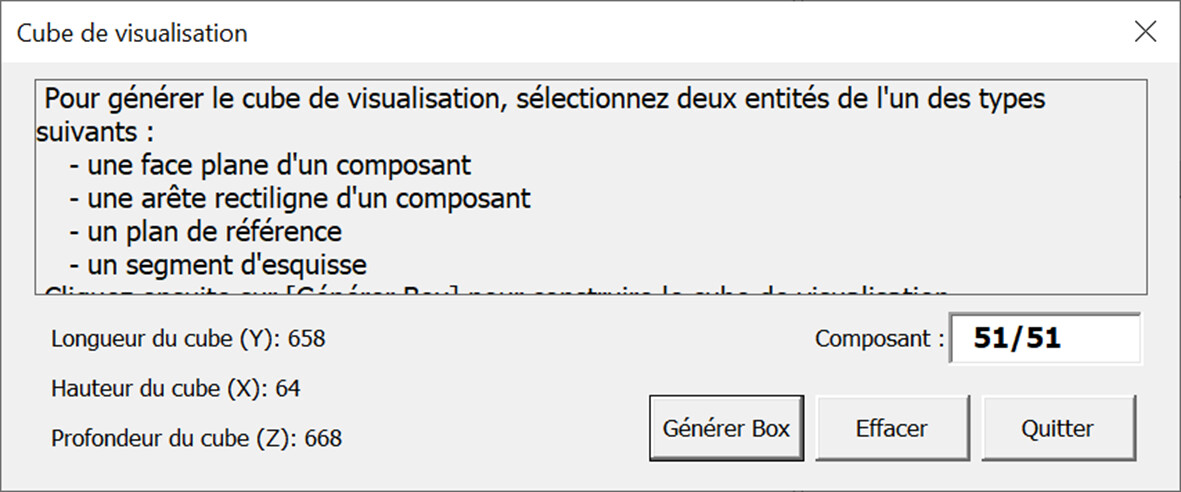
  • To fulfill @Sylk's :wink:wish, I added a local coordinate system at the origin of the cube, whose axes are aligned with the edges. In order to identify the X, Y and Z directions.
    It seems to me that for @MLG, it is in order of height (X), length (Y) and depth (Z).
    Order can be easily changed on lines 322 to 334.


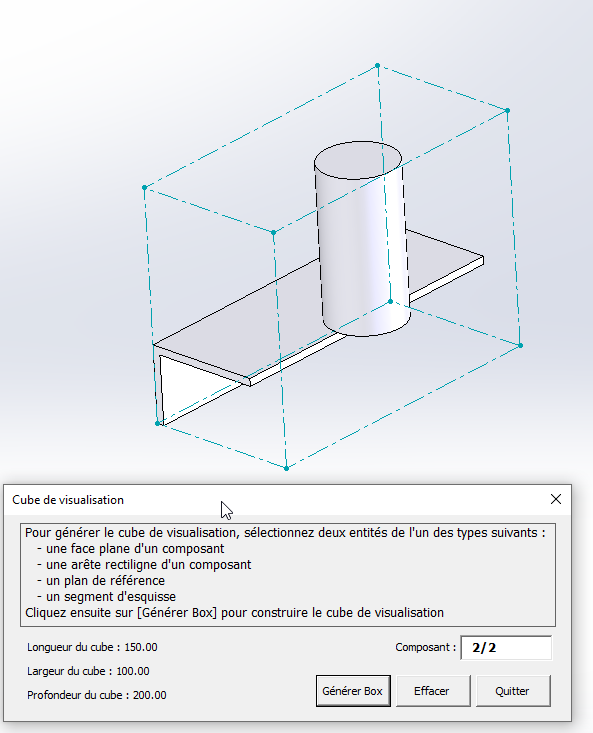
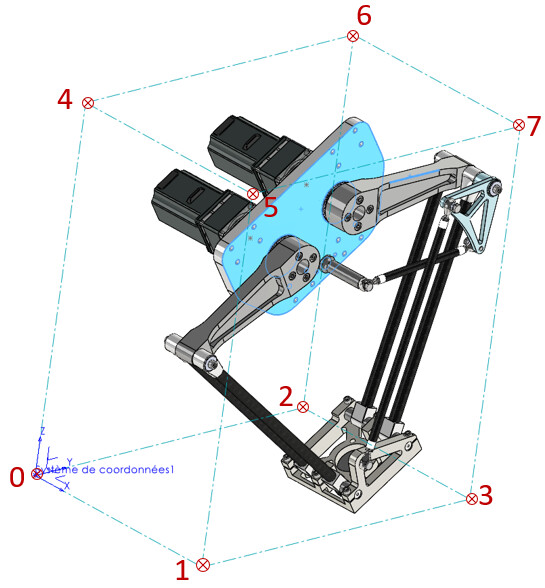
A small image to locate the vertices of the cube.
Kind regards.
CubeVisuAssembly.swp (223 KB)

2 Likes

Thanks again @m.blt
It works very well :ok_hand:

I have a difference in the precision of the results between the dialog box and the variables in the properties (F8):


The precision is in units (no decimal places) in the dialog box


The accuracy is 6 decimal places

However, I applied the same FORMAT in the code between what is displayed in the dialog box and in the properties (F8):

        Dim valLONG         As Variant
        Dim valLARG         As Variant
        Dim valHAUT         As Variant

    
    Set ptLoc(0) = creationPt(min(0), min(1), min(2))
    Set ptLoc(1) = creationPt(max(0), min(1), min(2))
    Set ptLoc(2) = creationPt(min(0), max(1), min(2))
    Set ptLoc(3) = creationPt(max(0), max(1), min(2))
    Set ptLoc(4) = creationPt(min(0), min(1), max(2))
    Set ptLoc(5) = creationPt(max(0), min(1), max(2))
    Set ptLoc(6) = creationPt(min(0), max(1), max(2))
    Set ptLoc(7) = creationPt(max(0), max(1), max(2))

    For iPt = 0 To 7
        Set ptLoc(iPt) = ptLoc(iPt).MultiplyTransform(RgToCube)
    Next iPt
    
    TraceBox ptLoc
    
    lgAreteCube(0) = CalculLongueur(ptLoc(0), ptLoc(1))
    lgAreteCube(1) = CalculLongueur(ptLoc(0), ptLoc(2))
    lgAreteCube(2) = CalculLongueur(ptLoc(0), ptLoc(4))
    
    UserForm1.Label3.Caption = "DIM-Lo : " & Format((lgAreteCube(2) / 10), "#####0")
    UserForm1.Label4.Caption = "DIM-La : " & Format((lgAreteCube(0) / 10), "#####0")
    UserForm1.Label5.Caption = "DIM-Ha : " & Format((lgAreteCube(1) / 10), "#####0")
    UserForm1.CommandButton3.Enabled = True
    
  
    valLONG = (Format((lgAreteCube(2) / 10), "#####0"))
    valLARG = (Format((lgAreteCube(0) / 10), "#####0"))
    valHAUT = (Format((lgAreteCube(1) / 10), "#####0"))

        
    swConfNames = swModel.GetConfigurationNames             ' Liste des noms de configurations
    For iPt = LBound(swConfNames) To UBound(swConfNames)    ' Boucle sur les configs
        Set swCstPropMgr = swModel.Extension.CustomPropertyManager(swConfNames(iPt))
        
        swCstPropMgr.Add3 "DIM-Lo", swCustomInfoDouble, valLONG, swCustomPropertyReplaceValue
        swCstPropMgr.Add3 "DIM-La", swCustomInfoDouble, valLARG, swCustomPropertyReplaceValue
        swCstPropMgr.Add3 "DIM-Ha", swCustomInfoDouble, valHAUT, swCustomPropertyReplaceValue
    Next iPt

End Sub

And I tested by changing the decimals in my SW unit settings, but it doesn't change anything.

Do you have any idea where the problem comes from?
1 Like

Since you don't want decimals, the easiest way is to convert the variable lgAreteCube from type Double to Integer in the property generation statement.
Replacing the line:

swCstPropMgr.Add3 "CubEnvLongueurY", swCustomInfoNumber, CInt(lgAreteCube(1)), swCustomPropertyReplaceValue

by it:

swCstPropMgr.Add3 "CubEnvLongueurY", swCustomInfoNumber, CInt(lgAreteCube(1)), swCustomPropertyReplaceValue

To be adapted according to your ratings.
If you are looking for a more detailed format, you will have to use strings...

2 Likes

Thanks again @m.blt

It works very well.
I've been looking since yesterday on Codestack if there is a way to name the 3D sketch when it is made, or to retrieve the name of the last sketch created in the tree.
But I couldn't find anything about it.
I would need this to add the deletion of the 3D sketch at the end of the macro to clean up our assemblies once the variables are retrieved.

When I look at this code generated in Solidworks with a first 2D sketch delete and then a 3D sketch delete, there is no synthaxis difference except for the function name. Whether it's 2D or 3D, it's " SKETCH " that appears:

boolstatus = Part.Extension.SelectByID2("Esquisse3D1", "SKETCH", 0, 0, 0, False, 0, Nothing, 0)
Part.EditDelete
boolstatus = Part.Extension.SelectByID2("Esquisse1", "SKETCH", 0, 0, 0, False, 0, Nothing, 0)
Part.EditDelete

Do you know how to proceed?
Thanks in advance

1 Like

Hello
On the UserForm1 record, there is a [Clear] button that deletes the 3D sketch and the coordinate system associated with the cube. Provided that these are the last two functions of the tree, so that nothing is added after the cube is created.

As for retrieving the name of a sketch, the " Name " method is part of the " ISketch " class of the API (" swSketch.Name ", see line 377).

But if you have a variable pointing to the sketch, such as line 363 (" Set swSketch = swModel.SketchManager.ActiveSketch "), the " Select4() " method allows selection without having to search for its name, for example:
ok = swSketch.Select4(False, Nothing) "
Probably inherited members, they are not documented in the help of the " ISketch " class, but are documented in other...

1 Like

Hello @m.blt
Thank you once again for your feedback.
I hadn't hit for the DELETE button actually.
I'll take a closer look at this to see when it acts in relation to the information of the variables I added... and to enrich my intellectual poverty in VBA :slightly_smiling_face:.

By the way, in VBA I tinkered with it this morning...
A macro that retrieves the name of the last function in order to delete it.
As there is a 3D sketch and a trihedron, I double the command lines to remove the 2 functions.
I know, it's archaic :sweat_smile:
There is surely a way to make it simpler I guess ...

Option Explicit

Dim swApp As SldWorks.SldWorks
Dim swDoc As SldWorks.ModelDoc2
Dim swAssembly As SldWorks.AssemblyDoc
Dim swFeatureName As SldWorks.Feature


Sub SuppressionDeuxDernieresFonctions()

    Set swApp = Application.SldWorks

    Set swDoc = swApp.ActiveDoc
  
    ' Vérifie que le document SW est ouvert
    If swDoc Is Nothing Then
  
    MsgBox "Aucun document Solidworks ouvert"
    Exit Sub
    
    End If
  
    Set swAssembly = swDoc
  
'''Première passe pour supprimer le trièdre
  
    'Attribution nom dernière fonction
    Set swFeatureName = swDoc.Extension.GetLastFeatureAdded

    'Vérifie la selection de la fonction
    If swFeatureName Is Nothing Then
  
    MsgBox "Sélection fonction impossible"
    swDoc.ClearSelection2 True
    Exit Sub
    
    End If
  
    'Selection du nom
    swFeatureName.Select True
  
    'Suppression de la fonction
    swDoc.EditDelete
  
'''Deuxième passe pour supprimer l'esquisse 3D
  
    'Attribution nom dernière fonction
    Set swFeatureName = swDoc.Extension.GetLastFeatureAdded

    'Vérifie la selection de la fonction
    If swFeatureName Is Nothing Then
  
    MsgBox "Selection fonction Impossible"
    swDoc.ClearSelection2 True
    Exit Sub
    
    End If
  
    'Selection du nom
    swFeatureName.Select True
  
    'Suppression de la fonction
    swDoc.EditDelete
  
End Sub
1 Like

Hello @m.blt

I have a small question about the definition of the layout of the box.
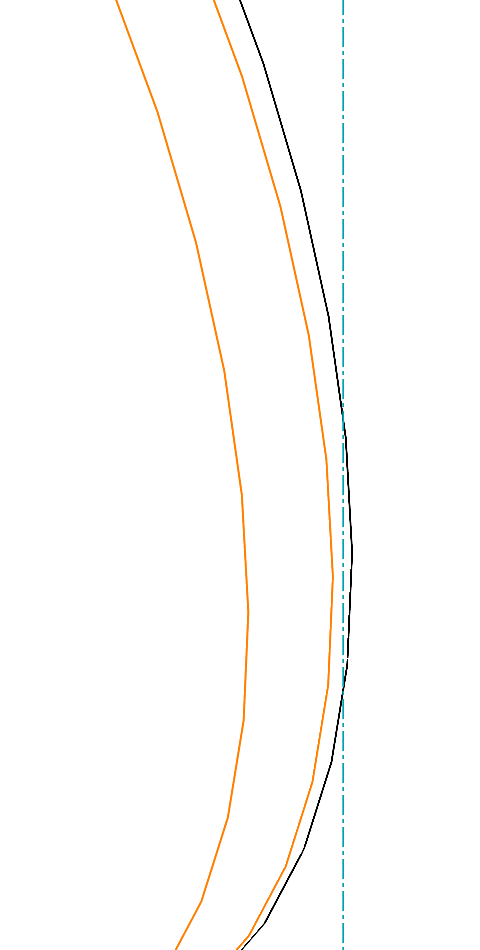
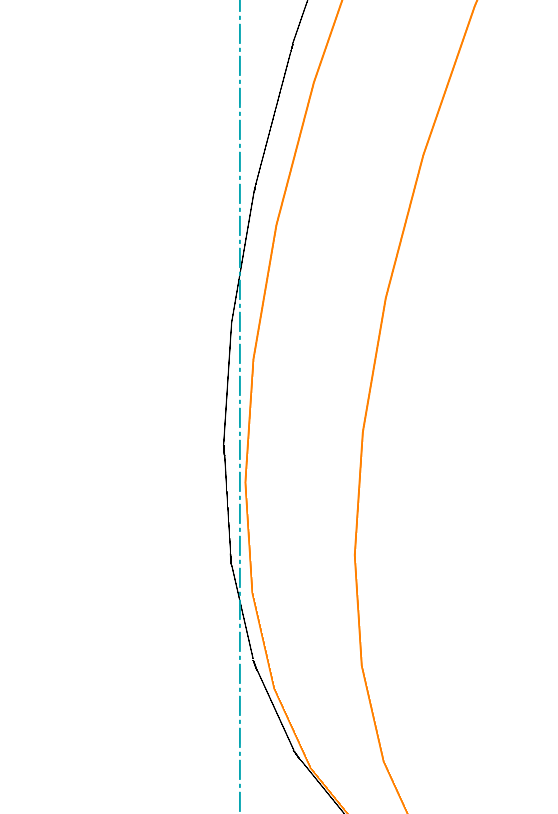
I have a few cases where it doesn't totally fit at the maximum of what should be. In particular on round parts with fillets:

I have the case on the 2 pieces on the right and left:

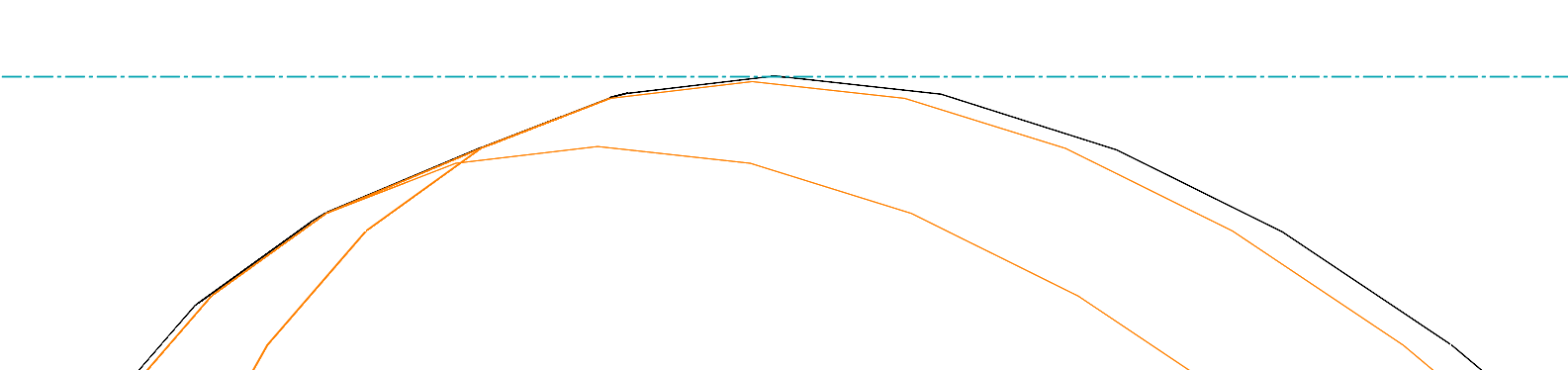
But I don't have the case on the top piece:

Where in the code can I intervene in order to obtain a good tangency?

In any case, the macro works great.
I brought my arrangements and extra functions and it's GREAT.
Thank you very much for the help provided.

Thank you in advance.

Hello
It is difficult to say what the origin of the problem you are raising. A few remarks:

  • What is the magnitude of the error, compared to the general dimensions of the assembly (in mm for example)?

  • Insofar as the observed defect requires a significant zoom, the display may be to blame...

  • The " GetExtremePoint() " method determines the outer limit for each part. This is a numerical calculation internal to the SolidWorks APIs. Is it rigorous? Like any numerical calculation, it uses a quality criterion to validate its search, a criterion unknown to the user.
    On this point, SolidWorks Help comment about the " GetBodyBox " function which apparently uses the " GetExtremePoint " method:
    IMPORTANT : The values returned are approximate and should not be used for comparison or calculation purposes. In addition, the bounding box may vary after the model is rebuilt.
    The outlines of the " clouds" visible in the screenshots appear to be based on splines. Could this be the origin of the pb?

  • The only calculations inside the macro are coordinate system changes that use the API's vector and raster functions. I don't see how they can generate the defect.

To conclude: I am not in a position to identify the origin of the problem. Can you share the example that is problematic? Even if it is degraded, or by private message...

Kind regards.

4 Likes

Thank you very much for these answers.

So the error varies according to the assemblies and parts.
This ranges from 0.5 to 1.5mm.
In my case this is not necessarily important, because I get my values back to the cm.

My question was mainly in order to better understand the code and possibly correct it if it was feasible. So nothing imperative.

I still put the assembly + parts with 3D Sketch + System coordinates generated by the macro if you want to look.

Thanks for the information :slight_smile:

TEST ENCOMBREMENT.rar (1.1 MB)

1 Like

Great job @m.blt , as always.
And I thought I'd never have to use the " BoundingBox " until now... I come across a client, let's say... Fussy.
Your Macro is therefore timely. Thank you :index_pointing_at_the_viewer: :+1: :+1: :index_pointing_at_the_viewer:

2 Likes

Hello @Maclane , and thank you for the compliment...
However, beware of the problem of precision raised by @MLG in his last message.
I noticed the anomaly, but I couldn't identify if it's SW or the macro that is at fault.

3 Likes

Hello;
This is a recurring problem with splines, Solidworks only takes into account the points and not the curve itself so I think the " GetExtremePoint() " function does the same thing (as its name suggests).

For my part, I took the liberty of modifying your macro by adding the properties to the document with an option to register them (or not) in all configurations.
On the other hand, I'm looking for how to add dimensioning on the 3D sketch.

I haven't looked at the notion associated with the " Delete " button yet, but I think that by renaming the " 3Dsketch " and " Coordinate System" functions in a more explicit way (like " BoundingBox_3D " and " BoundingBox_XYZ "), it will be easier to delete them, or even to delete all the functions (leftovers) with the same Names (+counter).

Kind regards.

3 Likes

Hello @MLG

Maybe the values will be more accurate with all the quality settings maxed out, in the document options?

1 Like

Hi all
The difference is really minimal but is indeed present.
Having documents listed by hand and some using this macro, we ended up with different output data, hence my question...
And for splines, we avoid working with them so as not to have this kind of problem.

Hi everyone
HOP, here I am back on this subject! :slight_smile:
The macro works well, but I find myself facing a problem.
Explanations:

The macro was used to define a 3D cube allowing me to retrieve the footprint values of my assembly according to a precise orientation. For this nickel and a BIG THANK YOU to @m_blt and to all those who participated in the advancement of this post :+1:.

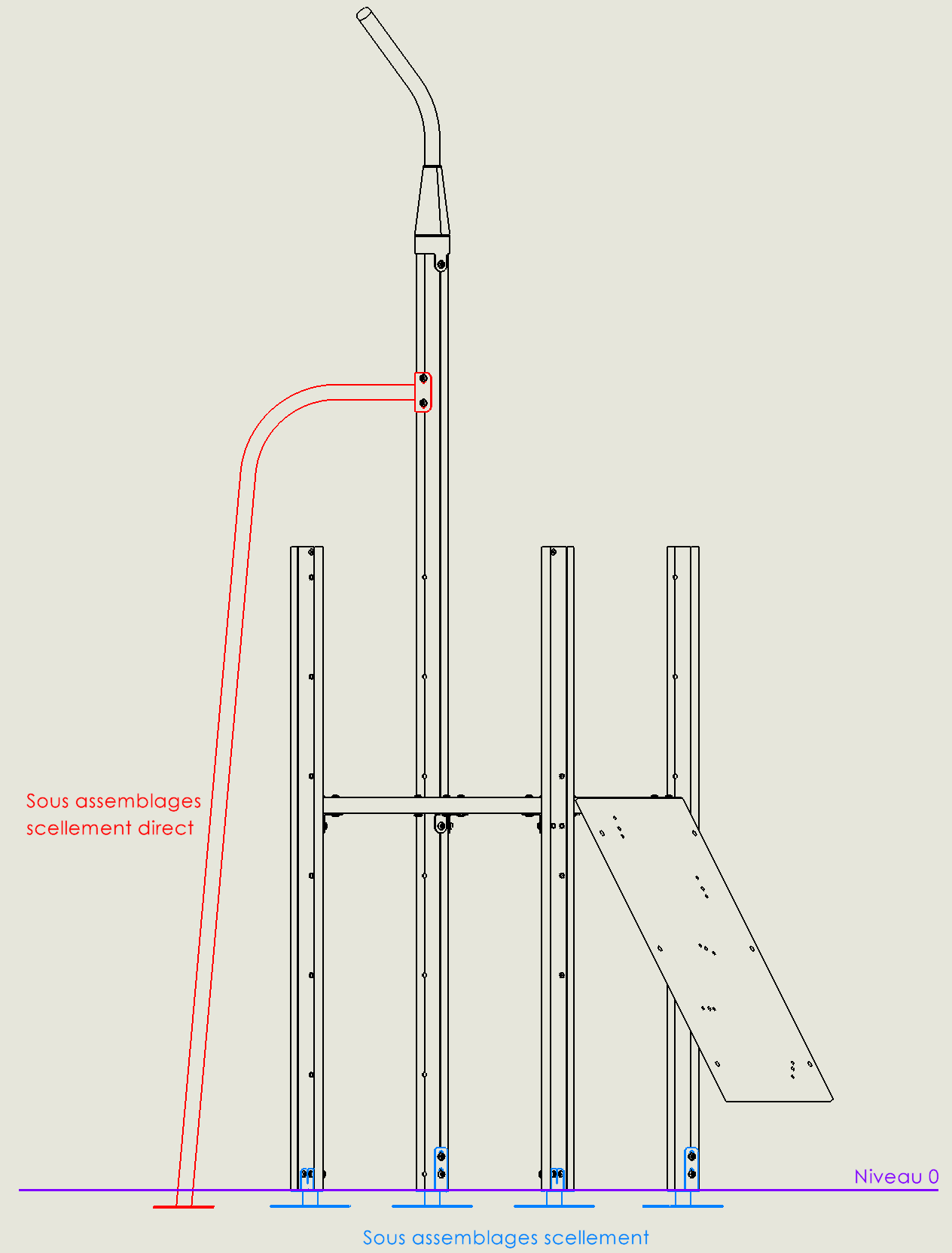
My assemblies have sealing sub-assemblies (below in blue) to fix the product to the floor. In my macro, I deleted these sub-assemblies so that I only had the part above the ground of present. However, I have sub-assemblies in direct sealing (below in red), i.e. they are present below and above level 0 (below without being able to be split/separated:

image

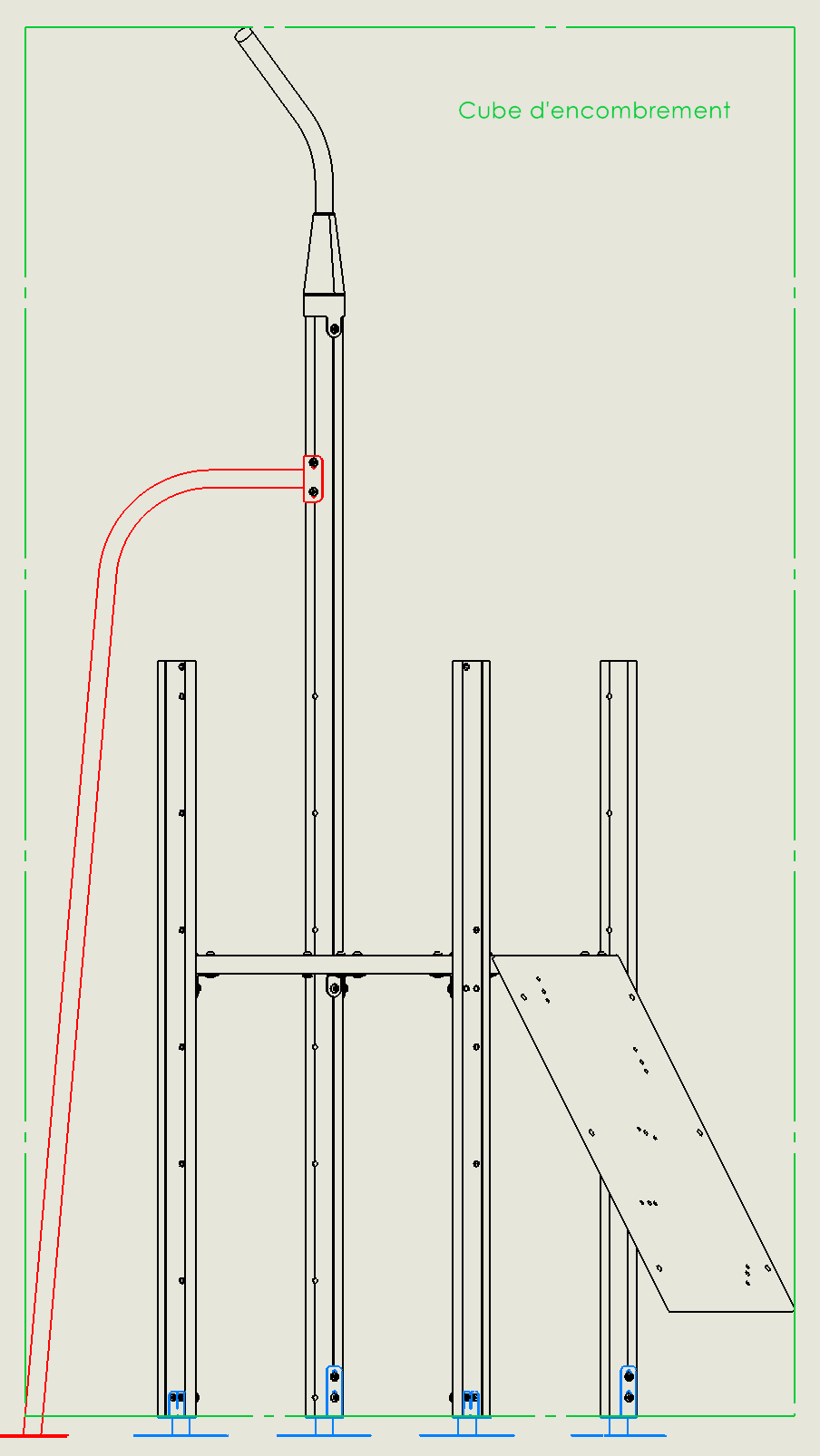
I would like to know if it is possible to add to the UserForm the selection of the level 0 plane (a plane or a part face) in order to determine the lowest plane of the 3D cube? Sub-assemblies in direct sealing (in red) cannot be deleted because they are used to define the width of the cube:

image

The selection of the Level 0 plan would therefore have to define the LOW plane of the cube and the length/width/height footprint would have to be defined only with everything above Level 0 without taking into account what is below.

I hope it's understandable because it's not easy to explain :sweat_smile: