Bah!
To dimension manually, you might as well do it without going through the macro, after all it is only three dimensions to be added to a cube.
Naively I thought I could easily add them directly into the macro code, but either I'm doing it very wrong (it's quite possible), or adding dimensioning in a 3D sketch via the APIs is not that simple.
However, the @m_blt code gives all the necessary information (or more).
=> I have the Point Name
=> I have the Sketch Name
=> I have the name of the marker
and I even have distances from the 3 X, Yet Z coordinates...
And with all this... well I'm getting there for ... 

Hello @Maclane ,
Sorry for this late reply...
It is not easy to dimension a 3D sketch in a macro.
The headache is to precisely define the position of the odds. We usually just let SW do it, and then we touch it up " by hand ".
In the " visualization cube" macro, the Sub TraceBox(ptLoc() As MathVector) function draws the box. I added a few lines to it:
- to best place the three sides of the length of the edges of the box from the origin point P0.
- to apply a " Fixed " constraint to the eight vertices of the box, so as to freeze the sketch.
- to create reference points to the vertices of the box, useful in debug mode to identify these vertices. Part of the code to comment out in standard mode.
The result:
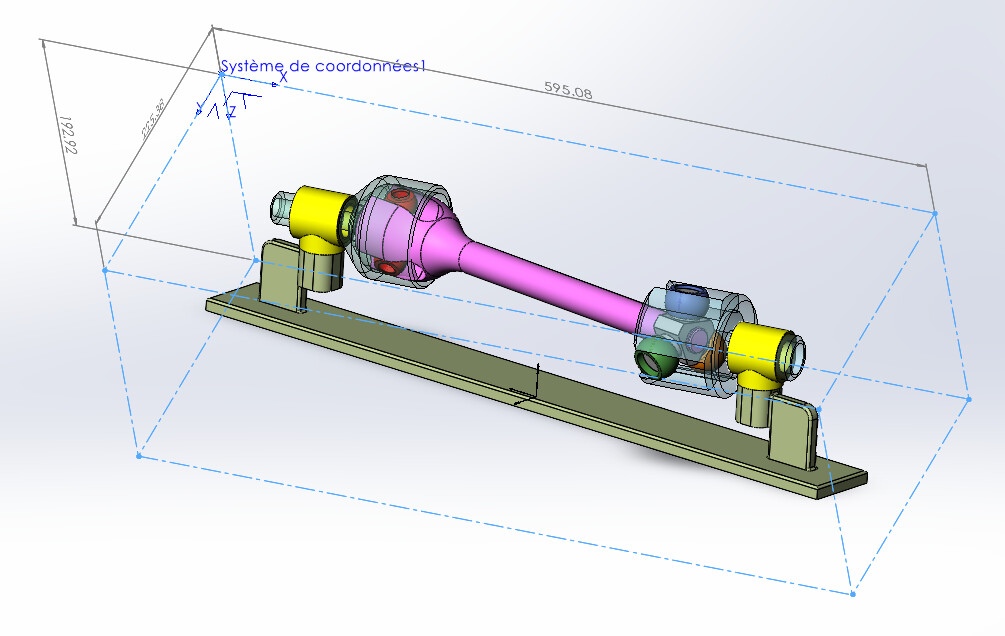
In principle  , it is sufficient to replace the original TraceBox function with the one below.
Sub TraceBox(ptLoc() As MathVector)

        Dim swFeat          As Feature
        Dim swRefPt         As RefPoint
        Dim swFeatMgr       As FeatureManager
        Dim matProps(8)     As Double
        Dim skSegment(11)   As SketchSegment
        Dim swSketch        As Sketch
        Dim posCote(2)      As Double
        Dim noPt            As Long
        Dim boolStatus      As Boolean
        Dim vRefPoint       As Variant
        Dim bInputDimPref   As Boolean
        Dim swDisplayDim    As DisplayDimension
        Dim i               As Long

    swModel.SketchManager.Insert3DSketch True
    swModel.SketchManager.AddToDB = True

    Set skSegment(0) = traceLigne(ptLoc, 0, 1)
    Set skSegment(1) = traceLigne(ptLoc, 0, 2)
    Set skSegment(2) = traceLigne(ptLoc, 2, 3)
    Set skSegment(3) = traceLigne(ptLoc, 1, 3)

    Set skSegment(4) = traceLigne(ptLoc, 4, 5)
    Set skSegment(5) = traceLigne(ptLoc, 4, 6)
    Set skSegment(6) = traceLigne(ptLoc, 6, 7)
    Set skSegment(7) = traceLigne(ptLoc, 5, 7)

    Set skSegment(8) = traceLigne(ptLoc, 0, 4)
    Set skSegment(9) = traceLigne(ptLoc, 1, 5)
    Set skSegment(10) = traceLigne(ptLoc, 3, 7)
    Set skSegment(11) = traceLigne(ptLoc, 2, 6)

    ' Contrainte "Fixe" des sommets de la boite
    For noPt = LBound(ptLoc) To UBound(ptLoc)
        boolStatus = swModel.Extension.SelectByID2("", "SKETCHPOINT", ptLoc(noPt).ArrayData(0), ptLoc(noPt).ArrayData(1), ptLoc(noPt).ArrayData(2), False, 0, Nothing, 0)
        If boolStatus Then
            swModel.SketchAddConstraints "sgFIXED"      ' Sommet fixé
        End If
    Next noPt

    ' Cotation des arêtes de la boite
    bInputDimPref = swApp.GetUserPreferenceToggle(swUserPreferenceToggle_e.swInputDimValOnCreate)
    swApp.SetUserPreferenceToggle swUserPreferenceToggle_e.swInputDimValOnCreate, False

    ' Cote de l'arête / X
    swModel.ClearSelection2 True
    For i = 0 To 2
        posCote(i) = ptLoc(0).ArrayData(i) * 3 / 4 + ptLoc(1).ArrayData(i) / 2 - ptLoc(4).ArrayData(i) / 4
    Next i
'    swModel.SketchManager.CreatePoint posCote(0), posCote(1), posCote(2)
    skSegment(8).Select4 False, Nothing
    skSegment(9).Select4 True, Nothing
    Set swDisplayDim = swModel.AddDimension2(posCote(0), posCote(1), posCote(2))

    ' Cote de l'arête / Y
    swModel.ClearSelection2 True
    For i = 0 To 2
        posCote(i) = ptLoc(0).ArrayData(i) * 3 / 4 + ptLoc(2).ArrayData(i) / 2 - ptLoc(4).ArrayData(i) / 4
    Next i
'    swModel.SketchManager.CreatePoint posCote(0), posCote(1), posCote(2)
    skSegment(8).Select4 False, Nothing
    skSegment(11).Select4 True, Nothing
    Set swDisplayDim = swModel.AddDimension2(posCote(0), posCote(1), posCote(2))

    ' Cote de l'arête / Z
    swModel.ClearSelection2 True
    For i = 0 To 2
        posCote(i) = ptLoc(0).ArrayData(i) * 3 / 4 + ptLoc(4).ArrayData(i) / 2 - ptLoc(1).ArrayData(i) / 4
    Next i
'    swModel.SketchManager.CreatePoint posCote(0), posCote(1), posCote(2)
    skSegment(0).Select4 False, Nothing
    skSegment(4).Select4 True, Nothing
    Set swDisplayDim = swModel.AddDimension2(posCote(0), posCote(1), posCote(2))

    swApp.SetUserPreferenceToggle swUserPreferenceToggle_e.swInputDimValOnCreate, bInputDimPref
    swModel.ClearSelection2 True

    ' Réactualiser l'affichage
    swModel.ClearSelection2 True
    swModel.GraphicsRedraw2

    Set swSketch = swModel.SketchManager.ActiveSketch
    swModel.SketchManager.AddToDB = False
    swModel.SketchManager.Insert3DSketch True


'''    ' Création de points de référence aux sommets de la boite
'''    Set swFeatMgr = swModel.FeatureManager
'''    For noPt = LBound(ptLoc) To UBound(ptLoc)
'''        boolStatus = swModel.Extension.SelectByID2("", "EXTSKETCHPOINT", ptLoc(noPt).ArrayData(0), ptLoc(noPt).ArrayData(1), ptLoc(noPt).ArrayData(2), False, 0, Nothing, 0)
'''        If boolStatus Then
'''            vRefPoint = swFeatMgr.InsertReferencePoint(swRefPointSketchPoint, 0, 0.01, 1)       ' Création d'un point de référence
'''            Set swFeat = vRefPoint(0)
'''            swFeat.Name = "Pt" & CStr(noPt)
'''        End If
'''    Next noPt


    Set swFeat = swModel.FeatureByPositionReverse(0)
    matProps(0) = 0#: matProps(1) = 162# / 255#: matProps(2) = 175# / 255#     'Couleur turquoise
    matProps(3) = 1: matProps(4) = 1: matProps(5) = 0.5
    matProps(6) = 0.4: matProps(7) = 0: matProps(8) = 0
    swFeat.SetMaterialPropertyValues2 matProps, swThisConfiguration, Empty
    UserForm1.Show
    swModel.ForceRebuild3 True
    swModel.ClearSelection2 (True)

    swModel.Extension.SelectByID2 "", "EXTSKETCHPOINT", ptLoc(0).ArrayData(0), ptLoc(0).ArrayData(1), ptLoc(0).ArrayData(2), False, 1, Nothing, 0
    swModel.Extension.SelectByID2 skSegment(0).GetName & "@" & swSketch.Name, "EXTSKETCHSEGMENT", 0#, 0#, 0#, True, 2, Nothing, 0
    swModel.Extension.SelectByID2 skSegment(1).GetName & "@" & swSketch.Name, "EXTSKETCHSEGMENT", 0#, 0#, 0#, True, 4, Nothing, 0
    swModel.FeatureManager.InsertCoordinateSystem False, False, False

End Sub
1 Like
Arrrgggghhhhh!
=> set the points... !! FIXING THE !! POINTS
… pfff, but damn, I knew I was on the right track. 
well I had also forgotten the:
swApp.SetUserPreferenceToggle swUserPreferenceToggle_e.swInputDimValOnCreate, False
So it didn't work as well as well.
Thank you @m_blt and hats off.
(not so simple macro quotation, eh?  )
)
1 Like
Above all, you need to have a sheet of paper and a pen near the keyboard to enrich the representations of SW... 


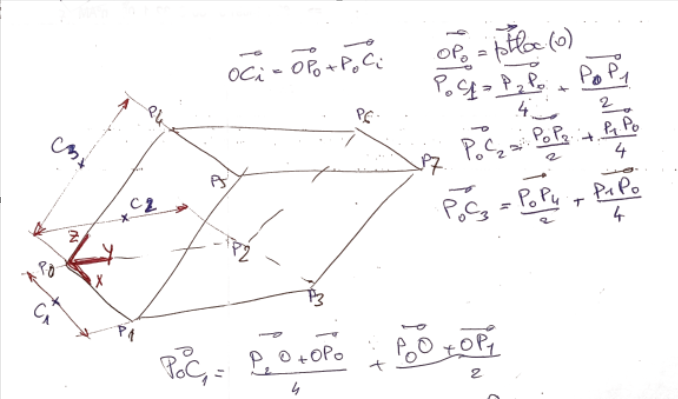
It's still more complete and more aesthetic than that:
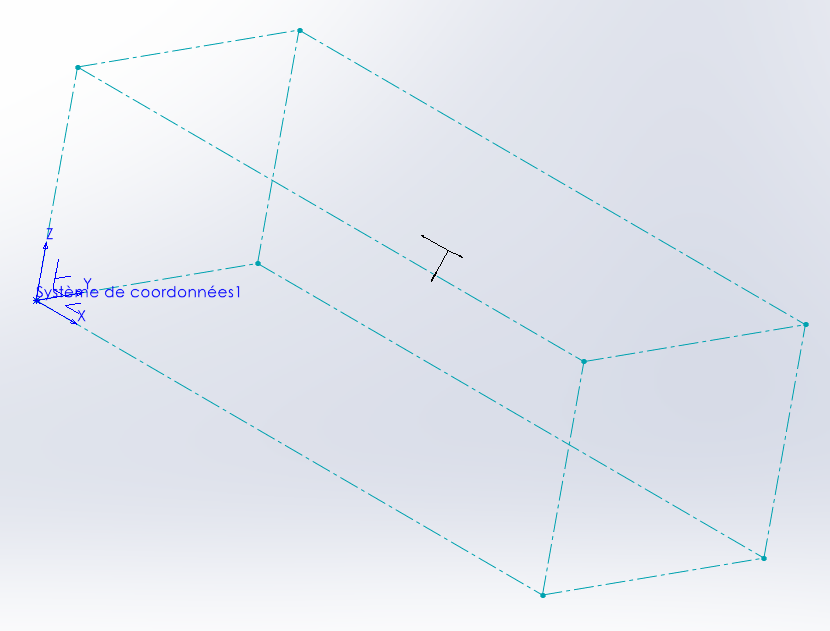
3 Likes