Hallo, in deze code wil ik een save maken om de locatie te kiezen waar het bestand opslaat. Ik heb verschillende methoden geprobeerd (Saveas Save as3 runcommand...) tevergeefs. Verschillende methoden werken in debugmodus, maar niet zo macro draaien vanuit SW.
Option Explicit

Dim swApp As SldWorks.SldWorks
Dim swModel As ModelDoc2
Dim swExt As ModelDocExtension
Dim bRet As Boolean

Sub addSameLink()

    Set swApp = Application.SldWorks
    Set swModel = swApp.ActiveDoc

    ' === Vérifie document ===
    If swModel Is Nothing Then
        MsgBox "Aucun document actif", vbExclamation
        Exit Sub
    End If

    Set swExt = swModel.Extension

    ' === Chemin fichier ===
    Dim swPath As String
    swPath = swModel.GetPathName

    ' === Enregistrer si nécessaire ===

If swPath = "" Then
    MsgBox "Fenêtre enregister sous à ouvrir ici pour chemin fichier  (fichier sldprt et déjà nommé)"
    swApp.RunCommand 620, ""

    swPath = swModel.GetPathName

    If swPath = "" Then
        MsgBox "Enregistrement annulé.", vbExclamation
        Exit Sub
    End If

End If


    ' === Chemin PDF attendu ===
    Dim pdfPath As String
    pdfPath = Left(swPath, InStrRev(swPath, ".") - 1) & ".pdf"

    Debug.Print "PDF attendu : " & pdfPath

    ' === Si PDF absent => sélection utilisateur ===
    If Dir(pdfPath) = "" Then

        Dim xlApp As Object
        Dim fd As Object
        Dim selectedFile As String

        ' ? Lancement Excel (solution fiable)
        Set xlApp = CreateObject("Excel.Application")
        Set fd = xlApp.FileDialog(3) ' FilePicker

        With fd
            .Title = "Sélectionner la fiche technique du MR (Fichier Pdf qui sera renommé et déplacé automatiquement)"
            .Filters.Clear
            .Filters.Add "Fichiers PDF", "*.pdf"
            .AllowMultiSelect = False

            ' Option : ouverture dans le bon dossier
            .InitialFileName = Left(swPath, InStrRev(swPath, "\"))

            If .Show <> -1 Then
                MsgBox "Aucun fichier sélectionné.", vbExclamation
                xlApp.Quit
                Set xlApp = Nothing
                Exit Sub
            End If

            selectedFile = .SelectedItems(1)
        End With

        ' Fermeture Excel
        xlApp.Quit
        Set xlApp = Nothing

        ' === Vérifications ===
        If LCase(Right(selectedFile, 4)) <> ".pdf" Then
            MsgBox "Le fichier sélectionné n'est pas un PDF.", vbCritical
            Exit Sub
        End If

        ' === Copie + renommage ===
        Dim fso As Object
        Set fso = CreateObject("Scripting.FileSystemObject")

        On Error Resume Next
        fso.MoveFile selectedFile, pdfPath

        If Err.Number <> 0 Then
            MsgBox "Erreur lors de la copie du PDF.", vbCritical
            Exit Sub
        End If

        On Error GoTo 0

    End If

    ' === Ajout Design Binder ===
    Dim bRes As Boolean
    bRes = swExt.InsertAttachment(pdfPath, True)

    If bRes Then

        Dim swCustProp As CustomPropertyManager
        Set swCustProp = swExt.CustomPropertyManager("")

        bRet = swCustProp.Add3("Material", _
                              swCustomInfoType_e.swCustomInfoText, _
                              "Pdf", _
                              swCustomPropertyAddOption_e.swCustomPropertyDeleteAndAdd)
                              MsgBox "Fiche technique motoréducteur(pdf) ajouté au classeur de conception."
    Else
        MsgBox "Echec de l'insertion du PDF", vbExclamation
    End If

End Sub
Wat mij betreft, na verschillende crashes van SW2025 met de functies die ik gebruikte om een Windows Verkenner-venster weer te geven, ben ik overgestapt op het aanroepen van de Excel-functie. Mijn codefragment:
Public Function GetFolder(Title As String)
Dim folder As FileDialog
Dim selected_folder As String
Set folder = Excel.Application.FileDialog(msoFileDialogFolderPicker)
With folder
    .AllowMultiSelect = False
    .ButtonName = "Ok"
    .Filters.Clear
    .InitialFileName = sInitialFolder 'Nom du dossier ouvert à l'affichage de la fenêtre
    .Title = Title
    If .Show <> -1 Then GoTo NextCode
    selected_folder = .SelectedItems(1)
End With
NextCode:
Debug.Print selected_folder
GetFolder = selected_folder
Set folder = Nothing
End Function
Ter informatie: ik nodig je ook uit om te anticiperen op het feit dat Microsoft objecten die verband houden met Microsoft Scripting Runtime (FSO) zal hebben heeft opgegeven en deze vervangt door pure VB-code.
Hallo, Ik ben geen expert in macro, maar ik heb wel iets weten te maken dat voor mij werkt.
Dim swApp As Object
Sub main()

    Dim swApp As SldWorks.SldWorks
    Dim swFile As ModelDoc2
    Dim swCustomPropMgr As CustomPropertyManager
    Dim docBE As Object
    Dim chemin As String
    Dim chemin2 As String
    Dim sh As Object
    Dim newname As String
    Dim rawValue As String
    Dim resolvedValue As String
    Dim status As Long
    Dim flags As Long
    Dim saveas As Boolean

    Set swApp = Application.SldWorks
    Set swFile = swApp.ActiveDoc

    'récup des propriétés personnalisées
    Set swCustomPropMgr = swFile.Extension.CustomPropertyManager("")

    'Récupération de valeur évaluée de la propriété PMI
    status = swCustomPropMgr.Get4("PMI", False, rawValue, resolvedValue)
    newname = resolvedValue

    'Demander le dossier
    Set sh = CreateObject("Shell.Application")

    'Nouveau style + zone d'édition + validation
    flags = &H40 Or &H10 Or &H20

    'Désignation du dossier pas défaut
    Set docBE = sh.Namespace("T:\BUREAU ETUDES\Données_SW")
    'Fenêtre de dialogue pour choisir le dossier
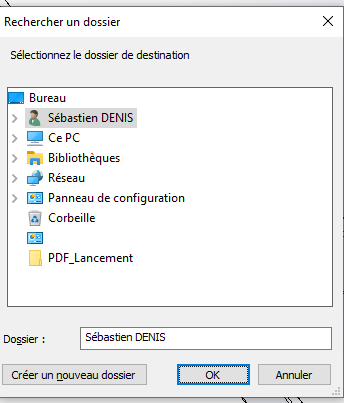
    chemin = sh.BrowseForFolder(0, "Sélectionnez le dossier de destination", flags, docBE).Self.Path

    'Création du chemin complet + nom de fichier
    chemin2 = chemin & "\" & newname & ".sldprt"

    'Enregistrement
    saveas = swFile.SaveAs2(chemin2, 0, True, True)

    'Fermeture du modèle
    Dim swModel As IModelDoc2
    Dim docName As String
    Set swModel = swApp.ActiveDoc
    docName = swModel.GetTitle
    swApp.CloseDoc docName

    'Ouverture du document généré
    Dim err As Long
    Dim warn As Long
    Set swModel = swApp.OpenDoc6(chemin2, swDocPART, swOpenDocOptions_Silent, "", err, warn)

End Sub
Deze macro haalt een persoonlijke eigenschap op die gebruikt zal worden voor de naam van het bestand, vraagt waar ik moet opslaan (met een deel van het pad vooraf ingevuld), slaat op, sluit en opent het betreffende bestand.
Fijne dag (in Nantes 26°C om 7 uur 's ochtends...)
Hier is wat ik in de tussentijd ook heb aangepast. Excel-functie werkt ook omdat @Cyril_f geen fan van de oplossing, maar bij gebrek aan betere...
Option Explicit

Dim swApp As SldWorks.SldWorks
Dim swModel As ModelDoc2
Dim swExt As ModelDocExtension
Dim bRet As Boolean

Sub addSameLink()

    Set swApp = Application.SldWorks
    Set swModel = swApp.ActiveDoc

    ' === Vérifie document ===
    If swModel Is Nothing Then
        MsgBox "Aucun document actif", vbExclamation
        Exit Sub
    End If

    Set swExt = swModel.Extension

    ' === Chemin fichier ===
    Dim swPath As String
    swPath = swModel.GetPathName

    ' === Enregistrer si nécessaire ===

' === Enregistrement si nécessaire ===
If swPath = "" Then

    Dim xlApp2 As Object
    Dim fd2 As Object
    Dim folderPath As String
    Dim fileName As String
    Dim fullPath As String
    Dim errors As Long
    Dim warnings As Long

    ' Lancement Excel
        Set xlApp2 = CreateObject("Excel.Application")
        Set fd2 = xlApp2.FileDialog(4) ' 4 = FolderPicker

        With fd2
            .Title = "Choisir le dossier d'enregistrement de la pièce"
            .AllowMultiSelect = False

            If .Show <> -1 Then
                MsgBox "Aucun dossier sélectionné.", vbExclamation
                xlApp2.Quit
                Set xlApp2 = Nothing
                Exit Sub
            End If

            folderPath = .SelectedItems(1)
        End With

        ' Fermeture Excel
        xlApp2.Quit
        Set xlApp2 = Nothing

        ' Nom basé sur la pièce
        fileName = swModel.GetTitle

        If InStrRev(fileName, ".") > 0 Then
            fileName = Left(fileName, InStrRev(fileName, ".") - 1)
        End If

        ' Chemin final
        fullPath = folderPath & "\" & fileName & ".sldprt"

        ' Sauvegarde
        Debug.Print fullPath

        Dim saveOk As Boolean

        saveOk = swModel.Extension.SaveAs3(fullPath, 0, 0, Nothing, Nothing, errors, warnings)

        If saveOk = False Then
            MsgBox "Erreur lors de l'enregistrement.", vbCritical
            Exit Sub
        End If


        swPath = swModel.GetPathName

    End If


    ' === Chemin PDF attendu ===
    Dim pdfPath As String
    pdfPath = Left(swPath, InStrRev(swPath, ".") - 1) & ".pdf"

    Debug.Print "PDF attendu : " & pdfPath

    ' === Si PDF absent => sélection utilisateur ===
    If Dir(pdfPath) = "" Then

        Dim xlApp As Object
        Dim fd As Object
        Dim selectedFile As String

        ' ? Lancement Excel (solution fiable)
        Set xlApp = CreateObject("Excel.Application")
        Set fd = xlApp.FileDialog(3) ' FilePicker

        With fd
            .Title = "Sélectionner la fiche technique du MR (Fichier Pdf qui sera renommé et déplacé automatiquement)"
            .Filters.Clear
            .Filters.Add "Fichiers PDF", "*.pdf"
            .AllowMultiSelect = False

            ' Option : ouverture dans le bon dossier
            .InitialFileName = Left(swPath, InStrRev(swPath, "\"))

            If .Show <> -1 Then
                MsgBox "Aucun fichier sélectionné.", vbExclamation
                xlApp.Quit
                Set xlApp = Nothing
                Exit Sub
            End If

            selectedFile = .SelectedItems(1)
        End With

        ' Fermeture Excel
        xlApp.Quit
        Set xlApp = Nothing

        ' === Vérifications ===
        If LCase(Right(selectedFile, 4)) <> ".pdf" Then
            MsgBox "Le fichier sélectionné n'est pas un PDF.", vbCritical
            Exit Sub
        End If

        ' === Copie + renommage ===
        Dim fso As Object
        Set fso = CreateObject("Scripting.FileSystemObject")

        On Error Resume Next
        fso.MoveFile selectedFile, pdfPath

        If Err.Number <> 0 Then
            MsgBox "Erreur lors de la copie du PDF.", vbCritical
            Exit Sub
        End If

        On Error GoTo 0

    End If

    ' === Ajout Design Binder ===
    Dim bRes As Boolean
    bRes = swExt.InsertAttachment(pdfPath, True)

    If bRes Then

        Dim swCustProp As CustomPropertyManager
        Set swCustProp = swExt.CustomPropertyManager("")

        bRet = swCustProp.Add3("Material", _
                              swCustomInfoType_e.swCustomInfoText, _
                              "Pdf", _
                              swCustomPropertyAddOption_e.swCustomPropertyDeleteAndAdd)
                              MsgBox "Fiche technique motoréducteur(pdf) ajouté au classeur de conception."
    Else
        MsgBox "Echec de l'insertion du PDF", vbExclamation
    End If

    ' === Sauvegarde finale ===
    Dim errorsSave As Long
    Dim warningsSave As Long
    Dim saveFinalOk As Boolean

    saveFinalOk = swModel.Save3(0, errorsSave, warningsSave)

    If saveFinalOk = False Or errorsSave <> 0 Then
        MsgBox "Erreur lors de la sauvegarde finale. Code : " & errorsSave, vbCritical
    Else
        Debug.Print "Fichier sauvegardé avec succès."
    End If

End Sub
Ik kijk nog steeds naar je oplossingen, maar de urgentie was om het functioneel te maken, wat nu gebeurt. Nu kan ik rustig veranderingen aanbrengen.
Het lijkt mij dat het SW explorer-venster alleen wordt weergegeven om SW-achtige extensies te beheren, dus voor pdf moet je helaas andere functies doorlopen.
@Cyril_f Het is nog steeds jammer, maar tot nu toe ook niet succesvol. De eerste oplossing werkte in het commandovenster, maar niet vanuit Sw... Ik ga naar je functie kijken, of die nu anders is dan wat ik doe.
@Maclane Ik kijk naar jouw oplossing, als het voor mij werkt, neem ik mee.
@a_eriaud Ik heb net naar jouw oplossing gekeken, ik heb hetzelfde gedaan maar ik haat dit venster (blader op map), je kunt de favorieten en likes niet vinden op netwerken om met meerdere mappen op te slaan, het is lang en irritant om het juiste pad te vinden. Aan de andere kant is het functioneel maar onpraktisch.
En hier in Quimperlé 30° op kantoor toen ik vanmorgen om 6 uur aankwam. Na het openen van de ramen zakte het weer naar 28°. Gelukkig is de tijd verschoven naar 14:45 uur, de dag is voorbij, maar het wordt vandaag ingewikkeld. (Airconditioning in installatie, kan niet wachten tot het klaar is...)
Toegegeven, de navigatie is niet vloeiend in de mappen met dit venster. Maar omdat ik altijd een Windows-verkenner open heb staan in mijn werkmap, maak ik een vulgaire kopie/plak van het pad van de verkenner in het " map "-vak van het venster.
Voor mij crasht deze code (voorgesteld door @Maclane) SW vanuit Windows 11 25H2 (een beetje willekeurig maar behoorlijk wiebelig, vandaar het feit dat ik via Excel moet gaan)
Ik heb geprobeerd het werkend te krijgen ( @Maclane code) en het mislukte. Bovendien, als het niet functioneel is op versie W11 25H2, zal ik de functionaliteit via Excel behouden.
Het voordeel van de oplossing via Excel (naast de stabiliteit) is dat het eenvoudig is om een vooraf geselecteerde locatie in te stellen voor het openen van het Windows Verkenner-venster. (InitialFileName) wat erg handig is.
Tot middag!! Ik zal een groot deel van mijn macro's moeten aanpassen (Snuffel!) ... Eindelijk een kans dat @sbadenis de pleisters voor me had weggeveegd...
Het probleem is dat we codes gebruiken die al beginnen te daten (voor mijn deel moet ik al meer dan 6 jaar een vergelijkbare code gebruiken). Het is alsof FileSystemObject, waarbij de verlating van Microsoft komt, voorlopig gewoon ingelogd is in de Windows-gebeurtenisbank.
Argh!! Ik werk de Solidworks API-functies alleen bij als ze niet meer werken (veroudering of verlatenheid) en als ik met Windows / Excel moet omgaan wordt het ingewikkeld.
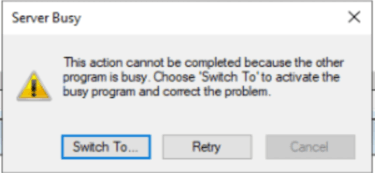
Aan de andere kant liet de Excel-oplossing mij dit zien:
Ik had al een ander Excel-venster openstaan, wat het probleem misschien verklaart. Het probleem verscheen nadat ik het Excel-venster had geopend om de map te kiezen na maximaal 5-10 seconden. Ik koos mijn map, klikte op opnieuw proberen en daar ga ik weer. Dit gebeurde bij mij na 3-4 pogingen en na het sluiten van het Excel-bestand + Solidworks geen zorgen meer
Hallo, Ik kom nog wat laat op dit onderwerp terug, maar het is nooit te laat om de juiste ^^ te doen. Het probleem is dat VBA minder opties biedt dan C# met .Net In C# is het heel eenvoudig:
 if (saveFileDialog1.ShowDialog() == DialogResult.OK)
{
       swDoc.SaveAs(saveFileDialog1.FileName);
 }
Maar als je in VBA wilt blijven, is hier een beetje code die bij je behoeften zou moeten passen
Dim swApp As Object
Sub main()
Dim filePath As String
    filePath = ShowNetSaveFileDialog()

    If filePath <> "" Then
        ' Sauvegarde SolidWorks ici
        MsgBox "Fichier choisi : " & filePath
    End If
Set swApp = Application.SldWorks
End Sub

Function ShowNetSaveFileDialog() As String
    Dim psScript As String
    ' Script PowerShell avec du code C# incorporé
    psScript = "Add-Type -AssemblyName System.Windows.Forms; " & _
               "$dialog = New-Object System.Windows.Forms.SaveFileDialog; " & _
               "$dialog.Filter = 'Fichiers SolidWorks (*.sldprt)|*.sldprt'; " & _
               "if ($dialog.ShowDialog() -eq [System.Windows.Forms.DialogResult]::OK) { $dialog.FileName }"

    ' Exécution via WScript.Shell
    Dim wsh As Object
    Set wsh = CreateObject("WScript.Shell")

    Dim exec As Object
    Set exec = wsh.exec("powershell -Command """ & psScript & """")

    ShowNetSaveFileDialog = Trim(exec.StdOut.ReadAll())
End Function
Het is nooit de beste tijd om @Konti goed te doen!
Ik heb net de code getest en ik heb 2 geweldige gedragingen. Het eerste PowerShell-venster opent tussen SW en het SW Explorer-venster. Ik heb het opgelost door het volgende te vervangen:
Set exec = wsh.exec("powershell -Command """ & psScript & """")
Wat aangenamer is, maar het verandert niets aan hoe het werkt.
Aan de andere kant, als ik een onderdeel maak (standaard deel 1 noemen bij het aanmaken) en ik start de macro en sla op als D:\Test.sldprt) aan het einde van de macro, is deel 1 nog steeds aanwezig en vind ik in D een kopie van deel 1. Voor mij maakt de macro een save-kopie als of in plaats van save als.
Weet je waarom?
Verder lijkt PowerShell gebruiken mij ook een goed idee (ik gebruik momenteel nog steeds de Excel-methode).
Ik heb het getest zoals het is (copy-paste van je code) en heel licht aangepast en het gedrag is in beide gevallen hetzelfde: ik ben een copy under en het originele stuk blijft open en niet opgeslagen. Voor het testonderdeel nieuw (naar mij vernoemd, Deel 1) Start de macro en sla op als D:\Test.sldprt. De macro geeft de naam van het nieuwe onderdeel terug in de Msgbox. Maar kamer 1 blijft de open kamer en is niet gered. (zoals wanneer een opgeslagen kopieert als.
Dim swApp As Object
Sub main()
Dim filePath As String
    filePath = ShowNetSaveFileDialog()

    If filePath <> "" Then
        ' Sauvegarde SolidWorks ici
        MsgBox "Fichier choisi : " & filePath
    End If
Set swApp = Application.SldWorks
End Sub

Function ShowNetSaveFileDialog() As String
    Dim psScript As String
    ' Script PowerShell avec du code C# incorporé
    psScript = "Add-Type -AssemblyName System.Windows.Forms; " & _
               "$dialog = New-Object System.Windows.Forms.SaveFileDialog; " & _
               "$dialog.Filter = 'Fichiers SolidWorks (*.sldprt)|*.sldprt'; " & _
               "if ($dialog.ShowDialog() -eq [System.Windows.Forms.DialogResult]::OK) { $dialog.FileName }"

    ' Exécution via WScript.Shell
    Dim wsh As Object
    Set wsh = CreateObject("WScript.Shell")

    Dim exec As Object
    'Set exec = wsh.exec("powershell -Command """ & psScript & """")
    Set exec = wsh.exec("powershell.exe -NoProfile -NonInteractive -WindowStyle Hidden -Command """ & psScript & """")

    ShowNetSaveFileDialog = Trim(exec.StdOut.ReadAll())
End Function

 moeten aanpassen (Snuffel!)
  ... Eindelijk een kans