Cześć, w tym kodzie chcę zrobić zapis, aby wybrać miejsce, gdzie zapisać plik. Próbowałem kilku metod (Saveas, Save as3, runcommand...) na próżno. Kilka metod działa w trybie debugowania, ale nie tak makra uruchamiane z SW.
Option Explicit

Dim swApp As SldWorks.SldWorks
Dim swModel As ModelDoc2
Dim swExt As ModelDocExtension
Dim bRet As Boolean

Sub addSameLink()

    Set swApp = Application.SldWorks
    Set swModel = swApp.ActiveDoc

    ' === Vérifie document ===
    If swModel Is Nothing Then
        MsgBox "Aucun document actif", vbExclamation
        Exit Sub
    End If

    Set swExt = swModel.Extension

    ' === Chemin fichier ===
    Dim swPath As String
    swPath = swModel.GetPathName

    ' === Enregistrer si nécessaire ===

If swPath = "" Then
    MsgBox "Fenêtre enregister sous à ouvrir ici pour chemin fichier  (fichier sldprt et déjà nommé)"
    swApp.RunCommand 620, ""

    swPath = swModel.GetPathName

    If swPath = "" Then
        MsgBox "Enregistrement annulé.", vbExclamation
        Exit Sub
    End If

End If


    ' === Chemin PDF attendu ===
    Dim pdfPath As String
    pdfPath = Left(swPath, InStrRev(swPath, ".") - 1) & ".pdf"

    Debug.Print "PDF attendu : " & pdfPath

    ' === Si PDF absent => sélection utilisateur ===
    If Dir(pdfPath) = "" Then

        Dim xlApp As Object
        Dim fd As Object
        Dim selectedFile As String

        ' ? Lancement Excel (solution fiable)
        Set xlApp = CreateObject("Excel.Application")
        Set fd = xlApp.FileDialog(3) ' FilePicker

        With fd
            .Title = "Sélectionner la fiche technique du MR (Fichier Pdf qui sera renommé et déplacé automatiquement)"
            .Filters.Clear
            .Filters.Add "Fichiers PDF", "*.pdf"
            .AllowMultiSelect = False

            ' Option : ouverture dans le bon dossier
            .InitialFileName = Left(swPath, InStrRev(swPath, "\"))

            If .Show <> -1 Then
                MsgBox "Aucun fichier sélectionné.", vbExclamation
                xlApp.Quit
                Set xlApp = Nothing
                Exit Sub
            End If

            selectedFile = .SelectedItems(1)
        End With

        ' Fermeture Excel
        xlApp.Quit
        Set xlApp = Nothing

        ' === Vérifications ===
        If LCase(Right(selectedFile, 4)) <> ".pdf" Then
            MsgBox "Le fichier sélectionné n'est pas un PDF.", vbCritical
            Exit Sub
        End If

        ' === Copie + renommage ===
        Dim fso As Object
        Set fso = CreateObject("Scripting.FileSystemObject")

        On Error Resume Next
        fso.MoveFile selectedFile, pdfPath

        If Err.Number <> 0 Then
            MsgBox "Erreur lors de la copie du PDF.", vbCritical
            Exit Sub
        End If

        On Error GoTo 0

    End If

    ' === Ajout Design Binder ===
    Dim bRes As Boolean
    bRes = swExt.InsertAttachment(pdfPath, True)

    If bRes Then

        Dim swCustProp As CustomPropertyManager
        Set swCustProp = swExt.CustomPropertyManager("")

        bRet = swCustProp.Add3("Material", _
                              swCustomInfoType_e.swCustomInfoText, _
                              "Pdf", _
                              swCustomPropertyAddOption_e.swCustomPropertyDeleteAndAdd)
                              MsgBox "Fiche technique motoréducteur(pdf) ajouté au classeur de conception."
    Else
        MsgBox "Echec de l'insertion du PDF", vbExclamation
    End If

End Sub
Z mojej strony, po różnych awariach SW2025 z funkcjami, których używałem do wyświetlania okna Eksploratora Windows, przeszedłem na wywoływanie funkcji Excel. Mój fragment kodu:
Public Function GetFolder(Title As String)
Dim folder As FileDialog
Dim selected_folder As String
Set folder = Excel.Application.FileDialog(msoFileDialogFolderPicker)
With folder
    .AllowMultiSelect = False
    .ButtonName = "Ok"
    .Filters.Clear
    .InitialFileName = sInitialFolder 'Nom du dossier ouvert à l'affichage de la fenêtre
    .Title = Title
    If .Show <> -1 Then GoTo NextCode
    selected_folder = .SelectedItems(1)
End With
NextCode:
Debug.Print selected_folder
GetFolder = selected_folder
Set folder = Nothing
End Function
Dla Twojej informacji, zachęcam cię również, byś przewidział porzucenie obiektów związanych z Microsoft Scripting Runtime (FSO) i zastąpienie go czystym kodem VB.
Cześć, Nie jestem ekspertem od makroekonomii, ale udało mi się poskładać coś, co działa dla mnie.
Dim swApp As Object
Sub main()

    Dim swApp As SldWorks.SldWorks
    Dim swFile As ModelDoc2
    Dim swCustomPropMgr As CustomPropertyManager
    Dim docBE As Object
    Dim chemin As String
    Dim chemin2 As String
    Dim sh As Object
    Dim newname As String
    Dim rawValue As String
    Dim resolvedValue As String
    Dim status As Long
    Dim flags As Long
    Dim saveas As Boolean

    Set swApp = Application.SldWorks
    Set swFile = swApp.ActiveDoc

    'récup des propriétés personnalisées
    Set swCustomPropMgr = swFile.Extension.CustomPropertyManager("")

    'Récupération de valeur évaluée de la propriété PMI
    status = swCustomPropMgr.Get4("PMI", False, rawValue, resolvedValue)
    newname = resolvedValue

    'Demander le dossier
    Set sh = CreateObject("Shell.Application")

    'Nouveau style + zone d'édition + validation
    flags = &H40 Or &H10 Or &H20

    'Désignation du dossier pas défaut
    Set docBE = sh.Namespace("T:\BUREAU ETUDES\Données_SW")
    'Fenêtre de dialogue pour choisir le dossier
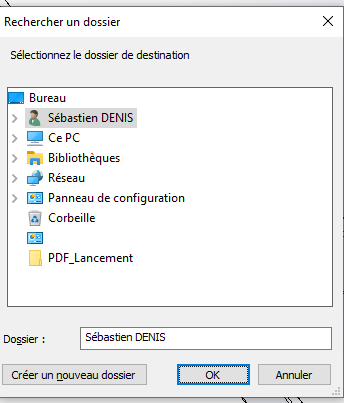
    chemin = sh.BrowseForFolder(0, "Sélectionnez le dossier de destination", flags, docBE).Self.Path

    'Création du chemin complet + nom de fichier
    chemin2 = chemin & "\" & newname & ".sldprt"

    'Enregistrement
    saveas = swFile.SaveAs2(chemin2, 0, True, True)

    'Fermeture du modèle
    Dim swModel As IModelDoc2
    Dim docName As String
    Set swModel = swApp.ActiveDoc
    docName = swModel.GetTitle
    swApp.CloseDoc docName

    'Ouverture du document généré
    Dim err As Long
    Dim warn As Long
    Set swModel = swApp.OpenDoc6(chemin2, swDocPART, swOpenDocOptions_Silent, "", err, warn)

End Sub
To makro pobiera osobistą właściwość, która będzie używana jako nazwa pliku, pyta, gdzie zapisać (z częścią ścieżki wstępnie wypełnioną), zapisuje, zamyka i otwiera dany plik.
Oto, nad czym też się bawiłem w międzyczasie. Excel też działa, bo nie @Cyril_f fanem tego rozwiązania, ale z braku lepszego...
Option Explicit

Dim swApp As SldWorks.SldWorks
Dim swModel As ModelDoc2
Dim swExt As ModelDocExtension
Dim bRet As Boolean

Sub addSameLink()

    Set swApp = Application.SldWorks
    Set swModel = swApp.ActiveDoc

    ' === Vérifie document ===
    If swModel Is Nothing Then
        MsgBox "Aucun document actif", vbExclamation
        Exit Sub
    End If

    Set swExt = swModel.Extension

    ' === Chemin fichier ===
    Dim swPath As String
    swPath = swModel.GetPathName

    ' === Enregistrer si nécessaire ===

' === Enregistrement si nécessaire ===
If swPath = "" Then

    Dim xlApp2 As Object
    Dim fd2 As Object
    Dim folderPath As String
    Dim fileName As String
    Dim fullPath As String
    Dim errors As Long
    Dim warnings As Long

    ' Lancement Excel
        Set xlApp2 = CreateObject("Excel.Application")
        Set fd2 = xlApp2.FileDialog(4) ' 4 = FolderPicker

        With fd2
            .Title = "Choisir le dossier d'enregistrement de la pièce"
            .AllowMultiSelect = False

            If .Show <> -1 Then
                MsgBox "Aucun dossier sélectionné.", vbExclamation
                xlApp2.Quit
                Set xlApp2 = Nothing
                Exit Sub
            End If

            folderPath = .SelectedItems(1)
        End With

        ' Fermeture Excel
        xlApp2.Quit
        Set xlApp2 = Nothing

        ' Nom basé sur la pièce
        fileName = swModel.GetTitle

        If InStrRev(fileName, ".") > 0 Then
            fileName = Left(fileName, InStrRev(fileName, ".") - 1)
        End If

        ' Chemin final
        fullPath = folderPath & "\" & fileName & ".sldprt"

        ' Sauvegarde
        Debug.Print fullPath

        Dim saveOk As Boolean

        saveOk = swModel.Extension.SaveAs3(fullPath, 0, 0, Nothing, Nothing, errors, warnings)

        If saveOk = False Then
            MsgBox "Erreur lors de l'enregistrement.", vbCritical
            Exit Sub
        End If


        swPath = swModel.GetPathName

    End If


    ' === Chemin PDF attendu ===
    Dim pdfPath As String
    pdfPath = Left(swPath, InStrRev(swPath, ".") - 1) & ".pdf"

    Debug.Print "PDF attendu : " & pdfPath

    ' === Si PDF absent => sélection utilisateur ===
    If Dir(pdfPath) = "" Then

        Dim xlApp As Object
        Dim fd As Object
        Dim selectedFile As String

        ' ? Lancement Excel (solution fiable)
        Set xlApp = CreateObject("Excel.Application")
        Set fd = xlApp.FileDialog(3) ' FilePicker

        With fd
            .Title = "Sélectionner la fiche technique du MR (Fichier Pdf qui sera renommé et déplacé automatiquement)"
            .Filters.Clear
            .Filters.Add "Fichiers PDF", "*.pdf"
            .AllowMultiSelect = False

            ' Option : ouverture dans le bon dossier
            .InitialFileName = Left(swPath, InStrRev(swPath, "\"))

            If .Show <> -1 Then
                MsgBox "Aucun fichier sélectionné.", vbExclamation
                xlApp.Quit
                Set xlApp = Nothing
                Exit Sub
            End If

            selectedFile = .SelectedItems(1)
        End With

        ' Fermeture Excel
        xlApp.Quit
        Set xlApp = Nothing

        ' === Vérifications ===
        If LCase(Right(selectedFile, 4)) <> ".pdf" Then
            MsgBox "Le fichier sélectionné n'est pas un PDF.", vbCritical
            Exit Sub
        End If

        ' === Copie + renommage ===
        Dim fso As Object
        Set fso = CreateObject("Scripting.FileSystemObject")

        On Error Resume Next
        fso.MoveFile selectedFile, pdfPath

        If Err.Number <> 0 Then
            MsgBox "Erreur lors de la copie du PDF.", vbCritical
            Exit Sub
        End If

        On Error GoTo 0

    End If

    ' === Ajout Design Binder ===
    Dim bRes As Boolean
    bRes = swExt.InsertAttachment(pdfPath, True)

    If bRes Then

        Dim swCustProp As CustomPropertyManager
        Set swCustProp = swExt.CustomPropertyManager("")

        bRet = swCustProp.Add3("Material", _
                              swCustomInfoType_e.swCustomInfoText, _
                              "Pdf", _
                              swCustomPropertyAddOption_e.swCustomPropertyDeleteAndAdd)
                              MsgBox "Fiche technique motoréducteur(pdf) ajouté au classeur de conception."
    Else
        MsgBox "Echec de l'insertion du PDF", vbExclamation
    End If

    ' === Sauvegarde finale ===
    Dim errorsSave As Long
    Dim warningsSave As Long
    Dim saveFinalOk As Boolean

    saveFinalOk = swModel.Save3(0, errorsSave, warningsSave)

    If saveFinalOk = False Or errorsSave <> 0 Then
        MsgBox "Erreur lors de la sauvegarde finale. Code : " & errorsSave, vbCritical
    Else
        Debug.Print "Fichier sauvegardé avec succès."
    End If

End Sub
Wciąż rozważam wasze rozwiązania, ale pilność polegała na tym, by to działało, co jest realizowane. Teraz będę mógł wprowadzać zmiany po cichu.
Wydaje mi się, że okno eksploratora SW jest wyświetlane tylko do zarządzania rozszerzeniami typu SW, więc w przypadku pdf niestety trzeba korzystać z innych funkcji.
Mam takie samo odczucie co @Cyril_f – przez rezygnację korzystam z funkcji Excela. Ale jeśli chcesz otworzyć swoje czakry na inne rozwiązania, " BrowseForFileSave " działa bez problemu (przynajmniej do Solidworks 2022). Prezentowane tutaj: Macro do eksportu wybranych ciał do formatu zagranicznego
@Cyril_f To wciąż szkoda, ale jak dotąd nie było to skuteczne – pierwsze rozwiązanie działało w oknie poleceń, ale nie w Sw... Przyjrzę się twojej funkcji, niezależnie od tego, co ja robię, czy nie.
@Maclane Rozważam twoje rozwiązanie, jeśli może mi się udać, chętnie je wezmę.
@a_eriaud Właśnie spojrzałem na twoje rozwiązanie, robiłem to samo, ale nie znoszę tego okna (Przeglądaj folder), nie można znaleźć ulubionych i jak w sieciach, żeby zapisać z wielu folderów, jest długie i irytujące, żeby znaleźć właściwą ścieżkę. Z drugiej strony, jest funkcjonalny, ale niepraktyczny.
A tutaj, w Quimperlé, 30° w biurze, gdy przyjechałem dziś o 6 rano. Po otwarciu okien temperatura spadła z powrotem do 28°. Na szczęście czas przesunął się na 14:45, dzień się skończył, ale dziś będzie skomplikowanie. (Klimatyzacja w montażu, nie mogę się doczekać ukończenia...)
Przyznaję, że nawigacja w folderach z tym oknem nie jest płynna. Ale ponieważ zawsze mam otwarty eksplorator plików Windows w folderze roboczym, robię wulgarną kopię/wklej ścieżkę eksploratora do pola " folder " w oknie.
Dla mnie ten kod (proponowany przez @Maclane) powoduje awarię oprogramowania z Windows 11 25H2 (trochę losowo, ale dość chwiejnie, stąd fakt, że korzystam z Excela)
Zaletą rozwiązania w Excelu (poza stabilnością) jest łatwe ustawienie wcześniej wybranej lokalizacji do otwarcia okna Eksploratora Windows. (InitialFileName), co jest bardzo wygodne.
Do zobaczenia w południe!! Będę musiał zmodyfikować sporą część moich makroskładników (Wąchanie!) ... szansę , że @sbadenis w końcu wytarła plastry przede mną...
Problem polega na tym, że używamy kodów, które zaczynają się starzać (z mojej strony musiałem używać podobnego kodu od ponad 6 lat). To jak w przypadku FileSystemObject, porzucenie ze strony Microsoftu, na razie jest po prostu zalogowane do Windows event viewer.
Agh!! Już teraz aktualizuję funkcje API Solidworks tylko wtedy, gdy przestają działać (przestarzałość lub porzucenie), a jeśli muszę radzić sobie z Windows / i Excelem, to się komplikuje.
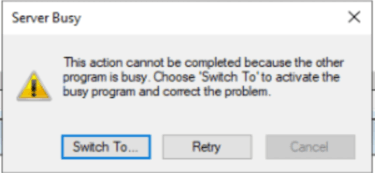
Z drugiej strony, rozwiązanie Excel pokazało mi to:
Miałem już otwarte kolejne okno Excela, co może tłumaczyć problem. Problem pojawił się po otwarciu okna Excel do wyboru folderu po maksymalnie 5-10 sekundach. Wybrałem folder, kliknąłem na "próbuj ponownie" i znowu zaczynam. U mnie to się stało przy 3-4 próbach i po zamknięciu pliku Excel + solidworks nie było już żadnych problemów
Cześć, Wrócę do tego tematu trochę później, ale nigdy nie jest za późno, by zrobić właściwą ^^. Problem polega na tym, że VBA oferuje mniej opcji niż C# z .Net W C# jest to bardzo proste:
 if (saveFileDialog1.ShowDialog() == DialogResult.OK)
{
       swDoc.SaveAs(saveFileDialog1.FileName);
 }
Ale jeśli chcesz zostać w VBA, oto trochę kodu, który powinien spełnić Twoje potrzeby
Dim swApp As Object
Sub main()
Dim filePath As String
    filePath = ShowNetSaveFileDialog()

    If filePath <> "" Then
        ' Sauvegarde SolidWorks ici
        MsgBox "Fichier choisi : " & filePath
    End If
Set swApp = Application.SldWorks
End Sub

Function ShowNetSaveFileDialog() As String
    Dim psScript As String
    ' Script PowerShell avec du code C# incorporé
    psScript = "Add-Type -AssemblyName System.Windows.Forms; " & _
               "$dialog = New-Object System.Windows.Forms.SaveFileDialog; " & _
               "$dialog.Filter = 'Fichiers SolidWorks (*.sldprt)|*.sldprt'; " & _
               "if ($dialog.ShowDialog() -eq [System.Windows.Forms.DialogResult]::OK) { $dialog.FileName }"

    ' Exécution via WScript.Shell
    Dim wsh As Object
    Set wsh = CreateObject("WScript.Shell")

    Dim exec As Object
    Set exec = wsh.exec("powershell -Command """ & psScript & """")

    ShowNetSaveFileDialog = Trim(exec.StdOut.ReadAll())
End Function
Nigdy nie jest za późno, żeby @Konti dobrze zrobić!
Właśnie przetestowałem kod i mam dwa niesamowite zachowania. Pierwsze okno PowerShell otwiera się między SW a oknem SW Explorer. Rozwiązałem to, zastępując:
Set exec = wsh.exec("powershell -Command """ & psScript & """")
Co jest przyjemniejsze, ale nie zmienia sposobu działania.
Z drugiej strony, jeśli utworzę część (domyślnie nazwę część 1 podczas tworzenia) i uruchomię makro, zapisując ją jako D:\Test.sldprt) na końcu makro część 1 nadal jest obecna, a w D znajduję kopię części 1. U mnie makro kopiuje zapis jako lub zamiast jako zapis jako.
Masz jakiś pomysł dlaczego?
Poza tym używanie PowerShell też wydaje mi się dobrym pomysłem (obecnie nadal stosuję metodę Excela).
Przetestowałem to tak, jak jest (kopiuj i wklej twój kod) i zostało to bardzo lekko zmodyfikowane, a zachowanie jest takie samo w obu przypadkach – to sprawia, że jestem kopią pod i oryginalny fragment pozostaje otwarty, a nie zapisany. Do testu nowej części (nazwanej na moją cześć Część 1) Uruchom makro i zapisz jako D:\Test.sldprt. Makro zwraca nazwę nowej części w skrzynce Msgbox. Ale pokój 1 pozostaje otwartym pokojem i nie został uratowany. (jak gdy zapisane kopiuje się jako.
Dim swApp As Object
Sub main()
Dim filePath As String
    filePath = ShowNetSaveFileDialog()

    If filePath <> "" Then
        ' Sauvegarde SolidWorks ici
        MsgBox "Fichier choisi : " & filePath
    End If
Set swApp = Application.SldWorks
End Sub

Function ShowNetSaveFileDialog() As String
    Dim psScript As String
    ' Script PowerShell avec du code C# incorporé
    psScript = "Add-Type -AssemblyName System.Windows.Forms; " & _
               "$dialog = New-Object System.Windows.Forms.SaveFileDialog; " & _
               "$dialog.Filter = 'Fichiers SolidWorks (*.sldprt)|*.sldprt'; " & _
               "if ($dialog.ShowDialog() -eq [System.Windows.Forms.DialogResult]::OK) { $dialog.FileName }"

    ' Exécution via WScript.Shell
    Dim wsh As Object
    Set wsh = CreateObject("WScript.Shell")

    Dim exec As Object
    'Set exec = wsh.exec("powershell -Command """ & psScript & """")
    Set exec = wsh.exec("powershell.exe -NoProfile -NonInteractive -WindowStyle Hidden -Command """ & psScript & """")

    ShowNetSaveFileDialog = Trim(exec.StdOut.ReadAll())
End Function

 makroskładników (Wąchanie!)
  ... szansę