Bonjour,
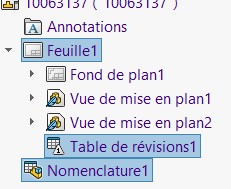
pour un export de mise en plan seulement avec les vues, je cherche une macro qui:
1 - masque le fond de plan (décocher ‹ Afficher le fond de plan › dans propriété de la feuille)
2-masque la table ‹ Nomenclature1 ›
3-masquer la table ‹ Table de révisions1 ›
puis un enregistrement au format .ai
et enfin réafficher les éléments cacher.
Une seule nomenclature et une seule table de révision par page?
Masquer les éléments n’est pas bien compliqué en macro mais faut connaître le nombre d’éléments à masquer et si un traitement sur plusieurs feuilles ou non
Dim swSheet         As SldWorks.Sheet
Dim swApp           As SldWorks.SldWorks
Dim swModel         As SldWorks.ModelDoc2
Dim swModelDocExt   As ModelDocExtension
Dim swDraw          As SldWorks.DrawingDoc
Dim swView          As SldWorks.View
Dim swAnn           As SldWorks.Annotation
Dim boolstatus      As Boolean
Dim sPathName       As String
Dim lErrors         As Long
Dim lWarnings       As Long

Sub main()

Set swApp = Application.SldWorks
Set swModel = swApp.ActiveDoc
If swModel Is Nothing Then
    MsgBox ("Pas de document ouvert")
    Exit Sub
    Else
        Set swModelDocExt = swModel.Extension
        If swModel.GetType <> 3 Then
            MsgBox ("Il ne s'agît pas d'une mise en plan")
        Else
            Set swDraw = swModel
            Set swSheet = swDraw.GetCurrentSheet
            swSheet.SheetFormatVisible = False ' Masque le fond de plan
            Set swView = swDraw.GetFirstView
            Do While Not Nothing Is swView
                Set swAnn = swView.GetFirstAnnotation3
                Do While Not Nothing Is swAnn
                    If swAnn.GetType = swTableAnnotation Then 'Verifie si c'est un objet de type table (BOM ou révision)
                        swAnn.Visible = swAnnotationHidden ' Cache les tables
                    End If
                Set swAnn = swAnn.GetNext3
                Loop
                Set swView = swView.GetNextView
            Loop
            sPathName = swModel.GetPathName 'Recupere le nom complet du document actif
            sPathName = Left(sPathName, Len(sPathName) - 6) 'Suppression de l'extension
            sPathName = sPathName + "ai" 'Formatage du nom d'enregistrement
            boolstatus = swModelDocExt.SaveAs3(sPathName, swSaveAsCurrentVersion, swSaveAsOptions_Silent, Nothing, Nothing, lErrors, lWarnings)
        End If
        swSheet.SheetFormatVisible = True 'Affiche le fond de plan
        Set swView = swDraw.GetFirstView
            Do While Not Nothing Is swView
                Set swAnn = swView.GetFirstAnnotation3
                Do While Not Nothing Is swAnn
                    If swAnn.GetType = swTableAnnotation Then 'Verifie si c'est un objet de type table (BOM ou révision)
                        swAnn.Visible = swAnnotationVisible ' Affiche les tables
                    End If
                Set swAnn = swAnn.GetNext3
                Loop
                Set swView = swView.GetNextView
            Loop
End If
End Sub
Pas géré le fait que le fichier ai existe ou non (possible d’ajouter)
Si plusieurs feuilles, je souhaite enregistrer que la 1ere feuille en Ai, actuellement la macro enregistre toutes les feuilles
merci pour ton aide.
Thierry
Bonjour,
Il faut que je regarde mais de mémoire seul l’export PDF le permet nativement dans l’API.
Va certainement falloir « bidouiller » pour supprimer les feuilles à ne pas exporter puis fermer le fichier sans enregistrer.
Bonjour,
En effet, en effectuant plusieurs essais, pas moyen de exporter en .ai seulement la feuille1.
Provisoirement, je supprime la feuille2, lance la macro et quand fichier généré touche anuler (ctrl + Z) .
est ce jouable avec la macro.
Dim swSheet             As SldWorks.Sheet
Dim swApp               As SldWorks.SldWorks
Dim swModel             As SldWorks.ModelDoc2
Dim swModelDocExt       As ModelDocExtension
Dim swDraw              As SldWorks.DrawingDoc
Dim swView              As SldWorks.View
Dim swAnn               As SldWorks.Annotation
Dim boolstatus          As Boolean
Dim sPathName           As String
Dim lErrors             As Long
Dim lWarnings           As Long
Dim vSheetNameArr       As Variant
Dim vSheetName          As Variant
Dim lUndo               As Long


Sub main()

Set swApp = Application.SldWorks
Set swModel = swApp.ActiveDoc
If swModel Is Nothing Then
    MsgBox ("Pas de document ouvert")
    Exit Sub
    Else
        Set swModelDocExt = swModel.Extension
        If swModel.GetType <> 3 Then
            MsgBox ("Il ne s'agît pas d'une mise en plan")
        Else
            Set swDraw = swModel
            Set swSheet = swDraw.GetCurrentSheet
            swSheet.SheetFormatVisible = False ' Masque le fond de plan
            Set swView = swDraw.GetFirstView
            Do While Not Nothing Is swView
                Set swAnn = swView.GetFirstAnnotation3
                Do While Not Nothing Is swAnn
                    If swAnn.GetType = swTableAnnotation Then 'Verifie si c'est un objet de type table (BOM ou révision)
                        swAnn.Visible = swAnnotationHidden ' Cache les tables
                    End If
                Set swAnn = swAnn.GetNext3
                Loop
                Set swView = swView.GetNextView
            Loop
            lUndo = swDraw.GetSheetCount - 1
            vSheetNameArr = swDraw.GetSheetNames  'Récupère tous les noms de feuilles
            For Each vSheetName In vSheetNameArr  'Boucle sur les noms de feuilles
                If vSheetName <> "Feuille1" Then 'Sélection des feuilles autres que la feuille 1
                    swModel.SelectByName 0, vSheetName 'Sélection de la feuille à supprimer
                    boolstatus = swModel.DeleteSelection(False) 'Suppression de la feuille
                End If
            Next
            sPathName = swModel.GetPathName 'Recupere le nom complet du document actif
            sPathName = Left(sPathName, Len(sPathName) - 6) 'Suppression de l'extension
            sPathName = sPathName + "ai" 'Formatage du nom d'enregistrement
            boolstatus = swModelDocExt.SaveAs3(sPathName, swSaveAsCurrentVersion, swSaveAsOptions_Silent, Nothing, Nothing, lErrors, lWarnings)
        End If
        swModel.EditUndo2 (lUndo) 'Annule les suppressions de feuilles
        swSheet.SheetFormatVisible = True 'Affiche le fond de plan
        Set swView = swDraw.GetFirstView
            Do While Not Nothing Is swView
                Set swAnn = swView.GetFirstAnnotation3
                Do While Not Nothing Is swAnn
                    If swAnn.GetType = swTableAnnotation Then 'Verifie si c'est un objet de type table (BOM ou révision)
                        swAnn.Visible = swAnnotationVisible ' Affiche les tables
                    End If
                Set swAnn = swAnn.GetNext3
                Loop
                Set swView = swView.GetNextView
            Loop
End If
End Sub
Bonjour,
Parfait cela fonctionne à merveille!!
Mes capacités en VBA sont limitées, voir trés limités.
Donc une petite derniére question si possible sur le code ci-joint, je n’arrive pas a trouver la solution pour cocher ‹ ‹ afficher sous un seul article les configurations ayant le même nom › › dans Regroupement des configurations de piéces de la nomenclatue créé.
As tu une solution?
Merci pour ta rapide réponse, mais ça ne marche pas, cela reste cocher à ‹ ‹ afficher séparement les configurations de la même piéce › › alors que je souhaite ‹ › afficher sous un seul article les configurations ayant le même nom’'.
quel est le code??
merci