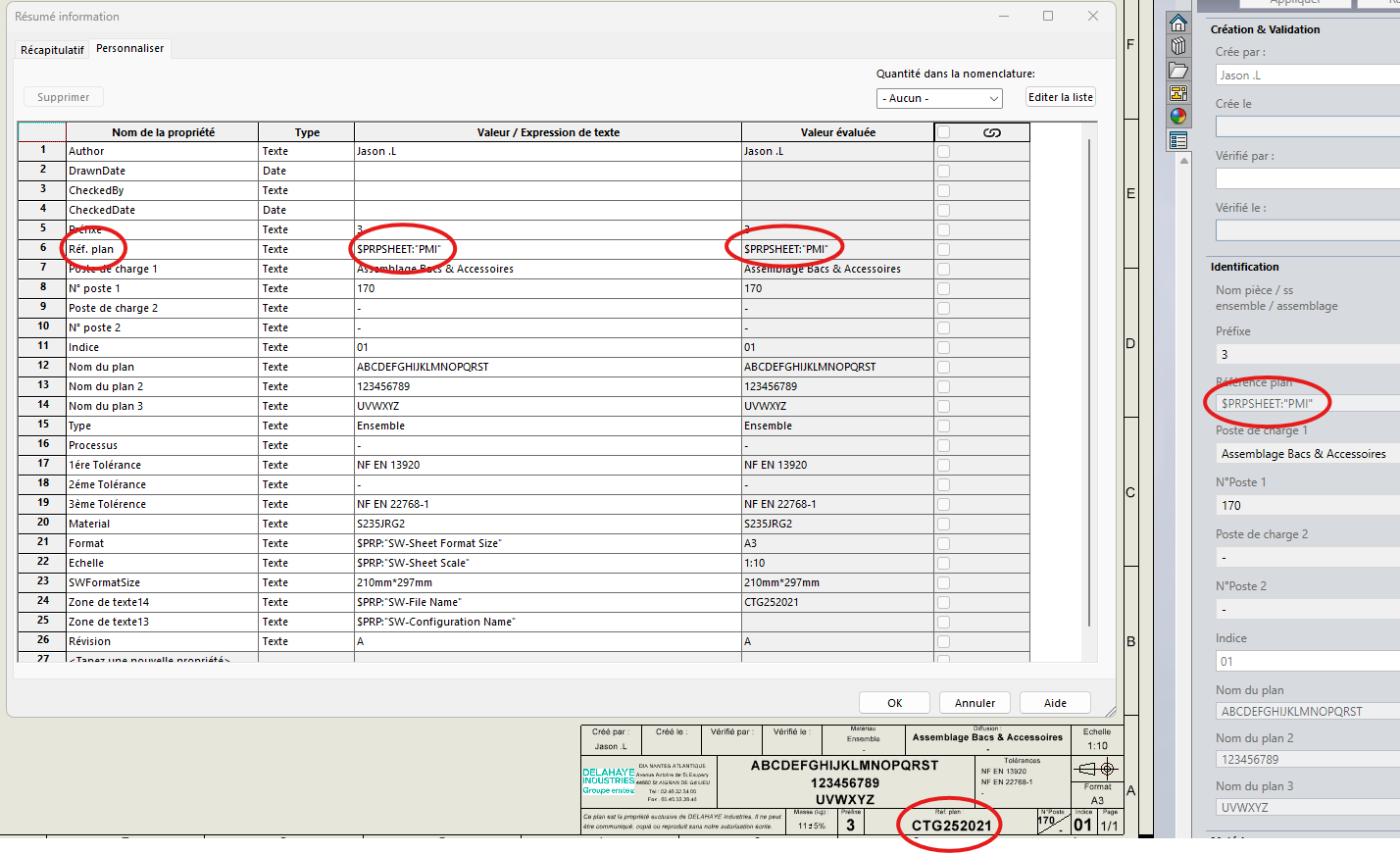
In order to be able to use " Integration " and export complete production folders per machine with a single click, I need to retrieve from the properties of my drawing, a property that exists in my part.
For example, in my room, I have a custom property called " Type ", the value is " D " and therefore the evaluated value is " D "
I'd like to retrieve this evaluated value " D " in the custom properties of my drawing.
I've tried with the value $PRPSHEET:" Type ", or $PRPMODEL:" Type " which works very well in the cartridge, but if I ask for it as a custom property it resets me to the evaluated value: $PRPSHEET:" Type ", or $PRPMODEL:" Type " and not " D "
I'm in Solidworks 2023 SP5.0, anyone have an idea?
I think Solidworks doesn't understand what you want to retrieve since " Type " is also a Solidworks variable. Using a property (" Type ") with the same name as a Solidworks variable (" Type ") doesn't seem to me to be the best solution:
Thank you for your answer, I chose the " Type " property as an example, but I have the same problem with the " Thickness " or Weld property". In my opinion, the name of the column has nothing to do with the name of the property.
In what form do you want to recover the value of the property: In a nomenclature? In your cartridge? (In this case why not use Smartproperties) In an Annotation? Your drawings are unique (one room = one drawing).
Basically, I want that, for example, if I ask Integration to export all the files whose custom property is equal to " D ", it will export the part, and the plan.
The info in the cartridge works very well, it retrieves the info without problem,
But I want this " D " info in the custom properties of the plan, not in the title block or on the sheet.
Today in the custom properties of the plans, the command returns the command to me in evaluated value, and not the value. Whereas it works well in the cartridge. But suddenly a software like Batch Converter or Integration can't go look for this value in the cartridge. That's why I want this value in the custom properties.
If you want to add 3D properties to your drawings (in the form of properties), I recommend using the " Smartproperties " utility to retrieve the desired properties.
But it is possible to do so via the Solidworks Property Editor.
You can also do this directly in " Integration " with the conditions: If the property of the part exists AND has a value equal to A... So we create the same property with the same value in the drawing...
Hello I have just joined a new BE, and I have the same problem... A drawing property copies a property of the part, no evaluated value but the right value in the block! I can't get it to name my PDF via a PDF export macro. Have you made progress in your research? For my part, I can't find anything Have a nice day.
Check not to have twice the value as explained by @Maclane. If this value appears twice, and in the event that you retrieve this value in a hyperlink in a note or a schedule or a title block, it will be empty, SW does not know which one to take.
For my part, the standard value used for commercial parts or manufactures appears well in our nomenclatures. So either the term used is misspelled in your case or there are already two values for the same information
Hello In fact I am in this case: https://forum.mycad.visiativ.com/t/propriete-des-pieces-dans-les-proprietes-de-mise-en-plan/112375/5 Even if you rename the property in question (PMI → tartanpion, little chance of a duplicate, etc.) it doesn't change anything. In the MEP, the " Plan Ref" property copies the " PMI " of the part, the evaluated value remains " the formula " and not the " result ". Whereas in the cartridge, it is the result that is displayed! I can't understand the why and how...
And if you put $PRP:" PMI" instead of PRPSHEET:PMI " in your properties. If necessary, edit your background map and look at the annotation if $PRP or $PRPsheet.
If I change $PRPSHEET:" PMI " to $PRP, nothing is displayed in the cartridge. Normal, well I think, the PMI property is not in the MEP but in the room.
The inspeculiar refers to $PRP:" Ref. plan " (property of the MEP) which calls on $PRPSHEET:" PMI " (property of the part, see table of properties). This is where it gets stuck and it's strange. The value is evaluated by the title block (last link in the chain) but not by the property table (previous link)!
Hello It seems to me that it worked on the 2020. On higher versions, it no longer evaluates the $PRPSHEET expression in file properties. In the cartridge it evaluates correctly which is why it correctly indicates the content of the " variable " For my part (provided that users use macros) I go back to the information which is basically in the 3D and displayed via $PRPSHEET in the properties of the fixed highlight (I get the displayed value of the annotation and copy it back into the value of the property).